Ai Tools
AI Cold Email Generator: Free Tool + 15 Templates (2026)
Generate personalized cold emails in seconds with AI. Get 15 copy-paste templates and try LeadSpark AI free (15 credits). Double your response rates with AI-powered icebreakers.
12 min read
You spend 10 minutes researching a prospect. Another 5 minutes crafting the perfect opening line. Then you hit send—and hear nothing back.
Here's the painful truth: average cold email response rates have dropped to just 5% in 2025. But personalized emails? They see response rates of 15-25%—sometimes higher.
The difference isn't luck. It's AI cold email generators.
In this guide, you'll discover:
- What AI cold email generators are and how they work
- 15 copy-paste email templates you can use today
- How to try LeadSpark AI free with 15 credits
- Which AI tools actually deliver results
Let's turn your cold outreach from ignored to irresistible.
Table of contents
- What is an AI cold email generator?
- Why use AI for cold emails?
- How AI cold email generators work
- 15 AI cold email templates
- Best AI cold email generators compared
- How to generate cold emails with LeadSpark AI
- Frequently asked questions
What is an AI cold email generator?
An AI cold email generator is a tool that uses artificial intelligence to create personalized outreach emails based on prospect data. Instead of manually researching each lead and writing custom messages, AI analyzes available information and generates tailored icebreakers in seconds.
There are two types of AI cold email tools:
- General AI assistants (like ChatGPT) — Require you to manually copy-paste prospect information and write detailed prompts
- Dedicated cold email tools (like LeadSpark AI) — Automatically scrape LinkedIn profiles, analyze posts, and generate personalized icebreakers
The key difference? Dedicated tools automate the entire workflow. You upload a CSV with LinkedIn URLs, and the AI handles research + writing.
According to Gartner's 2025 research, sellers who effectively partner with AI tools are 3.7 times more likely to meet quota than those who don't use AI.
Why use AI for cold emails?
Manual personalization doesn't scale. Here's why sales teams are switching to AI:
1. Dramatically higher response rates
Generic cold emails average a 9% response rate. Emails with advanced personalization? 18% response rates—double the generic rate.
Even better: highly personalized campaigns using multiple custom fields see 142% higher reply rates compared to non-personalized blasts.
2. Massive time savings
HubSpot's 2025 State of Sales Report found that 64% of sales reps save 1-5 hours weekly through AI automation. LinkedIn's research shows sellers using AI for prospect research save 1.5 hours per week.
That's time you can spend on calls, not copying and pasting.
3. AI adoption is now table stakes
AI isn't optional anymore. According to Gartner, 81% of sales teams are already experimenting with or have fully deployed AI tools in 2025.
HubSpot puts it bluntly: "AI adoption is no longer up for debate. It's the starting line."
4. Better consistency at scale
Human writers get tired. They rush through prospect #47 differently than prospect #1. AI maintains the same research depth and personalization quality whether it's processing 10 leads or 1,000.
Ready to see AI personalization in action?
LeadSpark AI analyzes your prospects' LinkedIn posts and generates hyper-personalized icebreakers in minutes.
How AI cold email generators work
Most AI cold email tools follow a three-step process:
Step 1: Data input
You provide prospect information—typically LinkedIn URLs, names, and company names. Tools like LeadSpark AI accept CSV uploads with multiple leads at once.
Step 2: AI research and analysis
This is where tools differ dramatically:
- Basic tools use only profile data (job title, company name)
- Advanced tools like LeadSpark scrape actual LinkedIn posts, comments, and recent activity
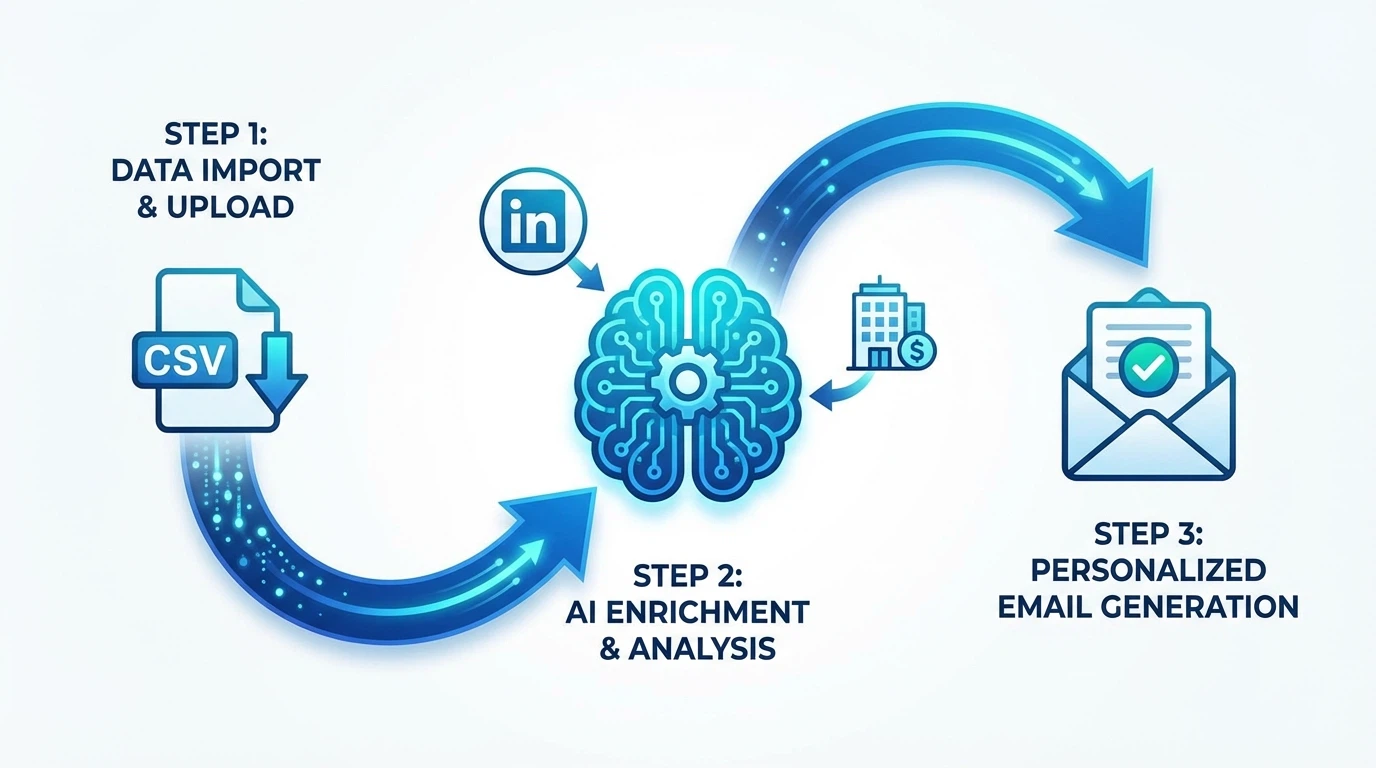
LeadSpark's approach is unique: it analyzes what prospects are actually talking about on LinkedIn—their opinions, achievements, and interests—not just their job description.
Step 3: Personalized output
The AI generates icebreakers based on real prospect activity. For example, if your prospect recently posted about expanding their sales team, LeadSpark might generate:
"Saw your post about scaling from 5 to 15 SDRs this quarter—that's ambitious growth. Curious how you're handling personalization at that volume?"
That's specific, relevant, and impossible to mass-produce manually.
15 AI cold email templates
Here are 15 templates you can use with any AI tool. Replace the bracketed variables with prospect-specific details (or let LeadSpark AI fill them automatically):
Cold outreach templates (5)
Template 1: The LinkedIn Post Hook
Subject: Your post on [TOPIC] resonated

Hi [FIRST_NAME],

[PERSONALIZED_ICEBREAKER_ABOUT_THEIR_POST]

I help [ROLE]s at [COMPANY_TYPE] companies [SPECIFIC_BENEFIT]. Would a 15-minute call to explore this make sense?

[YOUR_NAME]
Template 2: The Company News Opener
Subject: Congrats on [COMPANY_NEWS]

Hi [FIRST_NAME],

Saw [COMPANY] just [RECENT_ACHIEVEMENT]. That's impressive—especially given [RELEVANT_CONTEXT].

Quick question: with that growth, are you finding [PAIN_POINT]?

If so, I'd love to share how we've helped similar teams [RESULT].

[YOUR_NAME]
Template 3: The Mutual Connection
Subject: [MUTUAL_CONNECTION] suggested I reach out

Hi [FIRST_NAME],

[MUTUAL_CONNECTION] mentioned you're [CURRENT_FOCUS]. Given your background in [RELEVANT_EXPERIENCE], I thought you'd appreciate [VALUE_PROP].

Worth a quick chat?

[YOUR_NAME]
Template 4: The Problem-Agitate Opener
Subject: Quick fix for [PAIN_POINT]

Hi [FIRST_NAME],

Most [ROLE]s at [INDUSTRY] companies tell me [COMMON_PROBLEM]. Sound familiar?

[PERSONALIZED_OBSERVATION_FROM_LINKEDIN]

We've helped teams like yours [SPECIFIC_RESULT]. Happy to share how.

[YOUR_NAME]
Template 5: The Compliment + Question
Subject: Impressed by [ACHIEVEMENT]

Hi [FIRST_NAME],

[PERSONALIZED_COMPLIMENT_ABOUT_THEIR_WORK]

Curious: how is your team currently handling [RELATED_CHALLENGE]?

[YOUR_NAME]
Follow-up templates (5)
Template 6: The Value-Add Follow-up
Subject: Re: [ORIGINAL_SUBJECT]

Hi [FIRST_NAME],

Following up on my last note. Since then, I came across [RELEVANT_RESOURCE] that reminded me of [THEIR_SITUATION].

Thought it might be useful: [LINK]

Still happy to chat if [VALUE_PROP] is on your radar.

[YOUR_NAME]
Template 7: The Social Proof Follow-up
Subject: Re: [ORIGINAL_SUBJECT]

Hi [FIRST_NAME],

Quick update: we just helped [SIMILAR_COMPANY] achieve [SPECIFIC_RESULT].

Given [PERSONALIZED_CONTEXT], I think you'd see similar outcomes.

Worth 15 minutes to explore?

[YOUR_NAME]
Template 8: The "Closing the Loop" Email
Subject: Should I close the loop?

Hi [FIRST_NAME],

I've reached out a couple of times about [VALUE_PROP]. Totally understand if timing isn't right.

If this isn't a priority, just let me know and I'll close the loop on my end.

Either way, [PERSONALIZED_WELL_WISH_ABOUT_THEIR_WORK].

[YOUR_NAME]
Template 9: The New Angle Follow-up
Subject: Different approach

Hi [FIRST_NAME],

My previous emails focused on [ORIGINAL_ANGLE]. But after seeing [THEIR_RECENT_LINKEDIN_ACTIVITY], I realized [NEW_RELEVANT_POINT].

Would that angle be more relevant for you right now?

[YOUR_NAME]
Template 10: The Breakup Email
Subject: Permission to close your file?

Hi [FIRST_NAME],

I've tried reaching you a few times about [VALUE_PROP]. Since I haven't heard back, I'm guessing the timing isn't right.

I'll assume [SOLUTION] isn't a priority and won't reach out again. But if things change, I'm here.

Wishing you success with [THEIR_CURRENT_INITIATIVE].

[YOUR_NAME]
Re-engagement templates (5)
Template 11: The Trigger Event
Subject: Saw your news about [TRIGGER_EVENT]

Hi [FIRST_NAME],

We connected [TIMEFRAME] ago about [ORIGINAL_TOPIC]. Noticed [COMPANY] just [TRIGGER_EVENT]—congrats!

Given this change, does [VALUE_PROP] make more sense now?

[YOUR_NAME]
Template 12: The Role Change Opener
Subject: Congrats on the new role

Hi [FIRST_NAME],

Saw you recently moved to [NEW_ROLE] at [COMPANY]. That's exciting!

When I chatted with [SIMILAR_ROLE]s in their first 90 days, [COMMON_PRIORITY] was always top of mind.

If that resonates, happy to share what's worked for others in your position.

[YOUR_NAME]
Template 13: The Industry Update
Subject: [INDUSTRY] update you might have missed

Hi [FIRST_NAME],

Given your role at [COMPANY], thought you'd want to know: [RELEVANT_INDUSTRY_NEWS].

This could impact [THEIR_AREA_OF_RESPONSIBILITY]. Worth a quick chat to discuss how [SIMILAR_COMPANIES] are responding?

[YOUR_NAME]
Template 14: The Content Reference
Subject: Your thoughts on [THEIR_RECENT_POST]

Hi [FIRST_NAME],

Just read your post about [TOPIC]. [SPECIFIC_POINT_THEY_MADE] really stood out.

It reminded me of a challenge we helped [SIMILAR_COMPANY] solve. Would you be open to comparing notes?

[YOUR_NAME]
Template 15: The Quarterly Check-in
Subject: Q[X] priorities at [COMPANY]

Hi [FIRST_NAME],

As Q[X] kicks off, many [ROLE]s are reprioritizing [COMMON_FOCUS_AREA].

[PERSONALIZED_OBSERVATION_FROM_LINKEDIN]

Is [PAIN_POINT] still on your radar? If so, I have some ideas.

[YOUR_NAME]
Tired of manually filling in these templates?
LeadSpark AI automatically researches your prospects and generates personalized icebreakers.
Best AI cold email generators compared
Here's how the top AI cold email tools stack up in 2026:
| Feature | LeadSpark AI | ChatGPT | Lyne.ai | Instantly.ai |
|---|---|---|---|---|
| Starting Price | $0 (15 free credits) | $20/mo | $120/mo | $37/mo |
| LinkedIn Post Scraping | Yes | No (manual) | Limited | No |
| Bulk Processing | Yes (CSV upload) | No | Yes | Yes |
| Icebreaker Length | Under 25 words | Variable | Variable | Variable |
| Personalization Source | LinkedIn posts + activity | Manual input | Profile data | Email-focused |
| Best For | LinkedIn prospecting | General writing | Cold email | Email sequences |
Why LeadSpark AI stands out
Most AI cold email tools rely on basic profile data—job title, company name, maybe a headline. That's the same information everyone has.
LeadSpark AI is different: it scrapes your prospects' actual LinkedIn posts and activity. This means icebreakers reference what they're genuinely talking about—their opinions, achievements, and interests.
The result? Icebreakers that feel researched, not templated.
For a deeper comparison, see our Lyne.ai vs LeadSpark AI breakdown.
How to generate cold emails with LeadSpark AI
Here's how to generate personalized cold email icebreakers in under 5 minutes:
Step 1: Sign up for free
Create an account at LeadSpark AI. You'll get 15 free credits—no credit card required. Each credit processes one lead.
Step 2: Prepare your CSV
Create a CSV file with these columns:
linkedin_url(required)first_name(optional)company(optional)
You can export leads from LinkedIn Sales Navigator, Apollo, or any prospecting tool.
Step 3: Upload and process
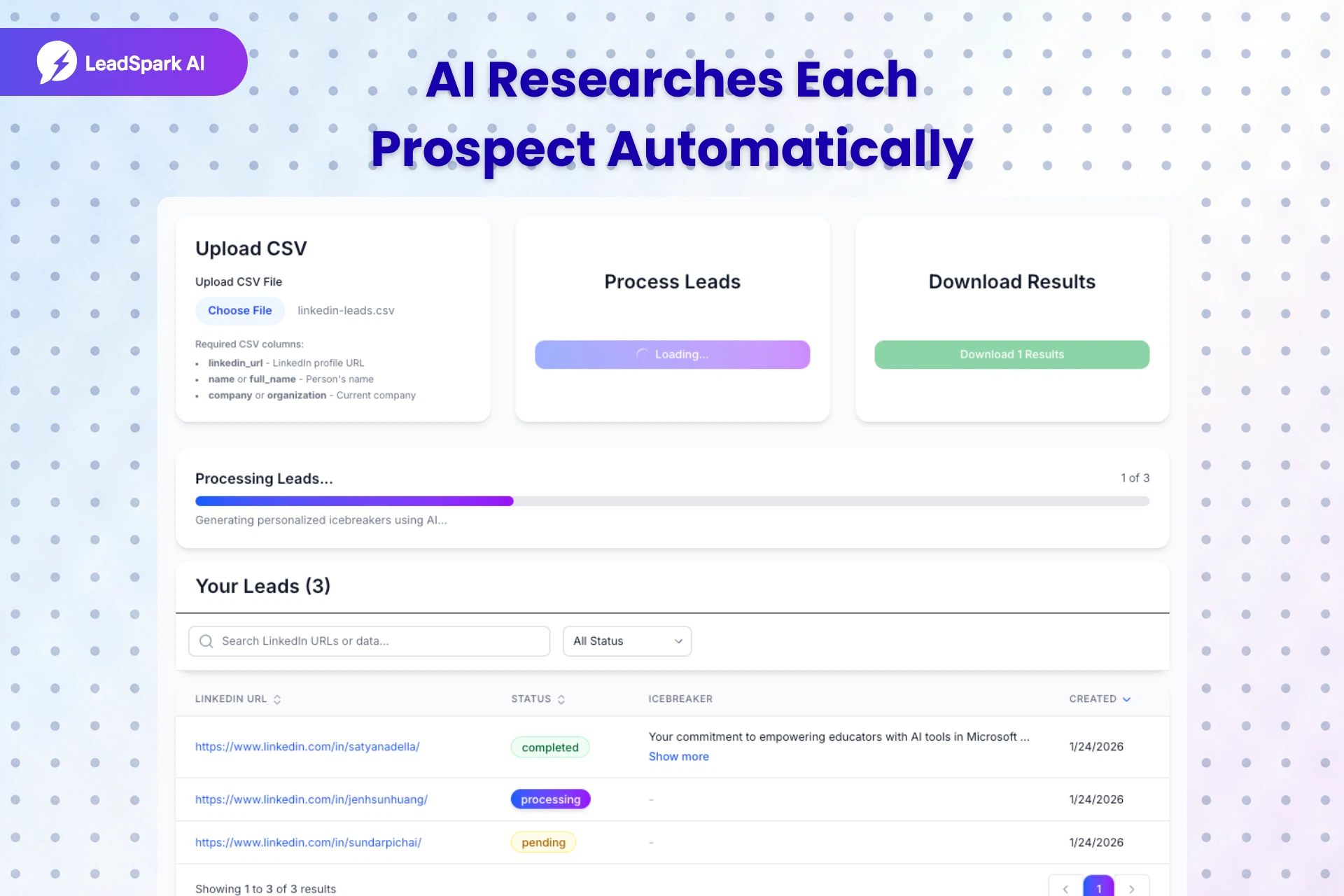
Upload your CSV in the dashboard. LeadSpark will:
- Scrape each prospect's LinkedIn profile
- Analyze their recent posts and activity
- Generate a personalized icebreaker under 25 words
Processing typically takes 15-30 seconds per lead.
Step 4: Download your results
Once processing completes, download your enriched CSV. You'll have a new column with personalized icebreakers ready to plug into your outreach sequences.
Example output:
| Name | Company | Icebreaker |
|---|---|---|
| Sarah Chen | Acme Corp | "Your post on scaling SDR teams resonated—we're tackling the same challenge. What's worked best for maintaining personalization at volume?" |
| Mike Johnson | TechStart | "Congrats on the Series B! Saw you're hiring 10 AEs—curious how you're handling onboarding at that pace." |
These icebreakers reference real LinkedIn activity, making them impossible to mass-produce manually.
Frequently asked questions
Are AI-generated cold emails effective?
Yes—when done right. Personalized cold emails see 32% higher response rates than generic messages. The key is using AI tools that personalize based on real prospect data (like LinkedIn posts), not just job titles.
Is AI cold email better than manual writing?
For most teams, yes. AI helps you personalize at scale without sacrificing quality. 64% of sales reps save 1-5 hours weekly with AI automation. The best approach: use AI for first drafts, then add a human touch where needed.
How many cold emails can I generate with AI?
It depends on the tool. With LeadSpark AI, you can process up to 1,500 leads per month on the Team plan. Free users get 15 credits to start. Each credit = one personalized icebreaker.
Do AI cold emails sound robotic?
Not with the right tool. Generic AI outputs sound robotic because they rely on template phrases. LeadSpark AI references specific LinkedIn posts and activity, so each icebreaker is unique and contextual. Always review outputs before sending.
Is LeadSpark AI free to try?
Yes! Sign up and get 15 free credits immediately—no credit card required. Process 15 leads, see the icebreaker quality, then decide if you want to upgrade.
Start generating personalized cold emails today
The data is clear: personalized cold emails dramatically outperform generic blasts. AI cold email generators make that personalization possible at scale.
Here's what you've learned:
- AI-powered personalization can double your response rates (18% vs 9%)
- Tools like LeadSpark AI scrape actual LinkedIn posts—not just profile data
- The best icebreakers reference what prospects genuinely care about
- You can try it free with 15 credits, no credit card required
Stop sending emails that get ignored. Start sending messages that get replies.
Related articles
Related Articles
Ai Tools
ChatGPT for Sales: 50+ Prompts to Write Cold Emails That Convert [2026]
Master ChatGPT for sales with 50+ copy-paste prompts to write cold emails, LinkedIn messages, and icebreakers. Includes templates for SDRs, BDRs, and sales teams looking to automate outreach.

Outreach Best Practices
How to Write LinkedIn Icebreakers That Get Responses (2026 Guide)
Discover 7 proven LinkedIn icebreaker formulas that achieve up to 90% response rates. Includes templates, examples, and AI-powered personalization tactics.
Ai Tools
7 Best LinkedIn Personalization Tools in 2026 (Tested & Ranked)
Compare the top LinkedIn personalization tools for SDRs and sales teams. Expert analysis of features, pricing, and AI icebreaker quality to help you choose the best tool in 2026.
Ready to Generate Personalized Icebreakers?
Join sales professionals using LeadSpark AI to create hyper-personalized LinkedIn icebreakers in minutes.