Sales Productivity
What is Sales Automation? Complete Guide for Sales Teams [2026]
Discover what sales automation is, how it works, and why 76% of companies achieve ROI within 12 months. Complete guide with tools, strategies, and implementation best practices for 2026.
![What is Sales Automation? Complete Guide for Sales Teams [2026]](/resources/what-is-sales-automation-hero.webp)
14 min read
Sales teams waste 72% of their time on non-selling activities like data entry, lead research, and follow-up emails. In 2026, that's no longer acceptable.
Sales automation is transforming how modern sales teams work—eliminating repetitive tasks, accelerating workflows, and letting sales professionals focus on what they do best: building relationships and closing deals.
If you're still manually entering CRM data, researching prospects one-by-one, or scheduling follow-ups on sticky notes, you're leaving revenue on the table.
This guide explains exactly what sales automation is, how it works, and how to implement it effectively—backed by current 2026 statistics and real-world examples.
What is Sales Automation?
Sales automation is the use of software and AI technology to automate repetitive, manual tasks throughout the sales process—from lead generation and prospecting to follow-up emails and CRM data entry.
Instead of sales reps spending hours on administrative work, automation handles these tasks automatically, allowing teams to focus on high-value activities like customer conversations, strategy, and relationship building.
According to Salesforce research, sales representatives spend only 28% of their time actually selling, with the remaining 72% consumed by manual tasks, data entry, and administrative work. Sales automation addresses this productivity crisis head-on.
How Sales Automation Works
Modern sales automation platforms integrate with your existing tools (CRM, email, LinkedIn) to:
- Capture data automatically – Lead information flows into your CRM without manual entry
- Trigger actions based on behaviors – Send follow-ups when prospects open emails or visit your website
- Score and prioritize leads – AI identifies which prospects are most likely to convert
- Personalize outreach at scale – Generate customized messages for hundreds of prospects simultaneously
- Track and report performance – Automatically measure metrics like response rates, conversion rates, and pipeline velocity
The result? Sales teams that move faster, close more deals, and never miss a follow-up opportunity.
Why Sales Automation Matters in 2026
The sales landscape has fundamentally changed. Buyers expect instant responses, personalized communication, and seamless experiences across every touchpoint.
The Market Growth
The numbers tell the story:
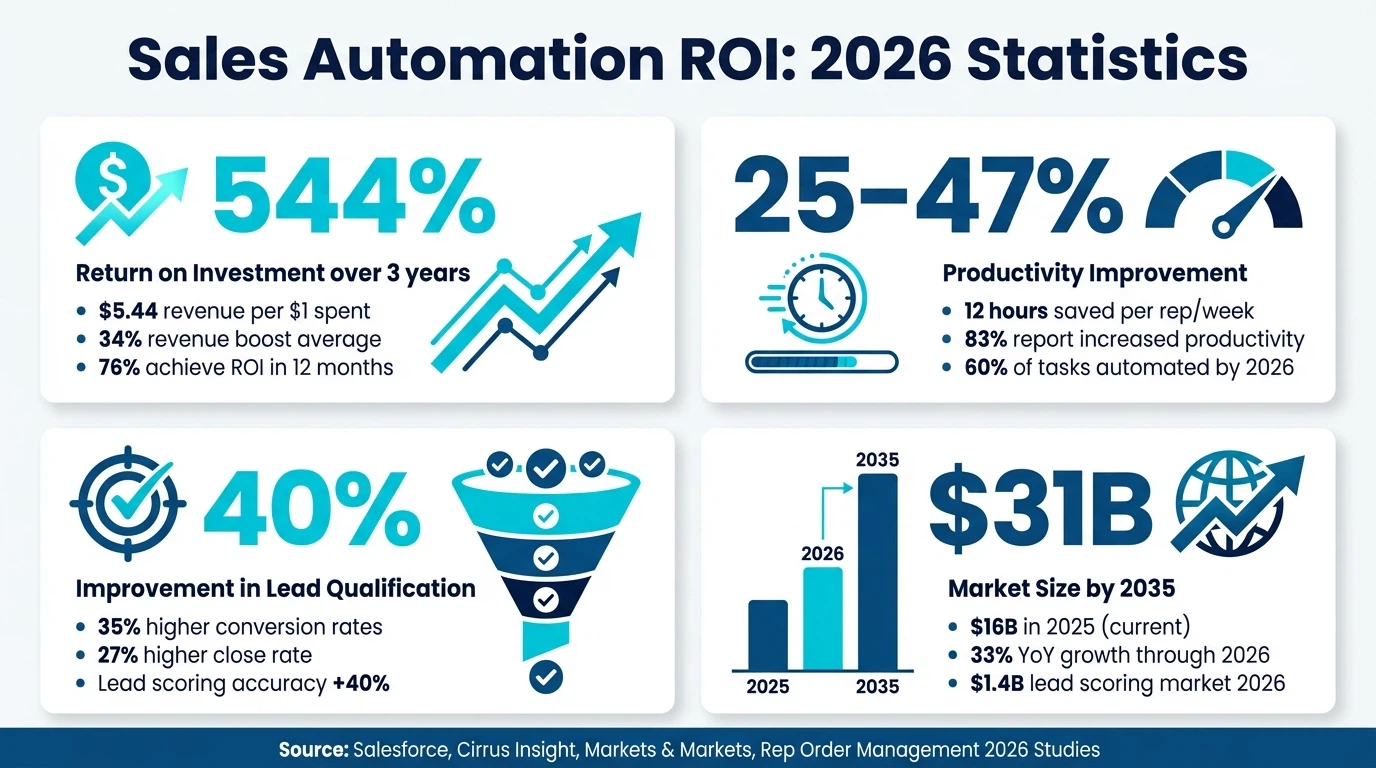
- The global sales automation market has more than doubled from $7.8 billion in 2019 to $16 billion in 2025, with projections to surpass $31 billion by 2035 (Rep Order Management)
- AI-driven sales automation is expected to grow by 33% year-over-year through 2026 (Cirrus Insight)
- By 2026, AI-powered automation will handle 60% of sales-related tasks (Markets and Markets)
Companies that haven't adopted sales automation are falling behind competitors who close deals faster, respond to leads instantly, and scale personalized outreach effortlessly.
Key Benefits of Sales Automation
Sales automation delivers measurable results across productivity, revenue, and efficiency. Here's what the data shows for 2026:
1. Massive ROI and Revenue Growth
The financial impact of sales automation is impossible to ignore:
- Companies see $5.44 in revenue for every $1.00 spent on automation, representing a 544% return over three years (Thunderbit)
- For every dollar invested in automation, companies are seeing an $8 return (Utmost Agency)
- 76% of companies achieve positive returns within 12 months, with 12% seeing payback in under one month (Thunderbit)
- The typical company attributes a 34% revenue boost to automation (Connection Model)
- Companies using AI in sales see 13-15% more revenue and 10-20% better sales ROI (Sopro)
2. Dramatic Productivity Increases
Sales automation gives time back to your team:
- Productivity typically jumps by 25-47%, which translates directly into more selling time and opportunities (Cirrus Insight)
- 83% of sales teams using AI automation report increased productivity (Sopro)
- Sales teams using automation are saving an average of 12 hours every week (Rep Order Management)
- Instead of spending time on data entry and follow-ups, reps can have 28% more conversations with prospects (Salesforce)
3. Better Lead Quality and Conversion Rates
AI-powered automation doesn't just save time—it improves results:
- AI-driven lead scoring systems deliver 40% improvement in lead qualification accuracy (Markets and Markets)
- AI-powered lead generation tools deliver 35% higher conversion rates (Cirrus Insight)
- Organizations implementing automation see a 27% higher close rate on average (Cirrus Insight)
- Lead scoring software market is growing from $600 million (2023) to $1.4 billion (2026) (Markets and Markets)
4. Improved Customer Experience
Automation enables faster, more consistent communication:
- Automated systems respond instantly to leads, reducing response time from hours to seconds
- Consistent follow-up sequences ensure no prospect falls through the cracks
- Personalization at scale makes every prospect feel like they're receiving individual attention
- AI-generated insights help sales reps have more relevant, valuable conversations
5. Scalability Without Linear Costs
Perhaps the most strategic benefit:
- As business volume grows, automation scales proportionally without requiring proportional headcount increases
- Companies can process more orders without building up staff on a linear basis (Workist)
- Small teams can achieve enterprise-level outreach volume with the right automation stack
Types of Sales Automation (2026)
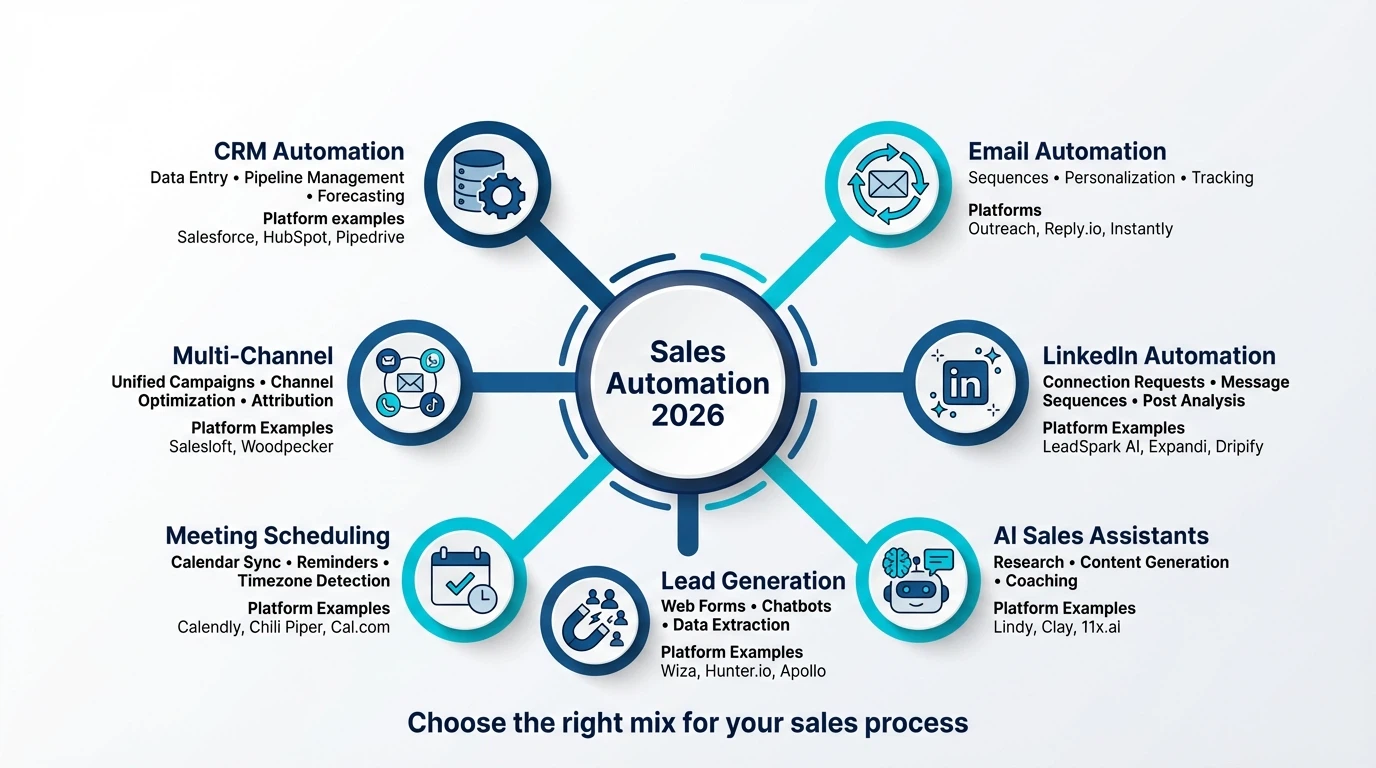
Modern sales automation spans the entire sales funnel. Here are the main categories and how they work:
1. CRM Automation
Your CRM is the foundation of sales automation. Modern CRM systems automate:
Data Entry and Enrichment
- Automatically capture contact information from emails, LinkedIn, and forms
- Enrich lead data with company size, industry, revenue, and technologies used
- Update contact records when prospects change jobs or companies
Pipeline Management
- Move deals through stages automatically based on actions taken
- Alert reps when deals are stalling or at risk
- Generate forecasts and pipeline reports automatically
Popular CRM Platforms: Salesforce, HubSpot, Pipedrive, Zoho CRM, Close
2. Email Automation
Email remains the workhorse of B2B sales, and automation makes it scalable:
Sequence Automation
- Create multi-step email campaigns that send automatically based on time delays or prospect behaviors
- A/B test subject lines, messaging, and CTAs automatically
- Pause sequences when prospects reply or book meetings
Personalization at Scale
- Insert custom fields like name, company, and role automatically
- AI generates personalized email content based on prospect data
- Send time optimization ensures emails land when prospects are most likely to engage
Email Tracking
- Know when prospects open emails, click links, or download attachments
- Trigger automated follow-ups based on engagement
- Prioritize hot leads based on email interaction
Popular Email Automation Tools: Outreach, Salesloft, Reply.io, Instantly.ai, Lemlist
For more on outreach tools, see our guide to sales prospecting tools.
3. LinkedIn Automation
LinkedIn has become the primary channel for B2B prospecting, and automation is transforming how sales teams use it:
Connection Request Automation
- Send personalized connection requests automatically
- Follow up with messages after connections are accepted
- Track acceptance rates and optimize messaging
Message Sequencing
- Create multi-touch LinkedIn campaigns similar to email sequences
- Combine LinkedIn messages with email for multi-channel outreach
- Pause sequences when prospects engage
LinkedIn Personalization Tools
- AI analyzes prospects' LinkedIn activity to generate personalized icebreakers
- Tools like LeadSpark AI scrape LinkedIn posts and interests to create hyper-personalized opening messages under 25 words
- Research automation saves hours of manual prospect analysis
Profile Viewing and Engagement
- Automatically view prospect profiles to appear in their "Who's Viewed Your Profile" section
- Like and comment on posts strategically to build awareness
- Trigger outreach sequences based on LinkedIn engagement
Popular LinkedIn Automation Tools: Expandi, Dripify, Waalaxy, Octopus CRM, LeadSpark AI
For templates and strategies, check out our 50 LinkedIn icebreaker examples and guide on how to write LinkedIn icebreakers.
4. AI-Powered Sales Assistants
The newest category of sales automation leverages generative AI to handle complex tasks:
AI Research and Enrichment
- AI agents research prospects across LinkedIn, company websites, news, and social media
- Extract pain points, priorities, and trigger events automatically
- Generate prospect summaries and talking points for sales calls
AI Content Generation
- Generate personalized emails, LinkedIn messages, and call scripts
- Create follow-up messages based on previous conversation context
- Draft proposals and sales decks with AI assistance
AI Coaching and Insights
- Analyze call recordings and provide coaching recommendations
- Surface objection handling suggestions in real-time
- Predict deal outcomes based on historical patterns
Popular AI Sales Platforms: Lindy, Momentum, Clay, 11x.ai, Regie.ai
5. Lead Generation and Capture Automation
Automating how leads enter your funnel saves massive time:
Web Form Automation
- Automatically route inbound leads to the right rep based on territory, product, or company size
- Trigger instant email responses and follow-up sequences
- Create deals in CRM automatically when forms are submitted
Chatbots and Live Chat
- Qualify leads 24/7 with conversational chatbots
- Schedule meetings directly from chat conversations
- Hand off qualified leads to human reps automatically
Data Extraction and Enrichment
- Extract contact data from LinkedIn, Sales Navigator, and company websites
- Enrich lead lists with email addresses, phone numbers, and firmographic data
- Verify email deliverability before sending outreach
Popular Lead Gen Tools: Wiza, Lusha, Hunter.io, Apollo.io, Kaspr
6. Meeting Scheduling Automation
The back-and-forth of scheduling meetings wastes hours every week:
Calendar Integration
- Prospects book meetings directly on your calendar without email tennis
- Automatic timezone detection and conversion
- Buffer time and meeting prep time built in automatically
Automated Reminders
- Send reminder emails and SMS before meetings
- Reduce no-show rates with automatic follow-ups
- Reschedule links for last-minute cancellations
Popular Scheduling Tools: Calendly, Chili Piper, Savvycal, Cal.com
7. Multi-Channel Orchestration
The most sophisticated sales automation coordinates touchpoints across multiple channels:
Unified Campaigns
- Combine LinkedIn, email, phone calls, and even direct mail in coordinated sequences
- Automatically adjust channel mix based on prospect engagement
- Optimize outreach timing across channels
Channel Prioritization
- AI determines which channel each prospect prefers based on engagement history
- Route prospects to their preferred channel automatically
- Track multi-channel attribution and ROI
Popular Multi-Channel Platforms: Salesloft, Outreach, Reply.io, Woodpecker
How to Implement Sales Automation: Step-by-Step Guide
Implementing sales automation effectively requires strategic planning. Here's how to do it right:
Step 1: Audit Your Current Sales Process
Before automating, understand what you're automating:
- Map your sales workflow – Document every step from lead generation to closed-won
- Identify time sinks – Which tasks consume the most time? (Data entry? Research? Follow-ups?)
- Find bottlenecks – Where do deals stall or leads get lost?
- Measure baseline metrics – Track current response rates, conversion rates, and time spent on tasks
Insight: The tasks you dread most are usually the best automation candidates.
Step 2: Choose Your Automation Stack
Start with the foundation and build from there:
Phase 1: Core Infrastructure (Months 1-2)
- CRM system (if you don't have one)
- Email automation platform
- Meeting scheduling tool
Phase 2: Channel Expansion (Months 3-4)
- LinkedIn automation
- Lead enrichment tools
- AI-powered personalization
Phase 3: Advanced Optimization (Months 5-6+)
- AI research assistants
- Multi-channel orchestration
- Advanced analytics and attribution
Budget Consideration: Most teams start with $100-300/month per rep and scale up as they prove ROI.
Step 3: Build Your First Automated Workflow
Start simple with high-impact automation:
Example: Inbound Lead Response Automation
- Trigger: New lead submits contact form
- Action 1: Create deal in CRM automatically
- Action 2: Send instant confirmation email with calendar link
- Action 3: Assign lead to rep based on territory
- Action 4: Send Slack notification to rep
- Action 5: If no meeting booked in 24 hours, send follow-up email
- Action 6: If no response in 3 days, add to LinkedIn outreach sequence
This workflow alone can reduce response time from hours to seconds and eliminate lead leakage.
Step 4: Create Templates and Sequences
Automation only works with quality content:
Email Sequences
- Write 3-5 email templates for each stage of the buyer journey
- Include personalization fields (first name, company, pain point)
- Test different messaging approaches and CTAs
LinkedIn Message Templates
- Create templates for connection requests, first messages, and follow-ups
- Use proven frameworks (see our LinkedIn icebreaker examples)
- Keep messages under 400 characters for higher response rates
Call Scripts and Talking Points
- Document common objections and responses
- Create battle cards for different industries or personas
- Build libraries of case studies and social proof
Step 5: Test, Measure, and Optimize
Sales automation requires continuous improvement:
Key Metrics to Track
- Response rate (% of prospects who reply)
- Acceptance rate (LinkedIn connections accepted)
- Meeting booking rate (% who schedule calls)
- Pipeline velocity (time from lead to opportunity to closed-won)
- Time saved (hours per rep per week)
- ROI (revenue generated vs. cost of tools)
Optimization Cycle
- Run campaigns for 2-4 weeks to gather data
- Analyze what's working and what's not
- A/B test messaging, timing, and sequences
- Double down on winning approaches
- Repeat monthly
Target: Aim for 40-70% response rates on LinkedIn outreach and 20-30% response rates on cold email with proper personalization.
Step 6: Train Your Team
Automation doesn't replace sales skills—it amplifies them:
Training Topics
- How to use automation tools effectively
- When to personalize vs. when to use templates
- Best practices for each channel (email, LinkedIn, phone)
- How to interpret analytics and optimize campaigns
- Compliance and ethical use of automation
Common Pitfall: Teams that don't train properly often see automation as a "set it and forget it" solution. The best results come from automation + human intelligence.
Sales Automation Best Practices (2026)
Follow these principles to maximize results and avoid common mistakes:
1. Personalization Still Matters
Automation doesn't mean generic messages:
- Use AI tools like LeadSpark AI to research prospects and generate personalized icebreakers automatically
- Reference specific LinkedIn posts, company news, or achievements
- Segment audiences and create targeted messaging for each persona
- Always include a human touch—automation should feel helpful, not robotic
Rule of Thumb: If your automated message could be sent to 1,000 people without changing a word, it's not personalized enough.
2. Respect Inbox and Connection Limits
Automation platforms enable high-volume outreach, but limits exist for a reason:
LinkedIn Limits (2026)
- 100-150 connection requests per week (safe limit)
- 150-200 messages per day (with existing connections)
- Exceeding limits risks account restrictions or bans
Email Limits
- Warm up new domains slowly (start with 20-50 emails/day)
- Aim for <1% spam complaint rate
- Use authenticated domains (SPF, DKIM, DMARC)
Best Practice: Quality beats quantity. 100 highly personalized messages outperform 1,000 generic ones.
3. Build Multi-Touch Sequences
Single touchpoints rarely convert:
- Plan 5-7 touchpoints across 2-3 weeks for cold outreach
- Mix channels (LinkedIn + email works better than either alone)
- Vary your approach (questions, insights, case studies, content)
- Add value in every message—don't just "check in"
Example Sequence:
- Day 1: LinkedIn connection request with personalized note
- Day 3: LinkedIn message after connection is accepted
- Day 7: Email with relevant industry insight
- Day 10: LinkedIn comment on one of their posts
- Day 14: Email with case study
- Day 21: Final email with clear ask
4. Monitor and Respond Quickly
Automation creates opportunities, but humans close deals:
- Set up real-time alerts when prospects reply or engage
- Respond to interested prospects within 1 hour (faster is better)
- Pause sequences immediately when prospects engage
- Don't let automation run on autopilot—monitor daily
Stat: Responding to leads within 5 minutes vs. 10 minutes can increase conversion rates by 400% (Harvard Business Review).
5. Clean Your Data Regularly
Automation only works with quality data:
- Remove bounced emails and invalid LinkedIn profiles
- Update contact information quarterly
- Verify email deliverability before large campaigns
- Segment inactive leads and re-engage or remove
Impact: Clean data = better deliverability = higher response rates = more revenue.
6. Comply with Regulations
Sales automation must respect privacy laws:
- GDPR (Europe): Obtain consent before automated outreach, allow opt-outs
- CAN-SPAM (US): Include physical address and unsubscribe links in emails
- CCPA (California): Respect data privacy rights and deletion requests
- LinkedIn TOS: Use automation tools that comply with LinkedIn's terms of service
Warning: Non-compliance can result in fines up to $50,000 per violation under CAN-SPAM.
Common Sales Automation Mistakes to Avoid
Even experienced teams make these errors:
1. Automating Before Optimizing
Don't automate a broken process:
- Fix first: If your manual outreach gets <10% response rates, automation won't help
- Optimize messaging: Test and improve templates before automating them at scale
- Validate offers: Make sure your value proposition resonates before automating outreach
2. Over-Automating
Some tasks require a human touch:
- High-value accounts deserve manual research and personalization
- Complex deals need nuanced communication, not templates
- Relationship building can't be fully automated
Balance: Use automation for top-of-funnel prospecting, but shift to manual when prospects engage.
3. Ignoring Analytics
Automation without measurement is guessing:
- Track metrics from day one
- Set up dashboards to monitor performance
- Run regular A/B tests to improve results
- Make data-driven decisions, not gut-based ones
4. Neglecting Deliverability
Aggressive automation can hurt your sender reputation:
- Warm up new email domains properly
- Monitor bounce rates and spam complaints
- Use double opt-in for email lists
- Avoid spam trigger words in subject lines
5. Forgetting the Human Element
The best sales automation enhances human skills:
- Train reps to have better conversations with the time automation frees up
- Use automation insights to improve sales skills
- Maintain authentic relationships despite automation
- Remember that buyers want to talk to humans, not bots
Sales Automation ROI: What to Expect
Here's what companies typically see when implementing sales automation:
Timeline to ROI
Months 1-2: Setup and Learning
- Small productivity gains (5-10% time savings)
- Team adapts to new tools
- First automated workflows go live
Months 3-4: Momentum Builds
- 20-30% productivity improvements
- Response rates improve with optimized messaging
- Pipeline starts growing
Months 5-6: Full Results
- 25-47% productivity gains
- 20-30% more pipeline generated
- Measurable revenue impact
Month 12+: Optimization
- 544% ROI on average (as shown earlier)
- Scalable processes in place
- Continuous improvement culture
Expected Metrics by Team Size
Solo Founder or SDR (1 person)
- Save 10-15 hours/week on manual tasks
- Reach 200-300 prospects/week (vs. 50-100 manually)
- Book 3-5 more meetings per week
Small Team (2-5 reps)
- Save 40-75 hours/week collectively
- Generate 30-50% more pipeline
- Close 20-30% more deals
Enterprise Team (10+ reps)
- Save 100-200+ hours/week
- Reduce cost per lead by 40-60%
- Increase win rates by 15-25%
FAQ: Sales Automation
What's the difference between sales automation and marketing automation?
Sales automation focuses on individual prospect interactions, relationship building, and moving deals through the pipeline. It's used by sales teams for outreach, follow-up, and closing deals.
Marketing automation focuses on broader audience engagement, nurturing large segments, and generating qualified leads for sales. It's used by marketing teams for email campaigns, social media, and content distribution.
Overlap: Many modern platforms combine both (HubSpot, ActiveCampaign, etc.), and the lines are blurring as AI enables personalization at scale.
Can small businesses benefit from sales automation?
Absolutely. In fact, small teams often see the biggest impact because they're resource-constrained.
A solo founder can use automation to achieve the outreach volume of a 5-person team. The key is choosing affordable tools that integrate well together (most start around $50-100/month total).
Start with free trials of essential tools (CRM, email sequencing, LinkedIn automation) and scale up as you prove ROI.
Will automation make my messages sound robotic?
Not if you do it right. Modern AI tools analyze prospects' actual LinkedIn activity and generate personalized messages that reference specific posts, interests, or achievements.
Tools like LeadSpark AI create icebreakers that sound natural because they're based on real prospect data, not generic templates.
Best practice: Always review AI-generated content and add your own voice before sending. Use automation for scale, but maintain authenticity.
How much time does sales automation really save?
On average, sales teams save 12 hours per week per rep with proper automation. That's equivalent to 1.5 full workdays that can be spent on high-value activities like discovery calls, demos, and closing deals.
For context, manual LinkedIn research takes 5-10 minutes per prospect. With automation, it takes 30 seconds. Research 100 prospects manually = 8-16 hours. Automated = 50 minutes.
What's the best sales automation tool for startups?
It depends on your primary sales channel:
- Email-focused: Reply.io or Instantly.ai (affordable, easy to use)
- LinkedIn-focused: Expandi or LeadSpark AI (compliant, effective)
- All-in-one: HubSpot (free CRM + paid automation)
- AI-powered: Clay or Lindy (advanced research and personalization)
Most startups start with a simple stack: CRM + email tool + LinkedIn tool ($100-200/month total).
See our comprehensive guide to sales prospecting tools for detailed comparisons.
How do I measure sales automation ROI?
Track these key metrics:
Efficiency Metrics
- Hours saved per week
- Cost per lead (before vs. after automation)
- Time from lead to opportunity
Effectiveness Metrics
- Response rate (% who reply)
- Meeting booking rate (% who schedule calls)
- Pipeline generated ($)
- Close rate (% of opportunities won)
Financial Metrics
- Revenue generated from automated campaigns
- Cost of automation tools
- ROI formula: (Revenue - Cost) / Cost × 100
Target ROI: Most companies see 200-500% ROI within 12 months of implementing sales automation.
Is sales automation compliant with LinkedIn's terms of service?
It depends on the tool. LinkedIn prohibits aggressive automation that violates user experience, but many automation tools operate within acceptable limits by:
- Mimicking human behavior (random delays, natural activity patterns)
- Staying within connection and message limits
- Using official APIs where available
- Not requiring your LinkedIn password
Compliant tools: Expandi, Dripify, LeadSpark AI, Octopus CRM
Non-compliant approaches: Browser plugins that spam connections, bot-like behavior, excessive daily activity
Always research a tool's compliance approach before using it.
Can I automate personalization?
Yes, and this is where AI-powered tools shine. Modern personalization automation works by:
- Researching prospects automatically – AI scrapes LinkedIn, company websites, and news sources
- Extracting relevant insights – Identifies pain points, interests, and trigger events
- Generating custom messages – AI creates personalized icebreakers referencing specific information
- Scaling infinitely – Process hundreds of prospects in the time it takes to research one manually
Example: LeadSpark AI analyzes prospects' recent LinkedIn posts and generates personalized icebreakers under 25 words—achieving 40-70% response rates vs. 3-5% for generic messages.
What's the future of sales automation in 2026 and beyond?
The industry is moving toward AI agents that handle entire workflows autonomously:
- AI SDRs: Fully automated prospecting agents that research, reach out, qualify, and book meetings
- Predictive analytics: AI predicts which deals will close and recommends next actions
- Conversational AI: Chatbots that handle initial sales conversations before handing off to humans
- Multi-modal automation: AI that can analyze video, voice, and text to understand prospect intent
Prediction: By 2028, 70-80% of top-of-funnel sales activities will be fully automated, with humans focusing exclusively on mid-to-late-stage deals and relationship building.
Conclusion: Sales Automation is No Longer Optional
In 2026, sales automation isn't a competitive advantage—it's table stakes.
Companies that automate effectively see 544% ROI, 25-47% productivity gains, and 12 hours saved per rep per week. Those that don't are falling behind competitors who respond faster, reach more prospects, and close more deals.
The question isn't whether to implement sales automation, but how quickly you can do it effectively.
Start with the basics:
- Choose a CRM and automate data entry
- Implement email sequencing to automate follow-ups
- Add LinkedIn automation for personalized outreach at scale
As you see results, expand into AI-powered research, multi-channel orchestration, and advanced analytics.
Remember: The best sales automation amplifies human skills, not replaces them. Use automation to eliminate busywork so your team can focus on what actually closes deals—building relationships and solving customer problems.
Ready to automate your LinkedIn prospecting? Try LeadSpark AI and generate personalized icebreakers in seconds, not hours.
Sources
- Outreach: 2026 Sales Automation Guide
- Workist: Sales Automation 2026 Strategies
- Thunderbit: Marketing Automation ROI Statistics
- Cirrus Insight: Sales Automation Statistics 2025
- Rep Order Management: 77 Sales Automation Statistics
- Cirrus Insight: AI in Sales Statistics
- Utmost Agency: Sales Automation ROI Statistics
- Markets and Markets: AI Sales Tools 2026
- Sopro: AI in Sales and Marketing Statistics
- Connection Model: Marketing Automation ROI 2026
Ready to Generate Personalized Icebreakers?
Join sales professionals using LeadSpark AI to create hyper-personalized LinkedIn icebreakers in minutes.