Linkedin Prospecting
How to Get Sales Leads Fast: SDR's Quick Start Guide
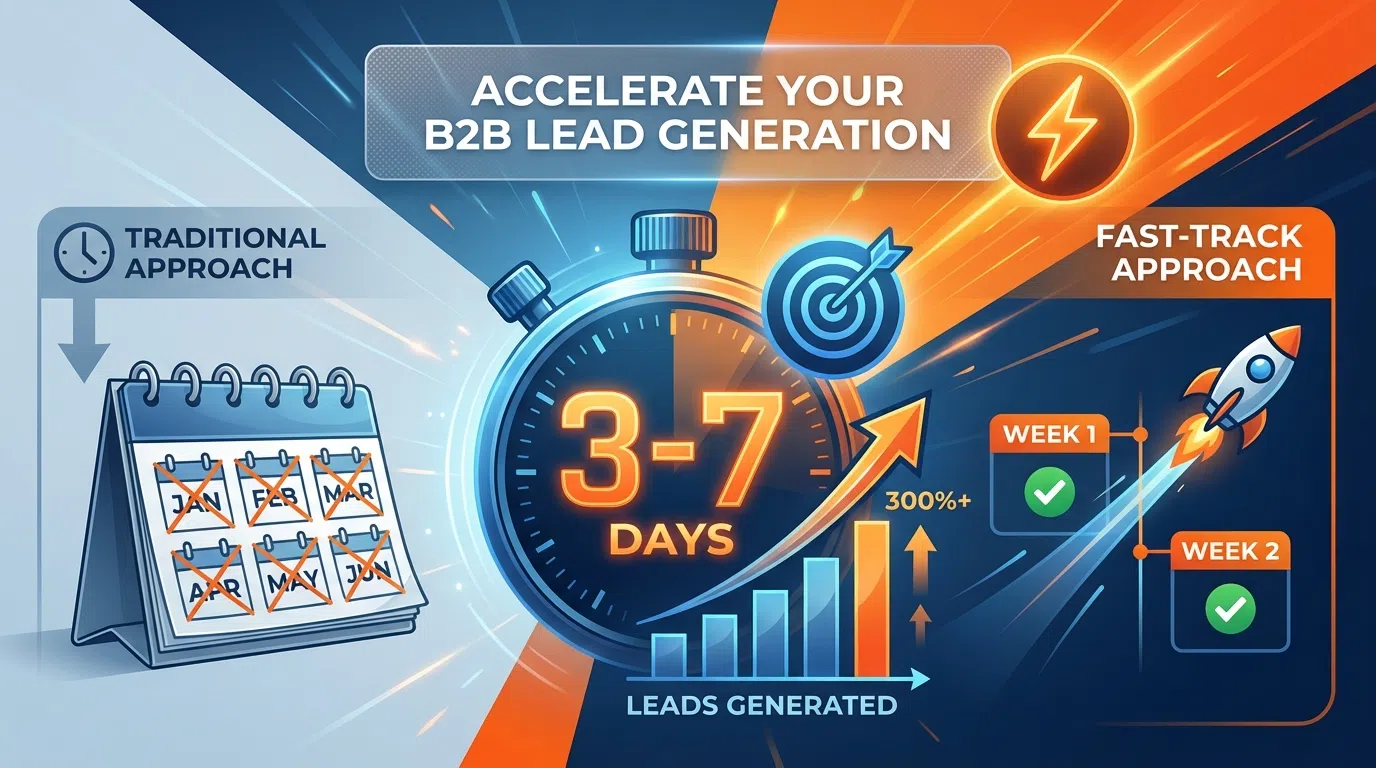
Generate qualified sales leads in 7-14 days. Quick-start framework for SDRs needing immediate pipeline using LinkedIn and AI prospecting tools.
10 min read
You need sales leads. Fast.
Maybe you're a new SDR starting with an empty pipeline. Maybe your VP just tripled your quota and you have 30 days to prove you can deliver. Maybe you're a founder who needs 10 qualified conversations this month to stay alive.
Whatever the reason, you don't have 60-90 days to perfect a complex outbound machine. You need leads now—ideally qualified conversations within 7-14 days.
This quick-start guide shows you exactly how to generate your first 20-40 sales leads in two weeks using the fastest proven methods: targeted LinkedIn outreach, AI-powered personalization, and strategic shortcuts that compress months of learning into days of execution.
Table of Contents
- Why Speed Matters (And The Trap to Avoid)
- The 7-Day Quick-Start Framework
- Day 1-2: Rapid Profile and ICP Setup
- Day 3-4: Build Your First 100-Prospect List
- Day 5-6: AI Personalization and Launch
- Day 7-14: Respond, Book, and Scale
- Fast-Track Tools and Shortcuts
- Common Fast-Start Mistakes
- Frequently Asked Questions
Why Speed Matters (And The Trap to Avoid)
Speed is critical when you need leads fast, but rushing creates its own problems.
The Speed Imperative
Why fast lead generation matters:
- New SDRs need early wins to build confidence and avoid being fired
- Quota pressure requires immediate pipeline (can't wait 90 days for content marketing)
- Founders need customer conversations to validate product-market fit now
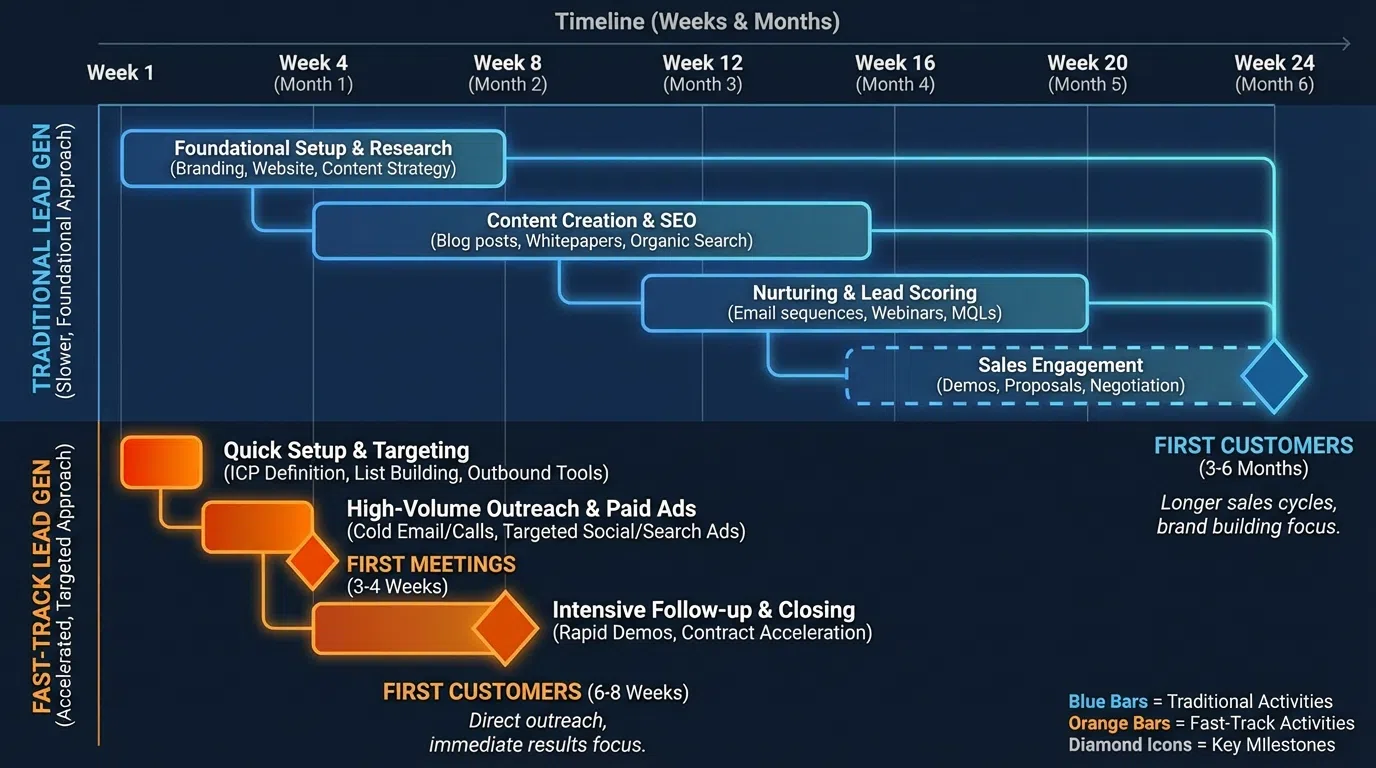
- Sales cycles are long (3-6 months)—delayed start = delayed revenue
According to research on SDR lead generation in 2026, the average B2B sales team takes 42 hours to follow up with new leads—but 38% of those leads never respond after that delay. Fast response times directly correlate with conversion.
The Quality Trap
But speed without strategy fails:
- Sending 500 generic LinkedIn messages gets 2-5% response (10-25 leads) and burns your reputation
- Spray-and-pray creates short-term volume but unsustainable long-term (account restrictions, poor response rates)
- Racing to quota with unqualified leads wastes sales team time
The balance: Move fast on setup and execution, but don't skip personalization and targeting. You can compress a 60-day playbook to 14 days—you can't skip it entirely.
What "Fast" Actually Means
Realistic fast-track timeline:
- Days 1-2: Profile + ICP setup (4-6 hours total)
- Days 3-4: List building (3-4 hours)
- Days 5-6: Personalization + launch (4-5 hours)
- Days 7-14: Responses, meetings, optimization (2-3 hrs/day)
Results within 7-14 days:
- 100-200 prospects contacted
- 25-60 responses (25-40% if done right)
- 10-25 meetings booked
- 5-12 qualified opportunities
This isn't "instant leads"—it's compressed execution producing results in weeks instead of months.
The 7-Day Quick-Start Framework
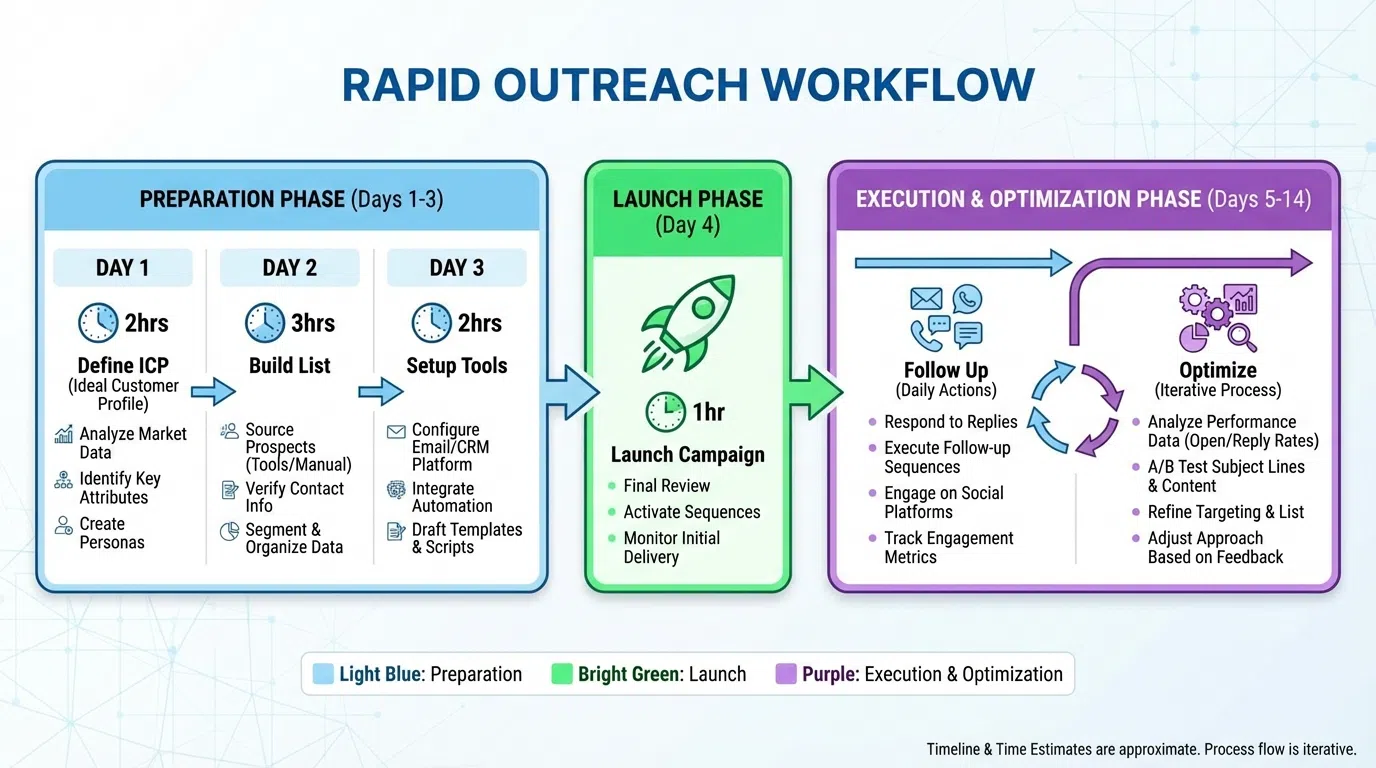
Here's the exact 7-day playbook to go from zero to first leads:
Overview
Days 1-2: Foundation (4-6 hours)
- Optimize LinkedIn profile (2 hrs)
- Define narrow ICP (1-2 hrs)
- Set up essential tools (1-2 hrs)
Days 3-4: List Building (3-4 hours)
- Build 100-prospect target list (2-3 hrs)
- Enrich with contact data (1 hr)
- Score and prioritize (30 min)
Days 5-6: Personalization & Launch (4-5 hours)
- AI research + personalization (2-3 hrs)
- Create message templates (1 hr)
- Launch first outreach wave (1 hr)
Days 7-14: Execution (2-3 hrs/day)
- Respond to replies (1 hr/day)
- Send follow-ups (30 min/day)
- Book meetings (30 min/day)
- Launch wave 2 (1 hr Day 10)
Total time investment: 20-25 hours over 14 days = 1.5-2 hrs/day
Expected output: 10-25 meetings booked within 14 days
Day 1-2: Rapid Profile and ICP Setup
The faster you need leads, the more important these foundations become.
LinkedIn Profile Optimization (2 hours)
Don't skip this. Every prospect who responds will visit your profile. If it looks like a resume, 30-50% won't respond or book meetings.
60-minute rapid optimization:
1. Professional headshot (5 min):
- Use existing professional photo
- If you don't have one, take high-quality phone photo with plain background
- Upload immediately (don't obsess over perfection)
2. Value-focused headline (10 min):
- Formula: "I help [ICP] achieve [outcome] | [Proof]"
- Example: "I help B2B SaaS companies generate 20+ qualified meetings/month | $3M+ pipeline created"
- Write 3 options, pick best one
3. About section (20 min):
- Paragraph 1: Prospect's problem (not your background)
- Paragraph 2: How you solve it + specific outcomes
- Paragraph 3: Social proof (companies, results)
- Paragraph 4: Clear CTA (DM me or book time: [calendar link])
- Keep it 100-150 words max
4. Featured section (10 min):
- Add 2-3 pieces of content:
- Case study PDF
- Relevant article you've written or shared
- Video testimonial if you have one
- If you have nothing, skip for now (optimize later)
5. Experience section (15 min):
- Current role: Add 3-5 bullet points with quantified results
- Don't rewrite entire history—just current role matters most
- Use formula: "Generated X by doing Y, resulting in Z"
Total: 60 minutes gets you from resume to prospect-ready profile
45-minute tool setup:
Essential tools (choose budget-appropriate stack):
Minimum viable ($97-160/mo):
- LeadSpark AI ($97/mo): AI personalization
- Waalaxy ($60/mo): Safe LinkedIn automation
- HubSpot Free CRM: Pipeline tracking
- Total: $157/mo
If budget allows ($300-400/mo):
- Add LinkedIn Sales Navigator ($99-149/mo): Advanced search, intent data
- Total: $256-306/mo
Setup tasks:
- Create accounts (15 min)
- Connect LinkedIn (carefully follow tool instructions) (15 min)
- Set up HubSpot CRM (pipeline stages, custom fields) (15 min)
Define Narrow ICP (60-90 minutes)
Speed trap: Targeting "everyone" wastes time on unqualified prospects.
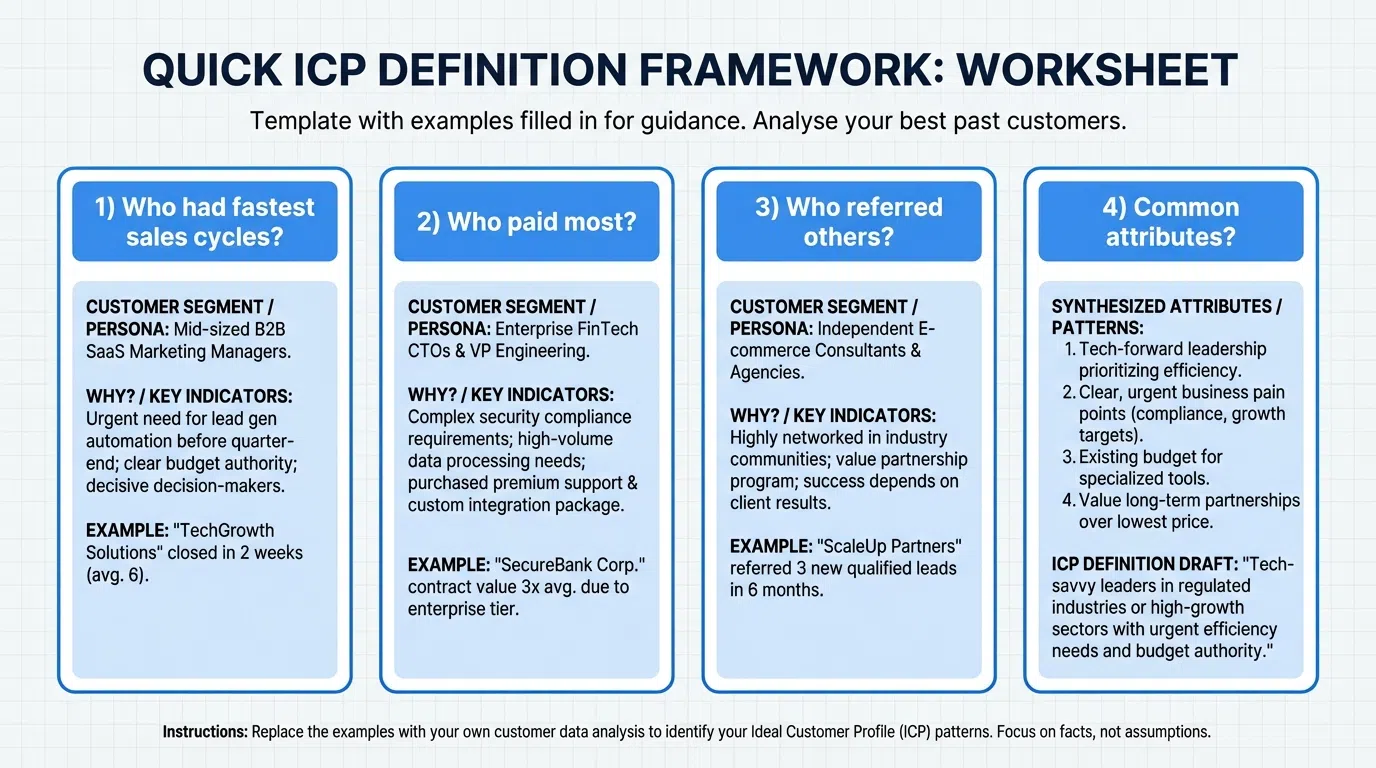
Fast ICP framework (pick ONE narrow segment):
Option 1: Industry + Size
- Industry: SaaS companies
- Size: 11-50 employees
- Geography: United States
- Role: VP Sales, Director of Sales
Option 2: Problem + Signal
- Problem: Hiring SDRs (active job posting)
- Company: B2B companies (any industry)
- Geography: United States
- Role: VP Sales, Head of Sales
Option 3: Funding Stage
- Signal: Raised Series A/B in last 12 months
- Industry: B2B SaaS
- Role: Founder, CEO, VP Sales
Why narrow?
- Easier to find (faster list building)
- Easier to message (shared pain points)
- Higher response rates (relevant to their situation)
- You can expand later—start tight
ICP checklist (15 min):
- [ ] Industry vertical (1-3 specific industries)
- [ ] Company size range (pick one: 1-10, 11-50, 51-200, 201-500, 500+)
- [ ] Geography (start with one country)
- [ ] Job titles (3-5 exact titles)
- [ ] Buying signal (hiring, funding, expansion, tech stack)
Output: One-paragraph ICP you can execute on immediately
Day 3-4: Build Your First 100-Prospect List
Lists are the fuel. Build your first batch of 100 prospects.
List Building Strategy (2-3 hours)
If you have Sales Navigator ($99-149/mo):
1. Advanced search (30 min):
- Navigate to Sales Navigator → Lead Search
- Apply filters matching your ICP:
- Industry (select 1-3)
- Company headcount (select one range)
- Geography (select target regions)
- Job title keywords (exact titles)
- Posted on LinkedIn last 30 days (active users respond better)
2. Save search (5 min):
- Save search with clear name: "SaaS 11-50 VP Sales US"
- Set weekly alert for new prospects matching criteria
3. Export prospects (45 min):
- Manually copy 100 prospects to spreadsheet OR
- Use Evaboot ($29/mo) to export Sales Navigator to CSV
- Columns needed: Name, Title, Company, LinkedIn URL, Location
If you don't have Sales Navigator (free approach):
1. LinkedIn free search (60-90 min):
- Use LinkedIn search bar
- Example query: "VP of Sales" + "SaaS" + Location
- Filter: People → 2nd degree connections (higher acceptance)
- Manually copy 100 prospects to spreadsheet
2. Scraping alternative (if comfortable with tools):
- PhantomBuster or Apollo Chrome extension
- Export LinkedIn search results to CSV
- Caution: Don't over-scrape (LinkedIn ToS risk)
3. Apollo.io database (if budget allows):
- Apollo.io free tier: 50 contact exports/month
- Paid: $49-99/mo for more volume
- Use filters matching ICP
- Export with LinkedIn URLs + emails
Data Enrichment (60 min)
Once you have 100 prospects with LinkedIn URLs, enrich with emails:
Option 1: Apollo.io
- Upload CSV to Apollo
- Run enrichment (finds emails, phones, company data)
- 60-70% email coverage typical
- Free: 50/month, Paid: $49-99/mo
Option 2: Hunter.io
- Find email patterns for each company
- Verify emails before sending
- $49-399/mo
Option 3: Manual (free but slow)
- Check company website "About" or "Team" pages
- Use format: firstname.lastname@company.com
- Verify with Hunter.io free email verifier
Output: 100-prospect CSV with LinkedIn URL + email (60-70 with emails)
Scoring and Prioritization (30 min)
Quick scoring (1-10):
For each prospect, score across 3 criteria:
- ICP fit (10 = perfect, 5 = marginal, 0 = not fit)
- Buying signal (10 = strong signal, 5 = moderate, 0 = none)
- Engagement (10 = active last 7 days, 5 = last 30 days, 0 = inactive)
Total score:
- 25-30: Tier 1 (deep research, fully custom outreach)
- 15-24: Tier 2 (AI research, personalized)
- 0-14: Skip for now (focus on higher scores)
Output: 60-80 scored prospects ready for outreach (prioritize 20-30 highest scores first)
Day 5-6: AI Personalization and Launch
The fastest way to generate quality personalization at scale: AI.
AI-Powered Research (2-3 hours for 100 prospects)
Manual research (slow):
- 8-14 min per prospect
- 100 prospects = 13-23 hours
- Not realistic when you need speed
AI research (fast):
- 30-60 sec per prospect with review
- 100 prospects = 1-2 hours
- Maintains quality
Using LeadSpark AI:
1. Upload CSV (5 min):
- Prepare CSV with LinkedIn URLs
- Upload to LeadSpark AI dashboard
- Select bulk processing
2. AI analysis (30-60 min automatic):
- LeadSpark analyzes each profile automatically
- Scrapes recent LinkedIn posts
- Extracts personalization hooks
- Generates icebreakers under 25 words
3. Human review (60-90 min):
- Review AI-generated hooks (10-20 sec per prospect)
- Edit 10-20% requiring customization
- Approve 80-90% as-is
- Flag any prospects needing manual research
4. Export personalized CSV (5 min):
- Download CSV with custom icebreaker column
- Import to Waalaxy or outreach tool
Output: 100 prospects with personalized icebreakers, ready to send
Message Template Creation (60 min)
Create 3 core templates:
Template 1: Connection request (150 characters max):
"{{Icebreaker_Hook}} Worth connecting?"
Example:
"Saw your post about reducing SDR ramp from 7mo to 4mo—exactly the challenge we solve. Worth connecting?"
Template 2: First message (if connection accepted):
"Thanks for connecting! {{Icebreaker_Hook}}
Quick question: how are you currently handling {{Pain_Point}}?"
Template 3: Follow-up (if no response after 5-7 days):
"{{FirstName}}, circling back—most {{Job_Title}}s we work with struggle with {{Pain_Point}}.
Worth a quick 15-min call to see if we can help? [Calendar link]"
Launch First Wave (60 min)
Day 6: Send first outreach batch
Using Waalaxy or Expandi:
- Import CSV (10 min):
- Upload your 100-prospect CSV with personalized hooks
- Map fields (Name, Company, Custom Icebreaker, etc.)
- Set up sequence (20 min):
- Day 1: Send connection request with personalized note
- Day 3-5: If accepted, send first message
- Day 8-10: Send follow-up if no response
- Day 14: Send breakup message
- Configure sending limits (10 min):
- 20-25 connection requests per day (stay safe)
- 50-100 messages per day to existing connections
- Randomize timing (9am-5pm, vary by 30-60 min)
- Launch campaign (5 min):
- Double-check templates have correct fields
- Test with 3-5 prospects first
- If working, launch to full 100
Manual alternative (if no automation tool):
- Send 20-25 connection requests daily manually
- Use saved templates in note section
- Track in spreadsheet: Date sent, Date accepted, Date messaged, Response status
Output: 100 prospects receiving personalized outreach over next 4-5 days
Day 7-14: Respond, Book, and Scale
The first responses start coming Day 7-10. Now convert them to meetings.
Response Handling (1 hr/day)
Daily routine (check 3-4x per day):
Morning (30 min):
- Check LinkedIn messages
- Respond to any new replies within 3 hours (critical for conversion)
- Answer questions helpfully (don't pitch immediately)
- Share value (relevant case study, article, data point)
Afternoon (15 min):
- Check for new connection acceptances
- Queue up first messages (templates with personalized hooks)
Evening (15 min):
- Final check before end of day
- Respond to any late replies
- Book meetings that came in
Response speed matters:
- <3 hours: 60-70% book meetings
- 24+ hours: 20-30% book meetings
According to SDR productivity research, with AI SDR agents, every lead gets personalized messages seconds after hitting the system—but human SDRs should aim for sub-3-hour response to maintain conversion rates.
Meeting Booking Best Practices
When someone shows interest:
1. Provide immediate value:
"Awesome! Before we chat, here's a 2-min case study of how [Similar Company] achieved [Result]: [link]
If relevant, happy to show you the exact approach. Here's my calendar: [Calendly link]"
2. Make booking frictionless:
- Use Calendly or HubSpot meetings (free tier)
- Show only 15-min slots (lower commitment)
- Offer specific times if prospect prefers: "Tuesday 2pm or Wednesday 10am?"
3. Confirm immediately:
- Send calendar invite with agenda
- Reminder email 24 hours before
- Text/LinkedIn message 2 hours before
Expected booking rates:
- 30-60 responses from 100 prospects (30-60% response)
- 15-30 meetings booked (50% of responses book)
- 10-20 meetings held (70% show-up)
- 6-12 qualified (60% qualify)
Scale to Wave 2 (Day 10)
Day 10: Build and launch second 100-prospect list
Now that Wave 1 is running, build Wave 2:
- Repeat Days 3-6 process
- Build another 100-prospect list
- AI research + personalization
- Launch second wave
By Day 14:
- Wave 1: 100 prospects → 30-60 responses → 15-30 meetings → 10-20 held → 6-12 qualified
- Wave 2: 100 prospects → outreach sent, responses starting
Compounding effect: Each week you add a new wave. By Week 4, you have 4 waves running = 400 prospects in various stages = 40-80 meetings booked.
Fast-Track Tools and Shortcuts
Tools make or break fast execution.
Essential Stack (Minimum Budget: $157/mo)
Must-haves:
- LeadSpark AI ($97/mo): AI personalization (saves 15+ hrs/week)
- Waalaxy ($60/mo): Safe LinkedIn automation
- HubSpot Free CRM: Pipeline tracking
Why this stack:
- Total cost: $157/mo
- Enables 100-200 prospects/week
- Maintains 30-40% response rates
- Pays for itself with 1-2 closed deals
Upgrade Path (As Budget Allows)
Add Sales Navigator ($99-149/mo) when:
- Hitting 50+ prospects/week consistently
- Need better targeting and intent data
- Want InMail credits for high-value prospects
Add Clay ($149/mo) when:
- Need better data enrichment
- Want waterfall coverage (90-95% vs 60-70%)
- Managing complex multi-channel workflows
Add Expandi ($99/mo) when:
- Need visual personalization (custom images)
- Want more advanced sequence logic
- Ready for enterprise features
Time-Saving Shortcuts
1. Use AI for research (saves 90% of time)
- 8-14 min manual → 30-60 sec with AI
- Same quality, 15x faster
2. Batch similar tasks
- List building: 1 session/week (not daily)
- Message creation: 1 session/week (not per prospect)
- Response handling: 3-4 scheduled times/day (not constant checking)
3. Start narrow, expand later
- Easier to message one ICP well than 5 ICPs poorly
- Easier to find in one industry/size than broad
- Expand after you have working playbook (Week 3-4)
4. Leverage templates smartly
- Create 3-5 core templates
- AI personalizes opening hook
- Body stays consistent
- Saves writing time while maintaining personalization
5. Use calendar tools
- Calendly or HubSpot meetings (avoid back-and-forth)
- Auto-reminders (reduces no-shows)
- Time zone detection (prevents confusion)
Common Fast-Start Mistakes
Avoid these pitfalls when rushing to generate leads:
Mistake 1: Skipping Profile Optimization
Trap: "I'll optimize later, I need leads now!"
Reality: 30-50% of prospects who respond visit your profile. If it looks like a resume, they ghost.
Fix: Spend the 2 hours on Day 1. It pays dividends for months.
Mistake 2: Targeting Too Broadly
Trap: "More targets = more leads, right?"
Reality: Broad targeting = generic messaging = 5-8% response vs 30-40% with narrow focus.
Fix: Pick ONE narrow ICP segment for first 100 prospects. Expand later once you have repeatable playbook.
Mistake 3: Pure Volume, Zero Personalization
Trap: "I'll send 500 generic messages to make up for low response rates"
Reality: 500 × 2% response = 10 leads. 100 × 30% response = 30 leads. Quality beats volume.
Fix: Use AI to maintain personalization at scale. LeadSpark AI enables 100-200/week with 30-40% response.
Mistake 4: No Follow-Up System
Trap: Send one message, give up if no response.
Reality: 80% of sales need 5+ touches. 44% of reps quit after 1 attempt.
Fix: Build 4-5 touch sequence before launching. Automate follow-ups (Waalaxy, Expandi).
Mistake 5: Slow Response Times
Trap: Check messages once a day, respond 24+ hours later.
Reality: Sub-3hr response converts 60-70%. 24+ hr converts 20-30%.
Fix: Check inbox 3-4x daily. Enable mobile notifications for new messages. Respond immediately.
Mistake 6: Ignoring Qualification
Trap: Book every meeting that responds, don't ask qualifying questions.
Reality: Waste sales team's time with poor fits, damage relationships.
Fix: Ask 2-3 qualifying questions in messages before booking: "Is [pain point] a current priority?" "What's your timeline for evaluating solutions?"
Frequently Asked Questions
Can I really generate leads in 7-14 days?
Yes, if you follow the framework:
- Days 1-6: Setup and launch (15-20 hours)
- Days 7-14: First responses and meetings (10-15 hours)
- Expected output: 10-25 meetings booked within 14 days
Caveats:
- You won't have 100 closed deals in 14 days (sales cycles are 30-180 days)
- You'll have qualified conversations and pipeline started
- Sustainable process that continues generating leads monthly
What if I have zero budget for tools?
Free stack (slower but workable):
- LinkedIn free search (list building)
- Manual research 2-3 min per prospect (vs AI in 30 sec)
- Manual sending (no automation, 20-25 requests/day)
- HubSpot Free CRM (pipeline tracking)
- Google Sheets (tracking)
Time investment: 30-40 hrs for same 100 prospects (vs 15-20 hrs with tools)
When to invest: Once you book 3-5 meetings and validate the process, invest $157/mo in tools—time savings pays for itself immediately.
How many prospects should I contact per day?
Safe LinkedIn limits:
- Connection requests: 20-25 per day
- Messages (to connections): 50-100 per day
- Profile views: 200-300 per day
Recommended starting pace:
- Week 1: 20-30 prospects total (testing)
- Week 2: 50-100 prospects (scaling)
- Week 3-4: 100-200 prospects (full volume)
Never exceed 25 connection requests/day—LinkedIn will restrict account if acceptance rate drops below 15%.
What response rate should I expect as a beginner?
Realistic benchmarks:
- Generic templates: 2-5% (don't do this)
- Basic personalization (name/company): 8-12%
- AI personalization (LeadSpark): 30-40%
As a beginner with AI tools: 25-35% response rate is achievable immediately (AI handles research, you review).
As a beginner manual: 15-25% response rate initially (learning curve on personalization), improving to 30-40% after 50-100 prospects.
Should I focus on LinkedIn or email for fast results?
LinkedIn wins for speed:
- Faster to find (Sales Navigator or free search)
- Higher response rates (25-35% vs email 5.1%)
- Direct to decision-maker (no gatekeepers)
- Immediate responses (vs email delays)
Email as supplement:
- Add email as touch 2-3 in sequence
- Multi-channel boosts results 287%
- But start with LinkedIn for fastest first conversations
Answer: Start LinkedIn-only for speed, add email Week 2-3 once LinkedIn working.
How do I know if I'm on track?
Week 1 benchmarks:
- 30-50 prospects contacted
- 10-15 responses (20-30% response)
- 3-5 meetings booked
Week 2 benchmarks:
- 100-150 prospects contacted total
- 30-45 responses (25-35% response)
- 10-20 meetings booked
- 5-10 meetings held
Red flags you're off track:
- Response rate <10% (poor targeting or messaging)
- Acceptance rate <15% (too generic, risk of LinkedIn restrictions)
- Zero meetings booked from 30+ responses (qualification or CTA problem)
If you see red flags, pause and diagnose (don't just send more volume).
Ready to Generate Your First Sales Leads This Week?
Speed matters, but speed without strategy creates noise instead of results. The 7-day quick-start framework gives you both:
- Days 1-2: Foundation (profile + ICP + tools)
- Days 3-4: List building (100 targeted prospects)
- Days 5-6: AI personalization and launch
- Days 7-14: Respond, book meetings, scale
Total time: 20-25 hours over 14 days
Expected results: 10-25 qualified meetings booked
The fastest path to quality personalization at scale: LeadSpark AI. It analyzes LinkedIn profiles and posts in 5-10 seconds (vs 8-14 min manual), enabling you to launch your first 100-prospect campaign in days, not weeks—while maintaining 30-40% response rates.
Get started now:
- Sign up for LeadSpark AI free trial (15 free credits)
- Build your first 15-prospect test list today
- Let LeadSpark analyze and personalize
- Send outreach tomorrow
- Book your first meetings by end of week
Related Posts
Ready to Generate Personalized Icebreakers?
Join sales professionals using LeadSpark AI to create hyper-personalized LinkedIn icebreakers in minutes.