Linkedin Prospecting
LinkedIn InMail vs Connection Request: Which Works Better for Cold Outreach?
InMail gets 10-25% response rates but costs $1.50-2 per message with 50/month limit. Connection requests are free with 45% accept rates and unlimited messaging. Compare costs, response rates, and when to use each.
LeadSpark AI Team
9 min read
Should you use LinkedIn InMail or connection requests for cold outreach? It's one of the most common questions SDRs and sales teams face when prospecting on LinkedIn.
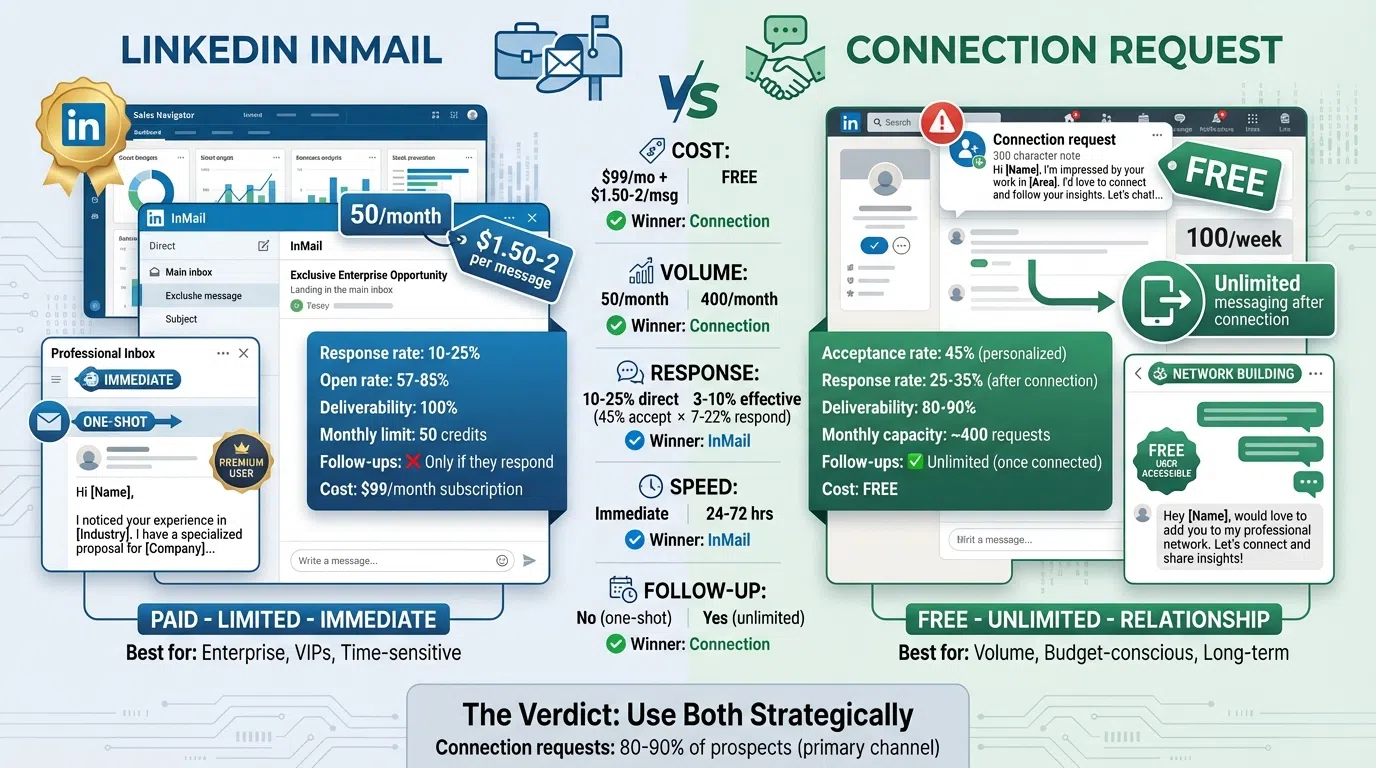
The answer isn't straightforward—both approaches have distinct advantages and use cases. InMail delivers 10-25% response rates but costs $1.50-$2 per message and has a 50/month limit. Connection requests are free with 45% acceptance rates and enable unlimited messaging once connected.
In this guide, we'll compare LinkedIn InMail vs connection requests across response rates, costs, limits, and use cases. You'll learn when to use each approach and how to combine them for maximum results.
What is LinkedIn InMail?
LinkedIn InMail is a direct messaging feature available to LinkedIn Premium, Sales Navigator, and Recruiter users that allows you to message anyone on LinkedIn, even if you're not connected.
How InMail Works
- Access: Requires LinkedIn Premium ($99/month), Sales Navigator ($99-$149/month), or Recruiter subscription
- Credits: Sales Navigator includes 50 InMail credits per month
- Direct inbox: InMails land in the recipient's main LinkedIn inbox (not filtered to a separate folder)
- One-shot opportunity: You cannot send follow-ups unless the recipient responds
- Guaranteed delivery: 100% deliverability (no spam filters)
InMail Benchmarks (2026)
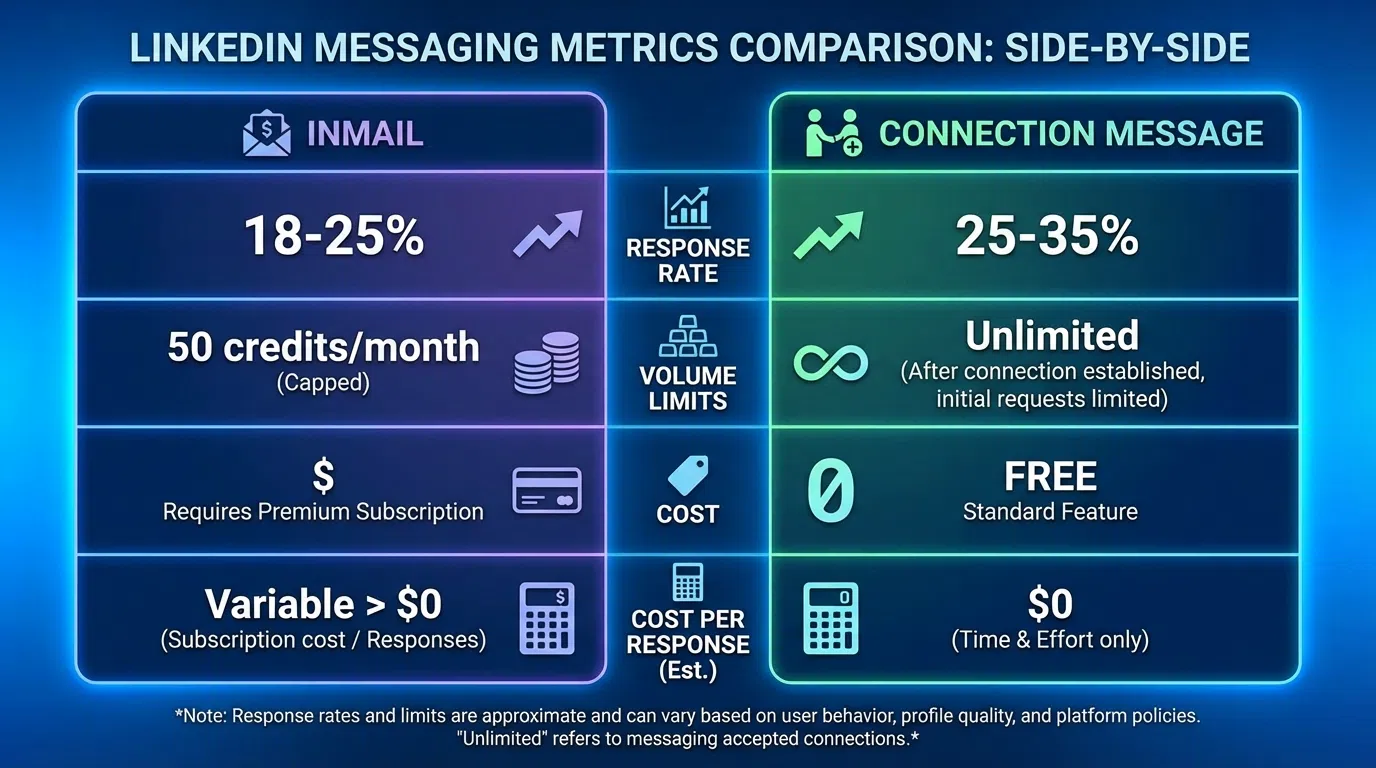
- Response rate: 10-25% average (18-25% for high performers, 30-40% elite tier)
- Open rate: 57.5-85% (significantly higher than cold email's 15-27%)
- Cost: $1.50-$2 per InMail message
- Monthly limit: 50 credits with Sales Navigator (unused credits roll over one month)
- Best response rates: Under 400 characters (+22% vs average), personalized (+15-20%), sent Tuesday-Thursday
The big advantage: InMail lets you reach anyone immediately, including senior executives who might not accept connection requests from strangers.
What are LinkedIn Connection Requests?
Connection requests are LinkedIn's way of building your professional network. Sending a connection request invites someone to join your 1st-degree network, enabling unlimited direct messaging once accepted.
How Connection Requests Work
- Access: Available to all LinkedIn users (free and paid)
- Limits: 100 connection requests per week (LinkedIn's limit to prevent spam)
- Acceptance required: Prospect must accept before you can message
- Unlimited messaging: Once connected, you can send unlimited messages for free
- Note character limit: 300 characters for the connection request note (personalization)
Connection Request Benchmarks (2026)
- Acceptance rate: 20-55% depending on personalization and mutual connections
- Personalized requests: 45% acceptance rate (with 2nd-degree connections)
- Generic requests: 15% acceptance rate
- Response rate after connection: 7.22% from general outreach, 25-35% with good messaging
- Cost: Free
- Time to connect: 24-72 hours typical (some accept within minutes, others take weeks)
The big advantage: Free, unlimited messaging once connected, and connection builds long-term relationship value.
Head-to-Head Comparison
Let's compare InMail and connection requests across the metrics that matter:
Response Rates
InMail: 10-25% response rate (18-25% high performers)
Connection Requests: 45% acceptance rate, then 7-22% response = ~3-10% effective response rate
Winner: InMail (higher overall response rate, though connection requests can match with strong follow-up messaging)
Cost
InMail: $1.50-$2 per message, $99/month for 50 credits
Connection Requests: Free
Winner: Connection Requests (infinite cost advantage)
Volume Capacity
InMail: 50 per month limit (can purchase additional credits)
Connection Requests: 100 per week = ~400 per month
Winner: Connection Requests (8x higher volume capacity)
Speed to Contact
InMail: Immediate (message lands in inbox instantly)
Connection Requests: 24 hours to 2+ weeks (waiting for acceptance)
Winner: InMail (immediate access)
Follow-Up Ability
InMail: Cannot follow up unless recipient responds
Connection Requests: Unlimited messages once connected
Winner: Connection Requests (enables nurture sequences and persistence)
Deliverability
InMail: 100% (always reaches inbox)
Connection Requests: ~80-90% (some prospects ignore all requests)
Winner: InMail (guaranteed delivery)
When to Use LinkedIn InMail
InMail makes sense in specific scenarios where its advantages outweigh the cost and limitations.
1. Reaching Senior Executives
C-level executives and VPs often ignore connection requests from strangers but check InMails because they're more formal and direct.
Why InMail works here:
- Appears in main inbox (hard to miss)
- Signals seriousness (you paid to reach them)
- Bypasses connection request gatekeeping
- Feels more professional than unsolicited connection
Example: Reaching out to a Fortune 500 CTO about an enterprise solution.
2. Time-Sensitive Opportunities
When timing matters—limited-time offers, event invitations, urgent opportunities—InMail's immediate delivery beats waiting days for connection acceptance.
Why InMail works here:
- Instant inbox placement
- No waiting for acceptance
- Creates urgency (one-shot message)
- Higher open rates (57-85%)
Example: Inviting prospects to an exclusive webinar happening in 48 hours.
3. High-Value, Low-Volume Outreach
When you're targeting 20-50 high-value prospects per month and cost per message doesn't matter compared to deal size, InMail's superior response rates justify the investment.
Why InMail works here:
- $1.50-$2 cost insignificant vs $100K+ deal sizes
- Higher response rates matter more than volume
- 50 credits matches targeting volume
- Quality over quantity approach
Example: Enterprise sales targeting 30 Fortune 1000 accounts per quarter.
4. Prospects Who Declined Your Connection Request
If someone doesn't accept your connection request, InMail provides a second channel to reach them.
Why InMail works here:
- Different approach after connection decline
- Shows persistence without being pushy
- More formal channel may resonate better
- Last-resort option before moving on
Example: Following up on ignored connection requests to high-priority prospects.
5. LinkedIn Open Profile Users
Some LinkedIn users enable "Open Profile," making InMail free to send them. Check for the green "Message" button on profiles—it indicates either a connection or Open Profile.
Why this works:
- Free InMail (no credit used)
- Same benefits as paid InMail
- Ideal for volume testing
When to Use Connection Requests
Connection requests are the better choice for most LinkedIn prospecting scenarios.
1. Volume Prospecting (100+ Prospects/Month)
When you need to reach hundreds of prospects monthly, InMail's 50/month limit doesn't scale. Connection requests allow 400 per month.
Why connection requests work here:
- 400/month capacity vs 50 InMail
- Free (sustainable at scale)
- Enables follow-up sequences
- Builds network long-term
Example: SDR reaching 300 mid-market prospects monthly.
2. Multi-Touch Nurture Campaigns
Connection requests enable ongoing conversation with accepted connections. You can send multiple follow-ups, share content, and build relationships over time.
Why connection requests work here:
- Unlimited messages once connected
- Can nurture over weeks/months
- Share updates and insights
- Build genuine relationships
Example: 6-month sales cycle requiring 8-12 touchpoints.
3. Budget-Conscious Teams
Startups and small teams without Sales Navigator budgets can still execute effective LinkedIn prospecting with free connection requests.
Why connection requests work here:
- Zero cost per prospect
- No subscription required
- Sustainable for small teams
- Scales with effort, not budget
Example: Solo founder or early-stage startup without sales tools budget.
4. Prospects with Mutual Connections
When you share 2nd-degree connections, connection requests have 45% acceptance rates and feel more natural than InMail.
Why connection requests work here:
- Mutual connections create trust
- 45% acceptance with personalization
- Feels like natural networking
- Can reference shared connection
Example: "Hi [Name], saw we're both connected to [Mutual Connection]. I work with companies like yours on [topic]..."
5. Building Long-Term Network Value
Every accepted connection adds to your network permanently. Over time, this builds a valuable asset for future opportunities, referrals, and insights.
Why connection requests work here:
- Network compounds over time
- Future opportunities from past connections
- Referral potential
- Industry insights from feed
Example: Building relationships that pay off 6-12 months later.
The Hybrid Approach: Using Both Strategically
The most effective LinkedIn prospecting combines InMail and connection requests strategically based on prospect tier and situation.
Recommended Hybrid Strategy
Tier 1 Prospects (Top 20-50 High-Value Accounts)
- Send personalized connection request
- Wait 3-5 days for response
- If accepted: Send value-first message sequence
- If ignored: Send InMail as follow-up channel
- If InMail also ignored: Move to email/phone
Tier 2 Prospects (100-200 Mid-Market Accounts)
- Send connection requests to all (free, scalable)
- For accepted connections: Engage with multi-touch sequence
- Reserve InMail for highest-priority prospects who don't accept
- Focus budget on prospects showing engagement signals
Tier 3 Prospects (Volume Prospecting)
- Connection requests only (cost-effective at scale)
- No InMail (budget better used on Tier 1-2)
- High-volume approach with AI personalization
- Accept that some won't connect (move on quickly)
Sequence Example: High-Value Prospect
Day 1: Personalized connection request (300 character note)
Day 5: If no acceptance, send InMail (different angle, more formal)
Day 8: If InMail response, great! If not, try email as third channel
Day 12: Phone call if all digital channels failed
Day 15: Final breakup email or move to long-term nurture
This approach uses connection requests for cost efficiency, InMail for important prospects who don't connect, and multi-channel persistence for best results.
Best Practices for LinkedIn InMail
If you're using InMail, follow these best practices to maximize your 50 monthly credits:
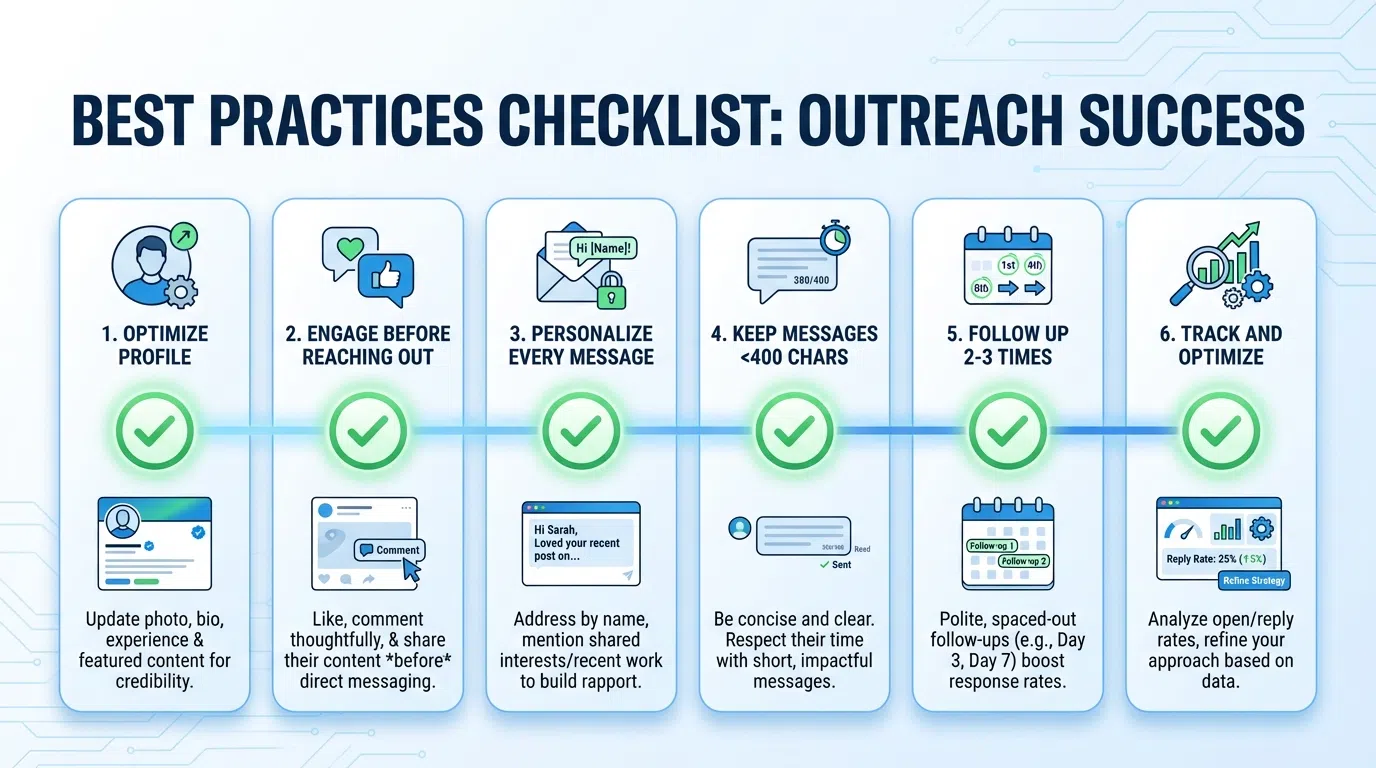
1. Keep It Short (Under 400 Characters)
InMails under 400 characters get 22% higher response rates than average. Busy executives appreciate brevity.
Structure:
- Opening line: Relevant observation (1 sentence)
- Value prop: Problem + proof point (2-3 sentences)
- CTA: Simple question or soft ask (1 sentence)
2. Personalize Every Message
Personalized InMails perform 15-20% better than generic templates. Reference their profile, recent posts, or company news.
Good personalization:
"Saw you just joined as VP Sales at [Company]—congrats on the new role! First 90 days are critical. Here's how [Similar Company] ramped their team faster..."
3. Send Tuesday-Thursday
InMails sent Friday or Saturday receive 4-8% fewer responses. Stick to mid-week for best results.
4. Target Active Users
InMails to recipients with recent activity (posting, commenting) see 27% higher response rates. Check their activity feed before sending.
5. Mobile-Optimize Your Subject Line
57-70% of LinkedIn traffic is mobile. Subject lines of 25-40 characters perform best on mobile screens.
6. Lead with Value, Not Features
Focus on their challenges and outcomes, not your product capabilities. InMail isn't a pitch—it's a conversation starter.
Best Practices for Connection Requests
Connection requests require a different approach to maximize acceptance and post-connection engagement:
1. Always Add a Personalized Note
Connection requests with personalized notes get 45% acceptance vs 15% for blank requests. Use all 300 characters.
Framework:
- Relevant observation: "Saw you're [specific detail]"
- Common ground: Mutual connection, shared interest, similar experience
- Reason to connect: Brief value prop or question
- Soft CTA: "Open to connecting?"
2. Focus on 2nd-Degree Connections
Prospects with mutual connections accept 2-3x more often than 3rd-degree or no connection. Filter Sales Navigator by "2nd-degree" for better results.
3. Don't Pitch in the Connection Request
Save the value proposition for after they accept. The connection request should focus on WHY you want to connect, not WHAT you're selling.
Bad: "I sell software that helps companies like yours..."
Good: "I help SaaS companies scale SDR teams. Saw you're hiring—worth connecting?"
4. Engage Before Connecting
View their profile, like a recent post, or comment thoughtfully before sending your request. This creates familiarity and increases acceptance.
5. Follow Up Within 24 Hours of Acceptance
When someone accepts, send a value-first message within 24 hours while you're top-of-mind.
Template: "Thanks for connecting, [Name]! [Callback to connection request topic]. Quick question: [relevant question]?"
6. Limit to 20-30 Requests Per Day
LinkedIn allows 100/week, but sending 20-30/day appears more natural and reduces risk of account restrictions.
Common Mistakes to Avoid
Mistake #1: Using Only InMail
InMail's 50/month limit doesn't support serious prospecting volume. Use connection requests as your primary channel, InMail for special cases.
Mistake #2: Blank Connection Requests
"I'd like to add you to my professional network on LinkedIn" gets 15% acceptance. Add a personalized note for 45% acceptance.
Mistake #3: Pitching Immediately After Connection
Give the relationship 1-2 messages to warm up before asking for meetings. Lead with value, not sales pitches.
Mistake #4: Wasting InMail on Low-Priority Prospects
Save your 50 monthly credits for high-value prospects who didn't accept connection requests or time-sensitive opportunities.
Mistake #5: Not Following Up on Accepted Connections
45% of your connections will accept, but only if you follow up with value-first messaging will they engage. Don't waste accepted connections.
Mistake #6: Generic InMail Templates
InMail costs $1.50-$2 per message. Don't waste it on copy-paste templates. Personalize every single one.
The Cost-Effectiveness Analysis
Let's break down the economics of InMail vs connection requests:
InMail Economics
- Cost: $99/month Sales Navigator + 50 InMail credits
- Response rate: 18% average (9 responses from 50 InMails)
- Cost per response: $11 ($99/9 responses)
- Cost per meeting (assuming 50% of responses book): $22
When InMail is cost-effective:
- Enterprise deals worth $100K+ (1-2 deals justify annual InMail cost)
- Senior executive targeting (C-level response rates higher)
- Time-sensitive campaigns (speed matters)
Connection Request Economics
- Cost: Free
- Acceptance rate: 45% (180 acceptances from 400 requests/month)
- Response rate after connection: 15% (27 responses from 180 connections)
- Cost per response: $0 (free)
- Cost per meeting (assuming 50% book): $0
When connection requests are cost-effective:
- Mid-market prospecting (volume matters)
- Budget-conscious teams (no subscription cost)
- Long-term network building (compound value)
Hybrid Economics
Most teams should use a hybrid approach:
- Connection requests: 350 per month (primary channel)
- InMail: 50 per month (for VIPs who don't connect)
- Total cost: $99/month Sales Navigator
- Blended response rate: 12-18% across all prospects
- Cost per response: ~$3-5 (much better than InMail alone)
AI-Powered Personalization: The Game-Changer for Both
Whether you use InMail or connection requests, personalization is critical. But manual personalization doesn't scale beyond 20-30 prospects daily.
AI-powered tools like LeadSpark AI solve this by analyzing LinkedIn profiles and recent posts to generate hyper-personalized messages at scale:
For InMail:
- Maximize your 50 monthly credits with deep personalization
- Reference specific posts and company developments
- Achieve 25-40% response rates (vs 10-18% generic)
For Connection Requests:
- Personalize 100+ connection notes daily
- Reference recent activity and shared interests
- Boost acceptance from 20% to 50-60%
The result: 70-90% response rates across InMail and connection messages by maintaining hyper-personalization quality at scale.
Conclusion: Use Both, Strategically
LinkedIn InMail vs connection requests isn't an either/or choice. The most effective approach uses both strategically:
Primary channel: Connection requests
- Free, scalable, enables follow-up
- Use for 80-90% of prospects
- Builds long-term network value
Secondary channel: InMail
- For VIPs who don't accept connections
- Time-sensitive opportunities
- Senior executives and key decision-makers
- Use for top 10-20% of prospects
The winning formula:
- Send personalized connection requests to all prospects
- Reserve InMail for high-value targets who don't accept
- Use AI to maintain personalization quality at scale
- Follow up consistently with value-first messaging
- Track which approach works best for your audience and adjust
Scale Your LinkedIn Outreach with AI Personalization
Whether you're using InMail or connection requests, personalization drives results. But manual personalization limits you to 20-30 prospects daily.
LeadSpark AI analyzes LinkedIn profiles and recent posts to generate hyper-personalized InMails and connection requests at scale, achieving 70-90% response rates while reaching 500+ prospects per week.
How it works:
- Upload your prospect list from Sales Navigator or CSV
- AI analyzes profiles, recent posts, and company news
- Generate personalized InMails and connection notes automatically
- Review (or auto-approve) and send through LinkedIn
- Track responses and optimize based on data
Sales teams using LeadSpark AI save 20+ hours per week on research and personalization while increasing LinkedIn response rates from 10-18% (manual) to 70-90% (AI-powered).
Start your free trial and see how AI personalization transforms both your InMail and connection request performance. No credit card required.
Ready to Generate Personalized Icebreakers?
Join sales professionals using LeadSpark AI to create hyper-personalized LinkedIn icebreakers in minutes.