Linkedin Prospecting
How to Research Prospects on LinkedIn: Manual vs AI Guide [2026]
Manual LinkedIn research takes 7-11 minutes per prospect. AI analyzes profiles in seconds. Compare processes, what to research, time investment, and when to use each approach for effective prospecting.
![How to Research Prospects on LinkedIn: Manual vs AI Guide [2026]](/resources/linkedin-prospect-research-hero.webp)
LeadSpark AI Team
11 min read
How much time do you spend researching prospects on LinkedIn before reaching out? If you're doing it manually, the answer is probably 7-11 minutes per prospect—and that's if you're efficient.
For SDRs reaching 100 prospects per week, that's 12-18 hours spent just on research. Not writing messages, not having conversations—just gathering information so you can personalize your outreach.
In 2026, AI-powered prospect research has changed the game. What once took 7-11 minutes per prospect now takes seconds, while delivering more comprehensive insights than manual research ever could.
In this guide, we'll break down both the manual and AI approaches to LinkedIn prospect research. You'll learn what to research, how long each method takes, and when to use manual research vs AI automation.
Why LinkedIn Prospect Research Matters
Before we dive into how, let's address why prospect research is non-negotiable in 2026.
The data is clear:
- Personalized messages: 2-3x higher response rates than generic templates
- Researched outreach: 12-18% response vs 1-5% for non-researched
- Relevant messaging: 30%+ boost in positive replies when you reference specific context
- Understanding their situation: Enables problem-focused messaging that resonates
The challenge? Research is time-intensive. Understanding the trade-off between quality research and volume prospecting is the key to scaling your LinkedIn outreach effectively.
The Manual LinkedIn Research Process
Let's start with the traditional approach most SDRs learn: manual LinkedIn research.
Step 1: Review the Profile (2-3 minutes)
What to look for:
Current Role:
- Job title and level (decision-maker?)
- How long in current role (newly promoted = pain points)
- Department and team size
- Reporting structure (who they report to)
Company Information:
- Company size and industry
- Revenue and funding stage
- Growth trajectory (hiring = scaling challenges)
- Tech stack (if visible on profile)
Career Trajectory:
- Previous roles and companies
- How they've progressed (IC → Manager → Director)
- Industry switches or specializations
- Time at each company (job hopper vs loyal)
Why this matters: Understanding their role and career path helps you tailor your message to their specific challenges and level of authority.
Step 2: Analyze Recent Activity (2-4 minutes)
What to review:
Posts They've Written:
- Topics they care about
- Challenges they're discussing
- Opinions and perspectives
- Engagement on their content
Comments and Engagement:
- What content they engage with
- Whose posts they comment on
- Industry topics of interest
- Questions they're asking
Shared Content:
- Articles they find valuable
- Industry news they track
- Thought leaders they follow
Why this matters: Recent activity reveals what's top-of-mind right now. A post about "struggling to scale our SDR team" from last week is gold for personalization.
Step 3: Check Company News and Triggers (1-2 minutes)
What to research:
Company Updates:
- Recent funding rounds (Series A, B, C)
- Product launches or new features
- Leadership changes (new CRO, VP Sales)
- Office expansions or new markets
- Awards or recognition
Hiring Signals:
- Open roles on company careers page
- Particularly relevant: sales roles, operations, specific tech roles
- Team expansion indicates scaling challenges
News Mentions:
- Press releases
- Industry awards
- Customer wins or case studies
- Mergers or acquisitions
Why this matters: Trigger events create urgency and relevance. "Saw you raised Series B" is a perfect conversation starter.
Step 4: Find Mutual Connections (1 minute)
What to check:
2nd-Degree Connections:
- Who you both know
- How strong are those connections
- Potential for warm introduction
- Shared experiences or companies
Shared Groups:
- Industry associations
- Alumni networks
- Professional communities
Why this matters: Mutual connections increase trust and acceptance rates by 2-3x. Referencing "[Mutual Connection] suggested I reach out" works.
Step 5: Review Education and Interests (1 minute)
What to note:
Education Background:
- University and degree
- Shared alma mater (talking point)
- Relevant certifications or courses
- Continuing education efforts
Skills and Endorsements:
- Top skills listed
- What colleagues endorse them for
- Expertise areas
Interests:
- Volunteering or causes
- Publications or speaking engagements
- Hobbies mentioned in "About" section
Why this matters: Shared backgrounds create rapport. Finding common ground beyond business helps build relationships.
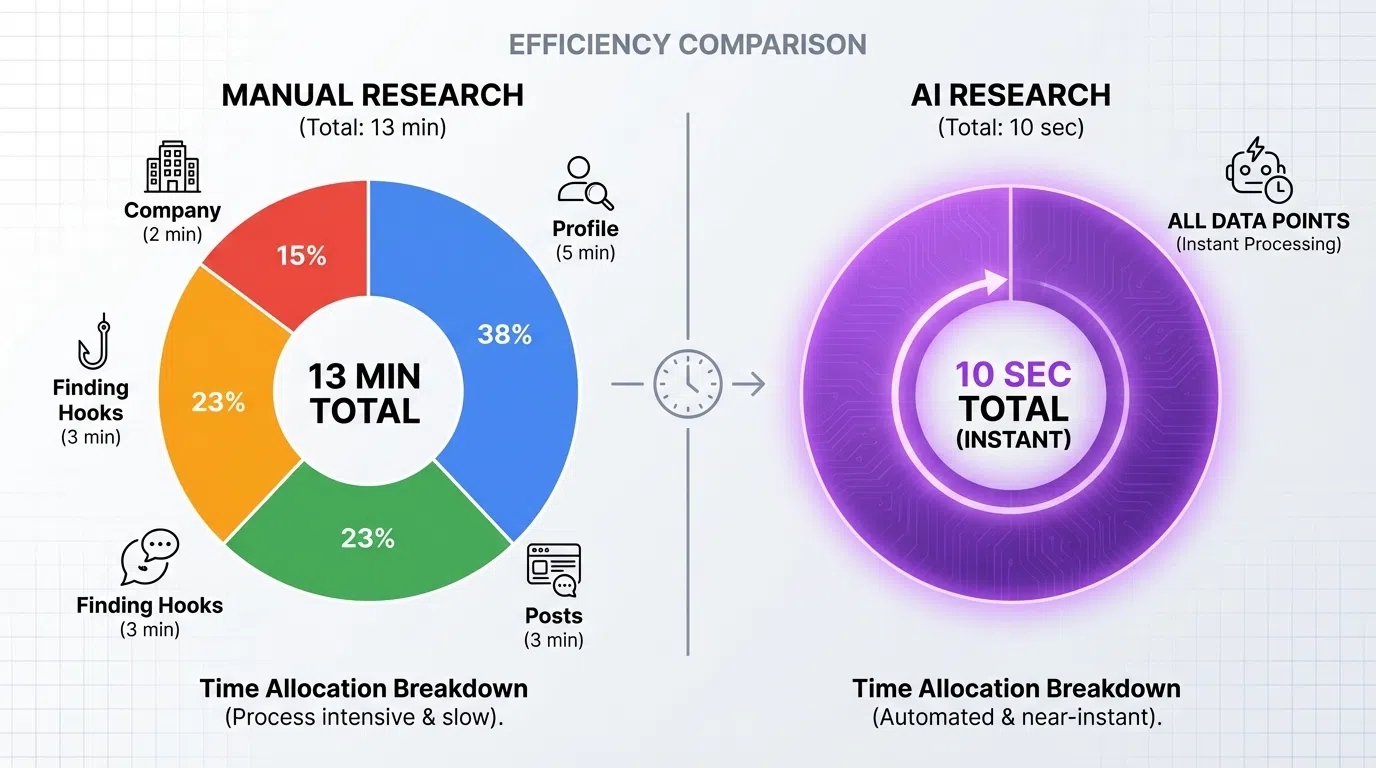
Total Time Investment: 7-11 Minutes Per Prospect
For high-quality manual research:
- Profile review: 2-3 minutes
- Activity analysis: 2-4 minutes
- Company research: 1-2 minutes
- Mutual connections: 1 minute
- Education/interests: 1 minute
At this pace:
- 20 prospects per day = 2.3-3.7 hours of research daily
- 100 prospects per week = 12-18 hours weekly
- 400 prospects per month = 47-73 hours monthly
That's nearly 2 full work weeks spent just on research alone, before writing a single message.
The AI LinkedIn Research Process
Now let's look at how AI-powered tools approach the same research—and what they can do that manual research can't.
How AI Research Works
AI tools like LeadSpark AI analyze LinkedIn profiles and activity automatically:
Step 1: Upload Prospect List
- Import from LinkedIn Sales Navigator, CSV, or CRM
- Bulk upload 100-1,000 prospects at once
Step 2: AI Analyzes Profiles (Automated - Seconds)
AI scans and extracts:
- Current role, title, and company
- Career history and progression
- Skills and endorsements
- Education and certifications
- Location and languages
Step 3: AI Analyzes Recent Activity (Automated - Seconds)
AI reviews last 30-90 days of activity:
- Posts they've written (topics, sentiment, engagement)
- Comments on others' content (interests, pain points)
- Articles shared (thought leaders they follow)
- Keywords and themes (what they care about)
Step 4: AI Identifies Trigger Events (Automated - Seconds)
AI monitors for:
- Job changes and promotions
- Company funding announcements
- Hiring activity (scraped from careers page)
- Product launches (news monitoring)
- Leadership changes
Step 5: AI Finds Personalization Hooks (Automated - Seconds)
AI identifies best angles:
- Most relevant recent post to reference
- Strongest trigger event for timing
- Mutual connections and shared backgrounds
- Company challenges based on role/industry
- Optimal value proposition angle
Total Time Investment: 2-10 Seconds Per Prospect
For AI-powered research:
- Profile analysis: <1 second
- Activity review: 1-3 seconds
- Trigger identification: <1 second
- Personalization hook selection: 1-3 seconds
- Report generation: 2-3 seconds
At this pace:
- 100 prospects = 3-17 minutes total (vs 12-18 hours manual)
- 500 prospects = 17-83 minutes total (vs 58-92 hours manual)
- 1,000 prospects = 33-167 minutes total (vs 117-183 hours manual)
AI research is 40-120x faster than manual research while covering more data points.
What to Research: Complete Checklist
Whether using manual or AI research, here's everything you should gather about a prospect:
Profile Information
- [ ] Current job title and level
- [ ] Company name, size, and industry
- [ ] Time in current role
- [ ] Department and team structure
- [ ] Previous roles and career trajectory
- [ ] Education and certifications
- [ ] Location and time zone
- [ ] Languages spoken
Activity and Engagement
- [ ] Recent posts (last 30 days)
- [ ] Topics they discuss frequently
- [ ] Engagement level (likes, comments, shares)
- [ ] Comments on others' content
- [ ] Articles or content they've shared
- [ ] Groups and communities they're active in
- [ ] Thought leaders they follow
Company Context
- [ ] Company size and revenue
- [ ] Funding stage and recent rounds
- [ ] Growth trajectory (headcount, locations)
- [ ] Recent product launches
- [ ] Leadership changes
- [ ] Open job requisitions
- [ ] Tech stack (if discernible)
- [ ] Company news and press
Relationship Context
- [ ] Mutual 1st-degree connections
- [ ] 2nd-degree connections
- [ ] Shared groups or communities
- [ ] Shared alma mater or education
- [ ] Previous company overlaps
- [ ] Similar interests or volunteering
Personalization Hooks
- [ ] Recent trigger event (best for outreach)
- [ ] Specific pain point based on role
- [ ] Relevant case study match
- [ ] Timely company development
- [ ] Strong mutual connection
- [ ] Shared background or interest
Manual vs AI Research: Head-to-Head Comparison
Let's compare the two approaches across key dimensions:
Time Investment
Manual: 7-11 minutes per prospect
AI: 2-10 seconds per prospect
Winner: AI (40-120x faster)
Data Coverage
Manual: Limited to what you can review in 7-11 minutes (typically 5-10 data points)
AI: Analyzes hundreds of data points across profile, activity, company, and network
Winner: AI (10-20x more comprehensive)
Recency of Insights
Manual: As recent as you can find (depends on how far back you scroll)
AI: Typically last 30-90 days of activity, automatically updated
Winner: AI (more consistent recency)
Depth of Analysis
Manual: Deep on specific points you focus on (subjective)
AI: Broad across all available data, but may miss nuance
Winner: Manual (for nuanced interpretation of complex situations)
Quality of Personalization Hooks
Manual: High quality if experienced researcher knows what to look for
AI: Consistently identifies strongest hooks based on data patterns
Winner: Tie (manual has edge for complex sales, AI for volume)
Scalability
Manual: Max 20-40 prospects per day (maintaining quality)
AI: 500-1,000+ prospects per day easily
Winner: AI (25-50x higher capacity)
Cost
Manual: Labor cost (SDR time at $25-30/hour = $3-6 per prospect)
AI: Tool cost (~$97/month ÷ 2,000 prospects = $0.05 per prospect)
Winner: AI (60-120x more cost-effective)
Consistency
Manual: Quality degrades with fatigue, varies by researcher
AI: Consistent quality regardless of volume or time
Winner: AI (no fatigue, no variance)
When to Use Manual Research
Despite AI's advantages, manual research still has its place:
1. Strategic Enterprise Accounts (Top 20)
For your absolute highest-value accounts worth $100K+ ARR, invest the 15-20 minutes in deep manual research.
Why manual wins here:
- Need to understand complex organizational dynamics
- Multiple stakeholders require nuanced understanding
- Custom insights justify the time investment
- One deal pays for hundreds of hours of research
2. Very Niche or Technical Industries
Highly specialized industries (medical devices, aerospace, advanced manufacturing) may require domain expertise that AI doesn't have.
Why manual wins here:
- Technical nuances AI may miss
- Industry-specific pain points require context
- Jargon and terminology need expert interpretation
3. Complex Multi-Stakeholder Sales
When selling requires understanding relationships between 5-10 people at one account, manual research helps map the dynamics.
Why manual wins here:
- Need to understand interpersonal dynamics
- Who influences whom matters
- Political navigation requires human insight
4. Learning and Development
New SDRs should do manual research initially to learn what matters, before relying on AI.
Why manual wins here:
- Builds skills in identifying good personalization
- Teaches what makes prospects tick
- Develops pattern recognition
- Foundation before automation
When to Use AI Research
AI research is the better choice for most modern prospecting scenarios:
1. Volume Prospecting (100+ Prospects/Week)
When you need to reach hundreds of prospects monthly, AI is the only scalable approach.
Why AI wins here:
- Can't manually research 100+ prospects weekly
- Maintains personalization quality at scale
- Cost-effective ($0.05 vs $3-6 per prospect)
- Consistent output regardless of volume
2. Multi-Touch Campaigns
Ongoing campaigns require staying current on prospect activity. AI monitors continuously while manual research is a point-in-time snapshot.
Why AI wins here:
- Tracks ongoing activity automatically
- Identifies new trigger events in real-time
- Updates personalization hooks as prospects post
- Scales across entire database
3. Time-Constrained Teams
Small sales teams juggling prospecting, demos, and deals don't have 12-18 hours weekly for research.
Why AI wins here:
- Reclaim 10-15 hours weekly
- Focus time on conversations, not research
- Same or better personalization in fraction of time
4. Testing and Optimization
When testing different messages across segments, AI enables rapid iteration with hundreds of prospects.
Why AI wins here:
- Can test across 500+ prospects quickly
- Identifies which personalization hooks perform best
- Scales learning across segments
- Data-driven optimization
5. Maintaining Consistent Quality
AI doesn't get tired, have bad days, or cut corners when under pressure to hit activity metrics.
Why AI wins here:
- Consistent depth regardless of workload
- No degradation under pressure
- Same quality for prospect #500 as #1
The Hybrid Approach: Best of Both Worlds
The most effective teams use both manual and AI research strategically:
Recommended Hybrid Framework
Tier 1 Accounts (Top 20-50):
- AI research first (3-5 minutes for 20 prospects)
- Then 10-15 minutes additional manual research per account
- Deep dive on organizational structure, news, insights
- Total: 15-20 minutes per account
Tier 2 Accounts (100-200):
- AI research only (3-17 minutes for 100 prospects)
- Human review of AI-generated insights (30 seconds per prospect)
- Manual override for edge cases
- Total: 1-2 minutes per prospect
Tier 3 Accounts (300+):
- Full AI research and automation
- Spot check 5-10% for quality assurance
- Trust the AI for volume prospects
- Total: 10-30 seconds per prospect
This approach gives you:
- Deep insights on accounts that matter most
- Scalability across hundreds of prospects
- Best use of SDR time (research Tier 1, let AI handle Tier 2-3)
- Flexibility to adjust based on results
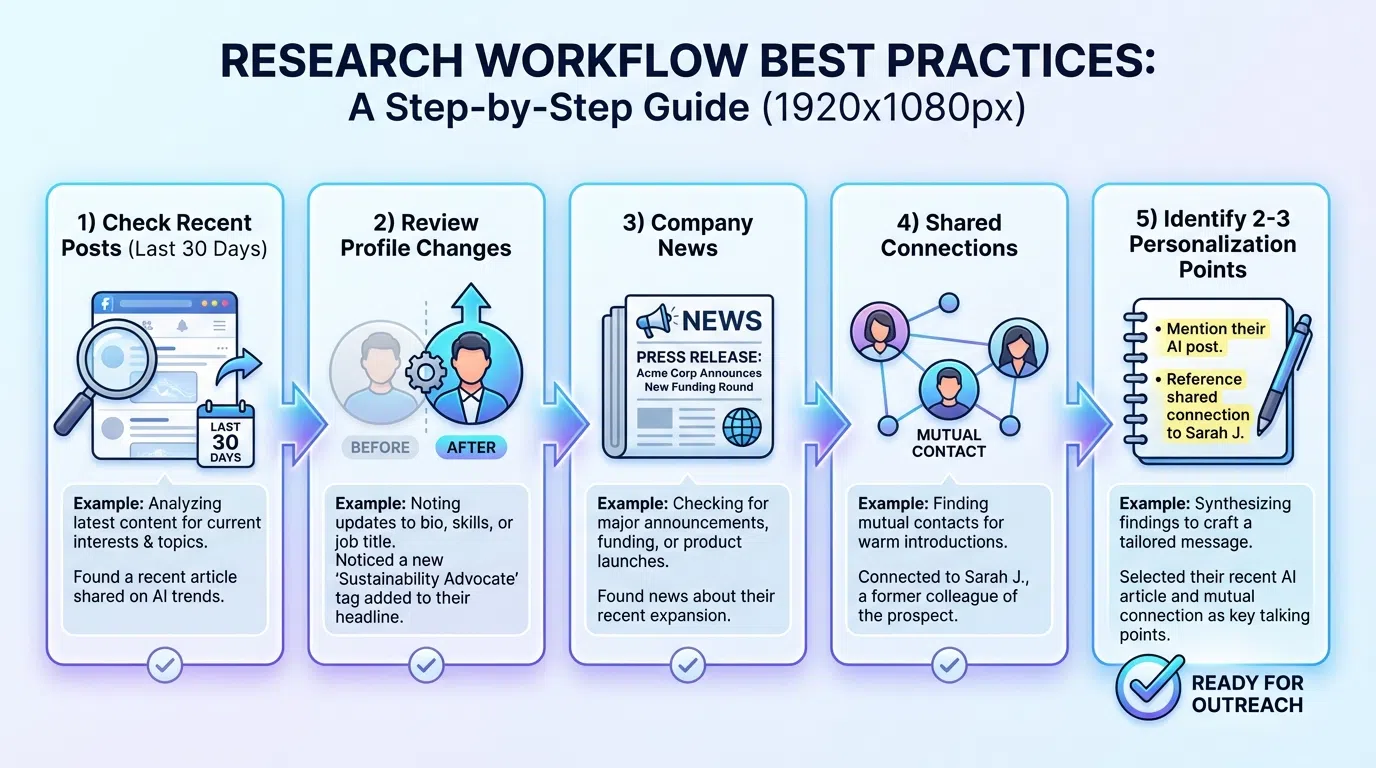
Best Practices for Manual Research
If you're doing manual research (Tier 1 accounts, learning phase), follow these best practices:
1. Use a Research Template
Create a standard checklist so you don't forget key points:
Template example:
- Current role and tenure: ___
- Career trajectory pattern: ___
- Most recent post (within 7 days): ___
- Company trigger event: ___
- Mutual connections: ___
- Best personalization angle: ___
2. Time-Box Your Research
Set a 7-minute timer. Research what matters most first:
- Minutes 1-3: Profile and role
- Minutes 3-5: Recent activity (last 7-14 days only)
- Minutes 5-7: Company news and mutuals
Don't get lost in rabbit holes.
3. Focus on Recency
A post from yesterday matters 10x more than one from 6 months ago. Start with most recent and work backward.
4. Take Notes
Document insights immediately. You'll forget by the time you write the message.
5. Look for Trigger Events First
If there's a job change, funding, or hiring signal, you've found your angle. Don't overthink it.
Best Practices for AI Research
If you're using AI research tools (most prospecting), follow these best practices:
1. Review AI Output Before Sending
Even with 90% accuracy, spot-check AI insights before using them:
- Does the recent post reference make sense?
- Is the trigger event actually relevant?
- Does the pain point match their role?
Time: 30-60 seconds per prospect for Tier 2, auto-approve for Tier 3
2. Provide Feedback to Improve AI
Most AI tools learn from corrections. When you edit or override:
- Mark which insights were useful vs not
- Indicate which personalization hooks worked
- Train the AI on your ICP and messaging
3. Set Up Filters and Criteria
Configure AI to prioritize what matters for your use case:
- Recent activity weight (posts from last 7 days vs 30 days)
- Trigger event types (funding, hiring, job changes)
- Personalization style (formal vs casual, brief vs detailed)
4. Combine AI Research with Human Strategy
Let AI handle data gathering, but keep human control over:
- Which prospects to target (ICP filtering)
- Messaging strategy and positioning
- When to reach out (timing)
- How to follow up (sequence logic)
5. Monitor Quality Metrics
Track these to ensure AI research delivers results:
- Response rates (should match or exceed manual)
- Positive reply rates (interested vs brushoff)
- Meeting booking rates
- Prospect feedback ("how did you know about [X]?")
Common Research Mistakes to Avoid
Mistake #1: Researching Too Much
Spending 20-30 minutes per prospect doesn't scale and often leads to analysis paralysis. Stick to 7-11 minutes manual, or use AI.
Mistake #2: Researching Too Little
Generic outreach without research gets 1-5% response vs 12-18% with proper research. Don't skip this step.
Mistake #3: Focusing on Old Information
A LinkedIn profile from 2 years ago doesn't tell you what matters today. Focus on last 30-90 days of activity.
Mistake #4: Ignoring Company Context
Researching the person without understanding their company situation misses half the picture. Always check company news.
Mistake #5: Not Documenting Insights
Researching without taking notes means you'll forget by message-writing time. Document immediately.
Mistake #6: Researching and Messaging Separately
Research today, message next week = your insights are stale. Research and message same day, or use AI for real-time updates.
Mistake #7: Using Research You Don't Understand
Don't reference a LinkedIn post if you didn't actually read it. Prospects will know if you're faking familiarity.
Tools for LinkedIn Prospect Research
Manual Research Tools
LinkedIn Sales Navigator ($99-$149/month)
- Advanced search filters
- Lead recommendations
- Real-time updates
- TeamLink (see team connections)
LinkedIn Premium ($39.99/month)
- InMail credits
- Who's Viewed Your Profile
- Applicant insights
- Extended network access
Chrome Extensions (Free/Freemium)
- LinkedIn Helper
- Dux-Soup
- PhantomBuster
AI Research Tools
LeadSpark AI ($97/month)
- Analyzes profiles and recent posts
- Identifies personalization hooks
- Generates context-aware messages
- 70-90% response rates
Apollo.io (Free-$149/month)
- Contact database
- Company intelligence
- Basic personalization
Clay ($149-$800/month)
- Data enrichment
- Workflow automation
- Multi-source data aggregation
Cognism/ZoomInfo ($12K-$30K/year)
- Enterprise contact data
- Intent signals
- Technographic data
The ROI of Research: Does It Pay Off?
Let's do the math on research ROI:
Manual Research ROI
Scenario: 100 prospects/week manually researched
Costs:
- Time: 12-18 hours weekly
- Labor: $300-$450/week (at $25/hour SDR rate)
- Annual: $15,600-$23,400
Results:
- Response rate: 12-18% (vs 1-5% without research)
- Meetings: 8-12 weekly
- Annual meetings: 416-624
- Cost per meeting: $25-$56
Conclusion: Research pays for itself if meetings drive pipeline.
AI Research ROI
Scenario: 500 prospects/week AI-researched
Costs:
- Time: 17-83 minutes weekly
- Labor: $7-$35/week (at $25/hour)
- Tool: $97/month = $23/week
- Annual: $1,560
Results:
- Response rate: 12-18% (same quality as manual)
- Meetings: 40-60 weekly (5x volume at same rate)
- Annual meetings: 2,080-3,120
- Cost per meeting: $0.50-$0.75
Conclusion: AI research delivers 5x meetings at 1/50th the cost per meeting.
Conclusion: Use AI for Scale, Manual for Strategy
LinkedIn prospect research is non-negotiable for effective prospecting. The question isn't whether to research—it's how.
Manual research wins when:
- Targeting top 20 strategic accounts ($100K+ deals)
- Complex multi-stakeholder enterprise sales
- Very niche technical industries
- Building foundational research skills
AI research wins when:
- Prospecting at volume (100+ weekly)
- Time-constrained teams
- Maintaining consistency across hundreds of prospects
- Testing and optimizing messaging
- Budget-conscious approach (60-120x cheaper)
The winning formula for 2026:
- Use AI for 80-90% of prospects (Tiers 2-3): Scale research across hundreds while maintaining personalization quality
- Add manual deep dives for top 10-20% (Tier 1): Strategic accounts justify the 15-20 minute investment
- Let AI handle data gathering, humans handle strategy: Best division of labor between automation and expertise
- Measure results and optimize: Track response rates, meeting bookings, and cost per meeting to validate approach
The teams winning at LinkedIn prospecting in 2026 aren't choosing between manual and AI research—they're using AI to handle volume while focusing human expertise on the accounts that matter most.
Transform Your LinkedIn Research with AI
Ready to reclaim 10-15 hours per week while improving your LinkedIn prospecting results?
LeadSpark AI analyzes LinkedIn profiles and recent posts in seconds, identifying personalization hooks and generating context-aware messages that achieve 70-90% response rates.
How it works:
- Upload your prospect list from Sales Navigator or CSV
- AI analyzes profiles, recent activity, and company context
- Receive personalization insights and message suggestions
- Review (or auto-approve) and send via your preferred tool
- Track responses and optimize based on what works
SDRs using LeadSpark AI save 20+ hours per week on research and personalization while increasing LinkedIn response rates from 5-12% (manual) to 70-90% (AI-powered).
The result: Research 500 prospects in the time it used to take to research 20, while maintaining—or improving—personalization quality.
Start your free trial and see how AI-powered research transforms your LinkedIn prospecting. No credit card required.
Ready to Generate Personalized Icebreakers?
Join sales professionals using LeadSpark AI to create hyper-personalized LinkedIn icebreakers in minutes.