Outreach Best Practices
Common LinkedIn Outreach Mistakes to Avoid (And How to Fix Them)
The average LinkedIn connection acceptance rate in 2026 is just 21%, and 70% of replies come from follow-ups, not first messages. Learn the 12 most critical LinkedIn outreach mistakes that kill response rates and exactly how to fix them.
LeadSpark AI Team
10 min read
LinkedIn lead generation is working dramatically differently in 2026. Tactics that crushed it in 2024 now get accounts restricted, and the average connection acceptance rate has dropped to just 21%.
The good news? Understanding these 12 critical mistakes—and how to fix them—can put you in the top 10% of LinkedIn prospectors who consistently achieve 40-60% acceptance rates and 15-25% response rates.
Why LinkedIn Outreach Fails in 2026
LinkedIn's algorithm changed dramatically with smarter spam detection, stricter connection limits, and engagement velocity tracking. Three core issues kill most outreach efforts:
Algorithm Changes: LinkedIn evaluates message quality, profile completeness, and engagement patterns. Generic templates, incomplete profiles, or excessive automation trigger spam filters and account restrictions.
Acceptance Rate Threshold: If your connection acceptance drops below 15%, LinkedIn assumes you're spamming and limits your account. The 2026 average is 21%, but top performers maintain 40-60% through personalization.
Follow-Up Gap: 70% of replies come from follow-up messages, not initial outreach. Yet 44% of sales reps quit after one message, leaving massive opportunity on the table.
The common thread? Most mistakes stem from prioritizing volume over quality, using outdated 2024 tactics, or misunderstanding how LinkedIn's 2026 algorithm rewards genuine engagement.

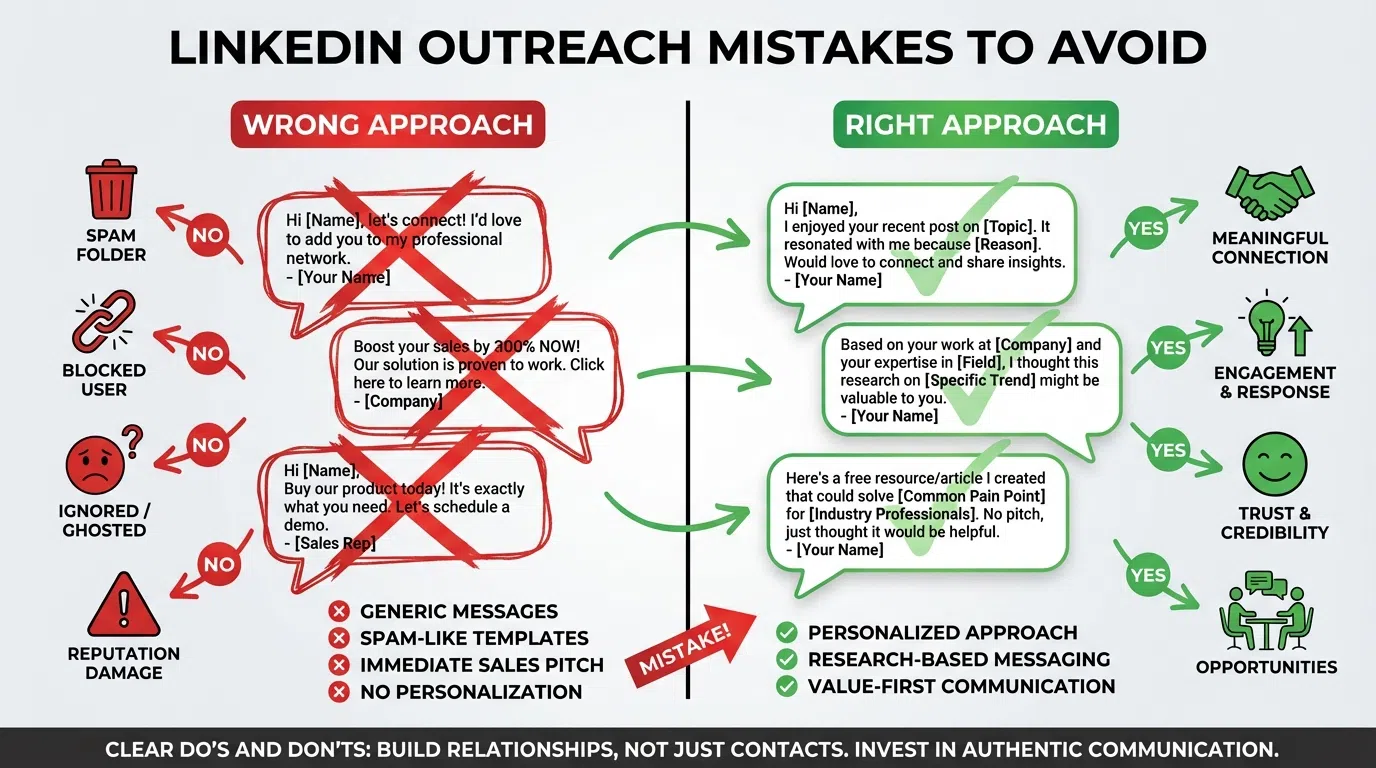
Mistake #1: Sending Generic Connection Requests
The Problem: Default connection requests or generic "I'd like to connect" messages get 15-25% acceptance rates in 2026. Decision-makers receive 50-100+ connection requests weekly and ignore anything that feels automated.
Why It Happens: Reps prioritize volume ("I need to send 100 requests today") over quality, use automation tools with template messages, or don't research prospects before reaching out.
The Fix:
- Always include a personalized note under 180 characters (preview optimization)
- Reference specific details: recent post, company news, mutual connection, shared interest
- State clear relevance: why you're connecting specifically with them
- Avoid pitch in connection request—save for after acceptance
Good Example: "Saw your post on PLG vs sales-led—resonated given our similar customer profile. Worth connecting?"
Bad Example: "Hi [Name], I help companies with sales automation. Let's connect!"
Impact: Personalized connection requests achieve 40-60% acceptance vs 15-25% generic.
Mistake #2: Incomplete or Outdated Profile
The Problem: Prospects check your profile before accepting. An incomplete profile (missing headline, sparse experience, no recommendations, generic photo) screams "spam account" and kills credibility.
In 2026, a "polished resume-style profile" is invisible. Profiles optimized for recruiters don't attract prospects.
Why It Happens: Reps focus outreach effort on messaging while neglecting their profile, don't realize prospects research them before responding, or haven't updated their profile for prospect-facing positioning.
The Fix:
- Professional photo (headshot with smile, not logo or group photo)
- Headline optimized for prospects, not recruiters: "I help [ICP] achieve [outcome]" vs "Sales Manager at Company"
- About section addressing prospect pain points and outcomes you deliver
- Featured section with case studies, testimonials, or valuable content
- Recent activity showing thought leadership (posts, comments, shares)
- 5+ recommendations from clients or colleagues
Before (Recruiter-Focused): "Experienced Sales Professional | 10+ Years | Team Player"
After (Prospect-Focused): "Helping B2B SaaS Companies Reduce CAC 30-40% Through AI Personalization | $50M+ Pipeline Generated"
Impact: Optimized profiles increase acceptance rates 25-35% and improve response rates to follow-up messages.
Mistake #3: Pitching Immediately After Connecting
The Problem: Sending a sales pitch within minutes or hours of connection acceptance is the #1 most hated LinkedIn behavior. Most buyers report finding "Bait & Pitch" tactics annoying and manipulative.
Why It Happens: Reps confuse connection acceptance with buying intent, feel pressure to convert connections quickly, or use automation that triggers immediate pitch sequences.
The Fix:
- Wait 24-48 hours after connection acceptance before any follow-up
- First message should provide value, not ask for something
- Reference specific content they've posted or challenge they face
- Earn the right to pitch through 2-3 value exchanges first
Value-First Sequence:
- Day 1: Connection request (personalized, no pitch)
- Day 2-3: Wait for acceptance
- Day 4-5: Value message (share relevant resource, insight, compliment their work)
- Day 8-10: Continue conversation based on their response
- Day 15-20: Soft introduction of how you might help (if conversation warrants)
Bad Example: [Immediate after acceptance] "Thanks for connecting! I'd love to show you how our platform helps teams like yours. When can we schedule 15 minutes?"
Good Example: [2 days after acceptance] "Really enjoyed your thoughts on multi-channel attribution—the 60% dark funnel stat was eye-opening. We're seeing similar patterns with our customers. Have you found effective ways to track that last 60%?"
Impact: Value-first approach achieves 3-4x higher response rates and builds relationships vs burning connections.

Mistake #4: Ignoring LinkedIn's 2026 Connection Limits
The Problem: LinkedIn enforces stricter connection limits in 2026: 20-40 connection requests per day depending on account age, acceptance rate, and activity. Exceeding limits triggers account restrictions or temporary bans.
Accumulated pending invitations (100+ unanswered requests) also restrict your account and signal spam behavior.
Why It Happens: Using aggressive automation tools, not tracking daily limits, ignoring pending invitation count, or prioritizing short-term volume over long-term account health.
The Fix:
- Limit to 20-25 connection requests daily maximum (safe zone)
- Withdraw pending invitations older than 21-30 days monthly
- Track acceptance rate weekly—pause outreach if below 20%
- Add random delays between requests (not batching 25 in 10 minutes)
- Never run automation overnight or when you can't monitor
Safe Daily Limits by Account Age:
- New account (<3 months): 10-15 requests/day
- Established account (3-12 months): 20-25 requests/day
- Mature account (12+ months, >40% acceptance): 30-40 requests/day
Impact: Staying within limits prevents account restrictions while maintaining sustainable prospecting volume.
Mistake #5: No Follow-Up Strategy
The Problem: 70% of replies come from follow-up messages, yet 44% of sales reps quit after one message. B2B decision-makers are busy; a single message rarely converts, but systematic follow-ups do.
Why It Happens: Assuming no response means no interest, fear of being annoying, lack of follow-up system, or moving on too quickly to new prospects.
The Fix:
- Plan 3-5 touch sequence before initial outreach
- Vary message angles: first provides value, second asks question, third shares case study, fourth "breakup" message
- Space appropriately: 5-7 days between touches (not 24-48 hours)
- Use different content types: text, article share, comment on their post, video message
- "Breakup" message on touch 4-5 often gets highest response
Effective Follow-Up Sequence:
- Day 1: Initial personalized connection request
- Day 3-5: Value-first message after acceptance (resource, insight, compliment)
- Day 10-12: Question about their challenge or approach
- Day 18-21: Relevant case study or customer example
- Day 28-30: "Breakup" message acknowledging timing might not be right
Breakup Message Example: "I've shared a few resources over the past few weeks—figured timing might not be right on your end. If you're ever revisiting [challenge area], happy to chat. Either way, I'll stop clogging your inbox!"
Impact: Follow-up sequences achieve 70% of total responses vs single-touch approach.
Mistake #6: Mass, Non-Personalized InMails
The Problem: LinkedIn InMail allows reaching prospects without connections, but generic mass InMails have terrible performance (2-5% response) and waste monthly credits. Research shows people are far less likely to respond to impersonal InMails.
Why It Happens: Paying for Sales Navigator creates pressure to "use all my InMail credits," using templates across all prospects, or treating InMail like email blasts.
The Fix:
- Reserve InMail for highest-value prospects (Tier 1: C-suite, key accounts)
- Always personalize: reference their company, content, achievements
- Subject line must be compelling (6-10 words, promise value)
- Keep message under 150 words
- Include specific ask with calendar link
InMail Personalization Checklist:
✓ Subject line references something specific to them
✓ First sentence shows you researched their company/role/content
✓ Clear, specific value proposition relevant to their industry/challenges
✓ Social proof (customer in similar situation, relevant results)
✓ Single, clear CTA with low friction (calendar link, not "let me know your availability")
Bad InMail: "Hi [Name], Our platform helps sales teams increase productivity. Can we schedule a call?"
Good InMail: "Congrats on the Series B—scaling from 10→50 customers is where most SaaS companies hit prospecting bottlenecks. When Acme Inc faced similar challenges, we helped them maintain 70% response rates at 10x volume. Worth 15 mins to compare notes? [Calendar link]"
Impact: Personalized InMails achieve 15-25% response vs 2-5% generic.
Mistake #7: Post and Ghost
The Problem: Publishing LinkedIn posts then closing the tab—the "Post and Ghost" error—is a cardinal sin for the 2026 algorithm. LinkedIn evaluates post quality based on engagement velocity in the first 60 minutes. Posts with immediate engagement see 3x higher reach than those without.
Why It Happens: Treating LinkedIn like Twitter/X (post and move on), not understanding algorithm mechanics, or lacking time to engage after posting.
The Fix:
- Block 60-90 minutes after posting to engage
- Respond to every comment within first hour (algorithm boost)
- Ask questions in post to encourage comments
- Engage with 5-10 other posts immediately after publishing (reciprocal visibility)
- Tag relevant people/companies for immediate engagement triggers
Post Engagement Checklist:
✓ Post during peak hours (7-9 AM or 12-1 PM on Tuesday-Thursday)
✓ Ask question or include CTA encouraging comments
✓ Respond to first 5 comments within 5 minutes
✓ Engage with 10 other posts in next hour (likes, thoughtful comments)
✓ Monitor for next 24 hours and respond to all comments
Impact: First-hour engagement increases post reach 3-5x, driving profile views and warm inbound.

Mistake #8: Targeting the Wrong People
The Problem: Reaching out to people who aren't decision-makers, don't match your ICP, or work at companies too small/large for your solution wastes time and tanks acceptance/response rates.
72% of people engage only with personalized, relevant messages—and relevance starts with targeting the right person.
Why It Happens: Vague ICP definition, searching by job title alone without firmographic filters, assuming anyone at target company is worth reaching, or prioritizing volume over fit.
The Fix:
- Define ICP with specific firmographic criteria: company size (employees, revenue), industry/vertical, geography, funding stage, tech stack
- Define buyer personas: exact titles, seniority level, department, responsibilities
- Use Sales Navigator filters comprehensively: don't just search "VP Sales" but add company size, industry, geography, recent funding, hiring signals
- Score prospects 1-10 before outreach—only reach 7+ scores
ICP Filter Example (B2B SaaS Sales Tool):
- Company size: 50-500 employees
- Industry: B2B SaaS, software
- Revenue: $5M-50M
- Funding: Series A-C
- Geography: North America, UK, Europe
- Buyer titles: VP Sales, Director of Sales Development, Head of Revenue Operations
- Signals: Hiring SDRs (expansion), recent funding (budget), using Salesforce/HubSpot (tech stack fit)
Impact: Targeting qualified prospects increases acceptance 40-60% and improves conversion to meetings 3-5x.
Mistake #9: Copy-Paste Templates Without Customization
The Problem: Using exact same message template for all prospects triggers LinkedIn spam filters, feels impersonal, and achieves terrible results. Personalized messages achieve 32% higher response than generic templates.
Why It Happens: Pressure to send high volume, relying too heavily on automation, not having efficient personalization process, or underestimating importance of customization.
The Fix:
- Use template framework but customize 30-50% of each message
- Always customize: name, company, specific detail (post, news, technology, achievement)
- Vary opening lines (not all starting with "I saw your post...")
- Randomize message length and structure slightly
- Human review of AI-generated personalization
Template Framework + Customization:
Framework: "[Specific observation] + [Relevant value prop] + [Low-friction ask]"
Example 1: "Your post on reducing SDR ramp time resonated—we're seeing similar challenges post-Series B. When Acme Inc scaled from 5→20 SDRs, we helped cut ramp 7mo→3mo. Worth comparing notes?"
Example 2: "Congrats on the [Company] rebrand launch—the positioning around AI-native is sharp. Helping B2B SaaS teams convert brand awareness into pipeline. Open to sharing strategies?"
Example 3: "Noticed you're hiring 3 SDRs—expansion mode! We work with growth-stage teams maintaining quality at scale. When [Customer] doubled SDR count, we kept response rates at 70%+. Relevant?"
Impact: Customized templates achieve 25-40% response vs 5-10% pure copy-paste.
Mistake #10: Not Providing Social Proof
The Problem: Cold outreach without credibility signals (customer logos, results, case studies, social proof) feels risky to prospects. They don't know if you're legitimate, have relevant experience, or can deliver results.
Why It Happens: Assuming prospects will research your company, forgetting they receive 50-100 messages weekly, not having case studies readily accessible, or hesitation to name-drop customers.
The Fix:
- Mention relevant customers by name (if allowed) or by profile ("3 Series B SaaS companies in HR tech")
- Quantify results achieved for similar customers ("reduced CAC 30-40%", "70% response rates")
- Link to case study, testimonial, or customer story in profile Featured section
- Use LinkedIn recommendations strategically (ask satisfied customers)
- Share third-party validation (awards, analyst reports, certifications)
With Social Proof: "When Salesforce faced similar SDR ramp challenges post-Series B, we helped cut ramp from 7mo to 3mo. Worth 15 mins to see if there's fit?"
Without Social Proof: "We help companies reduce SDR ramp time. Can we schedule a call?"
Impact: Social proof increases response rates 35-50% and improves meeting conversion.
Mistake #11: Ignoring Response Time
The Problem: Responding slowly to prospect replies (24+ hours) kills momentum and signals low priority. Top performers respond within 1-3 hours, maintaining conversation velocity.
Why It Happens: Not monitoring LinkedIn messages regularly, treating LinkedIn as lower priority than email, letting automation handle outreach without human monitoring, or poor notification setup.
The Fix:
- Enable mobile LinkedIn notifications for messages
- Check LinkedIn inbox 3-4x daily minimum (morning, lunch, afternoon, evening)
- Respond to prospect replies within 3 hours during business hours
- Use mobile app for quick responses on-the-go
- Set up dedicated time blocks for LinkedIn engagement
Response Time Benchmarks:
- Under 1 hour: Optimal (shows attentiveness, builds momentum)
- 1-3 hours: Good (maintains conversation flow)
- 3-8 hours: Acceptable (if outside business hours)
- 24+ hours: Poor (signals lack of interest, kills momentum)
Impact: Sub-3-hour responses improve meeting booking rates 40-60% vs 24+ hour delays.
Mistake #12: Using Outdated 2024 Tactics in 2026
The Problem: LinkedIn's algorithm, spam detection, and user expectations evolved dramatically from 2024 to 2026. Tactics that worked 18 months ago now trigger account restrictions, get ignored, or damage reputation.
What Changed in 2026:
- Stricter connection limits (100/week → 20-40/day)
- Engagement velocity tracking (first 60 minutes critical)
- Smarter spam detection (flags template language patterns)
- Lower average acceptance rates (35% → 21%)
- Topic authority scoring rewards consistent posting
- Voice messages and video notes gain 2-3x higher engagement
Why It Happens: Not staying current with platform changes, copying strategies from old blog posts, assuming "what worked before still works," or not testing and optimizing.
The Fix:
- Test new formats: voice messages (2-3x higher response), video notes, LinkedIn Live
- Build topic authority through consistent posting (10+ posts/year = 33% more leads)
- Focus on engagement quality over quantity (algorithm rewards genuine interactions)
- Monitor account health metrics weekly (acceptance rate, response rate, post reach)
- Stay updated on LinkedIn algorithm changes quarterly
2024 Tactics to Avoid in 2026:
- ❌ Sending 100+ connection requests weekly
- ❌ Automated sequences with no personalization
- ❌ Pure text outreach (ignoring voice/video)
- ❌ Posting without first-hour engagement
- ❌ Generic InMails using all monthly credits
2026 Best Practices:
- ✅ 20-25 highly personalized requests daily
- ✅ AI-assisted personalization with human review
- ✅ Multi-format outreach (text, voice, video, comments)
- ✅ Post + 60-min engagement commitment
- ✅ Selective InMail for Tier 1 prospects only
Impact: Adapting to 2026 standards maintains account health and achieves 2-3x better results than outdated approaches.
How to Audit Your LinkedIn Outreach
Run this monthly health check to identify which mistakes you're making:
Acceptance Rate Check: Last 100 connection requests ÷ acceptances = ?
- Below 15%: URGENT—pause outreach, fix targeting and personalization
- 15-25%: Needs improvement—review templates and profile
- 25-40%: Good—optimize for next tier
- 40%+: Excellent—maintain and scale
Response Rate Check: Last 50 follow-up messages ÷ responses = ?
- Below 5%: Poor targeting or value proposition
- 5-10%: Average—increase personalization
- 10-20%: Good—standard performance
- 20%+: Excellent—winning approach
Profile Health Check:
- ✓ Professional photo
- ✓ Prospect-focused headline
- ✓ About section addressing prospect pain points
- ✓ Featured section with case studies/content
- ✓ Recent activity (posts, comments)
- ✓ 5+ recommendations
Engagement Check:
- ✓ Responding to messages within 3 hours
- ✓ Following up 3-5 times per prospect
- ✓ Engaging within 60 minutes of posting
- ✓ Varying message angles in sequences
- ✓ Providing value before pitching
How LeadSpark AI Prevents Common Mistakes
Creating personalized outreach at scale without these mistakes requires 15-20 minutes research per prospect manually. At 50 prospects daily, that's 12+ hours of work.
LeadSpark AI prevents the most critical mistakes while maintaining quality:
Prevents Generic Templates: Analyzes each prospect's profile, posts, and company to generate unique personalized hooks in 5-10 seconds, ensuring every message references specific details vs copy-paste templates.
Optimizes Targeting: Helps score prospects based on fit signals before outreach, reducing wasted effort on poor-fit prospects that tank acceptance rates.
Maintains Account Health: Credit-based pricing encourages quality over spam volume, keeping you within safe daily limits while maximizing results per connection.
Enables Value-First: Quick research enables you to reference prospect's actual content and challenges, making value-first sequences practical at scale.
Human-AI Hybrid: AI handles research and draft generation in seconds, you review and adjust for authenticity—avoiding pure automation that triggers spam filters while saving 90% of manual time.
Result: 70-90% response rates while staying within LinkedIn's 2026 limits, preventing account restrictions, and building genuine relationships.
Fix your LinkedIn outreach mistakes in minutes → Try LeadSpark AI Free
Sources:
- LinkedIn Lead Generation Not Working? Fix It in 2026
- 15 LinkedIn Marketing Mistakes to Avoid in 2026
- 7 LinkedIn Outreach Mistakes That Kill Response Rates
- Common LinkedIn Outreach Mistakes and How to Fix Them
- 12 Mistakes That Are Sabotaging Your LinkedIn Outreach
- 4 Common Mistakes Salespeople Make on LinkedIn
Ready to Generate Personalized Icebreakers?
Join sales professionals using LeadSpark AI to create hyper-personalized LinkedIn icebreakers in minutes.