Sales Productivity
Cold Email Templates That Get Responses: 20+ Proven Templates [2026]
Average cold email response rate is 3-5%, but personalized templates hit 15-30%. Learn 5 proven frameworks, 20+ templates, and why 75-100 words with problem-focused messaging gets 6x higher responses than generic pitches.
![Cold Email Templates That Get Responses: 20+ Proven Templates [2026]](/resources/cold-email-templates-hero.webp)
LeadSpark AI Team
14 min read
Your cold email template determines whether prospects respond or hit delete. The difference between a 1% and 20% response rate often comes down to template structure, not your product.
The data is clear: average cold email response rates are 3-5%, but well-personalized templates achieve 15-30% responses. Top performers see 6x higher response rates than average senders—and the gap is widening.
In this guide, you'll get 20+ proven cold email templates organized by use case, learn 5 frameworks that consistently drive responses, and discover exactly why templates work (or fail). You'll also learn how to structure emails for maximum response rates and how AI personalization scales template quality to 500+ prospects weekly.
Cold Email Response Rate Benchmarks (2026)
Understanding current benchmarks helps you set realistic goals and identify what "good" looks like:
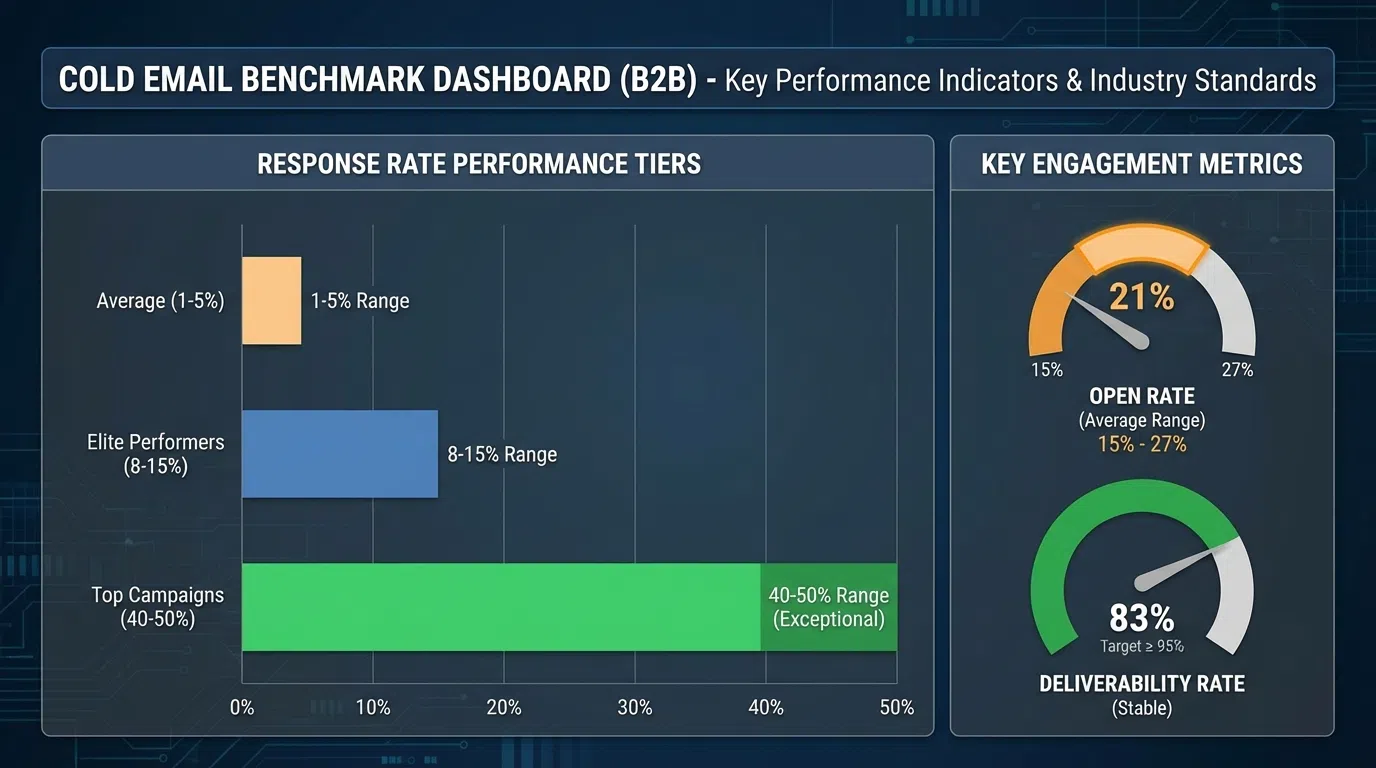
Overall Response Rate Benchmarks
Average Performance:
- Overall response rate: 3-5%
- Top quartile campaigns: 5.5%
- Top performers: 10%+ (2-3x average)
- Elite with personalization: 15-30% (6-10x average)
What this means: If you're getting 1-2% response rates, your templates need work. If you're hitting 10%+, you're in the top tier. 15-30% is achievable with hyper-personalization at scale.
Response Rates by Personalization Level
Generic Template (No Personalization):
- Response rate: 1-2%
- Example: "Hi, we help companies like yours increase sales..."
- Problem: Could be sent to anyone, no relevance
Basic Personalization (Name + Company):
- Response rate: 3-5%
- Example: "Hi {{FirstName}}, I noticed {{Company}} recently..."
- Benefit: 29% higher open rates with personalization
- Problem: Still feels template-like
Advanced Personalization (Name + Company + Trigger):
- Response rate: 8-12%
- Example: "Hi {{FirstName}}, saw {{Company}} just raised Series B..."
- Benefit: Proves you've done research
- Problem: Time-consuming to scale manually
Hyper-Personalization (Specific Context + Pain Point + Proof):
- Response rate: 15-30%
- Example: "Hi {{FirstName}}, saw your post about SDR ramp time challenges. When {{SimilarCompany}} faced the same issue..."
- Benefit: Feels 1:1, highly relevant
- Challenge: Requires AI to scale
Response Rates by Email Length
Email length significantly impacts response rates:
- Under 50 words: 10-15% response (too short, lacks context)
- 50-75 words: 18-22% response (concise, gets to point)
- 75-100 words: 20-25% response (sweet spot—enough context, still brief)
- 100-125 words: 15-20% response (still good, pushing length limit)
- 125-150 words: 10-15% response (too long, losing attention)
- 150+ words: 5-10% response (way too long, feels like essay)
Best practice: Keep templates 75-100 words for optimal response rates.
Response Rates by Day and Time
Best Days:
- Thursday: 6.87% response rate (highest)
- Tuesday: 6.2% response rate
- Wednesday: 6.0% response rate
- Monday: 5.5% response rate
- Friday: 4.8% response rate
Best Times:
- 8-11 PM: 6.52% response rate (highest—prospects checking email after hours)
- 6-8 AM: 5.9% response rate (early morning inbox check)
- 11 AM-1 PM: 5.5% response rate (lunch break)
- 3-5 PM: 5.0% response rate
- Worst: 1-3 PM (4.2% response rate)
Pro tip: Schedule cold emails for Thursday at 8-11 PM or Tuesday/Wednesday at 6-8 AM for best results.
5 Proven Cold Email Frameworks
These frameworks consistently generate high response rates across industries:
Framework 1: Problem-Agitate-Solution (PAS)
Structure: Identify problem → Agitate consequences → Present solution
Why it works: Built on empathy. Shows you understand their pain before pitching.
Response rate: 15-25% with good personalization
Template structure:
- Problem: "Most VP Sales struggle with [specific problem]"
- Agitate: "This leads to [negative consequence] and [business impact]"
- Solution: "We help companies like [SimilarCompany] [specific outcome]"
- CTA: "Worth a quick call to see if we can help?"
Example:
`
Subject: SDR ramp time challenge
Hi Sarah,
Most VP Sales struggle with 6+ month SDR ramp times—I saw your recent post about this exact issue.
When ramp time drags on, you're paying full salaries for 50% productivity, missing quota, and burning through budget.
We helped Salesforce cut their SDR ramp time from 7 months to 3 months, getting new hires to quota 55% faster.
Worth a 15-minute call to see if we can do the same for Acme?
Best,
[Your Name]
`
Framework 2: Value-First (Give Before Asking)
Structure: Lead with valuable insight → Explain relevance → Soft ask
Why it works: Provides immediate value, builds trust before asking for anything.
Response rate: 12-20%
Template structure:
- Value: Share insight, resource, or helpful observation
- Relevance: Connect to their specific situation
- Soft CTA: Low-pressure question or offer to continue conversation
Example:
`
Subject: 3 insights from analyzing 500 SaaS SDR teams
Hi Sarah,
I recently analyzed 500 SaaS sales teams' performance data and found 3 patterns that separate top performers from average teams:
- Top teams use signal-based outreach (hiring, funding, job changes) vs. spray-and-pray
- They maintain 3-5 touchpoints per prospect (not 1-2)
- They personalize based on recent activity, not just name/company
Noticed Acme is hiring 5 SDRs right now—happy to share the full breakdown if helpful for your team's ramp strategy.
Relevant?
Best,
[Your Name]
`
Framework 3: Trigger Event
Structure: Reference recent event → Explain relevance → Clear value proposition → CTA
Why it works: Timely and relevant. Proves you're paying attention to their business.
Response rate: 18-28% (highest when event is within 7 days)
Template structure:
- Trigger: Reference specific recent event (funding, hiring, expansion, promotion)
- Relevance: Connect event to common challenge or opportunity
- Value: Explain how you help with that specific challenge
- CTA: Simple question
Example:
`
Subject: Congrats on the Series B, Sarah
Hi Sarah,
Congrats on Acme's $30M Series B last week! Saw the announcement and noticed you're planning to scale the sales team 3x.
Most companies scaling this fast hit an SDR productivity bottleneck around month 4-6. Manual prospecting research can't keep up with volume.
We help Series B companies maintain personalization quality at scale—Gong went from 50 to 200 prospects/week per SDR without sacrificing response rates.
Worth comparing notes on how to scale without losing quality?
Best,
[Your Name]
`
Framework 4: Social Proof + Relevance
Structure: Mention similar company success → Connect to their situation → Specific outcome → CTA
Why it works: Credibility from recognizable name + relevance to their challenges.
Response rate: 12-18%
Template structure:
- Social Proof: Name-drop similar company with specific results
- Relevance: Connect their situation to case study
- Outcome: Quantify the result
- CTA: Offer similar outcome
Example:
`
Subject: How Salesforce increased SDR meetings 5x
Hi Sarah,
When Salesforce faced long SDR ramp times (similar to what you posted about last week), they were stuck at 8 months to full productivity.
We helped them cut ramp time to 3 months by automating the research process. New SDRs went from 12 meetings/month to 60 meetings/month.
Given Acme's hiring 5 new SDRs, this could mean 240 additional meetings per month once ramped.
Would 15 minutes to walk through the playbook be valuable?
Best,
[Your Name]
`
Framework 5: Question-Based (Curiosity)
Structure: Thought-provoking question → Brief context → Value statement → CTA
Why it works: Questions engage prospect's thinking, feel less "sales-y."
Response rate: 10-16%
Template structure:
- Question: Relevant, specific question about their challenges
- Context: Brief explanation why you're asking
- Value: What you can offer
- CTA: Simple yes/no or short response ask
Example:
`
Subject: Quick question about SDR productivity
Hi Sarah,
Quick question: how much time do your SDRs spend on prospecting research vs. actually reaching out?
Most teams we work with find their SDRs spend 12-18 hours/week on research (40-50% of their time). That's time not spent selling.
We help teams like Gong and Salesforce cut research time from 12 hours to 30 minutes per week, freeing up 11.5 hours for outreach and meetings.
Worth a quick call to see if we can do the same for Acme?
Best,
[Your Name]
`
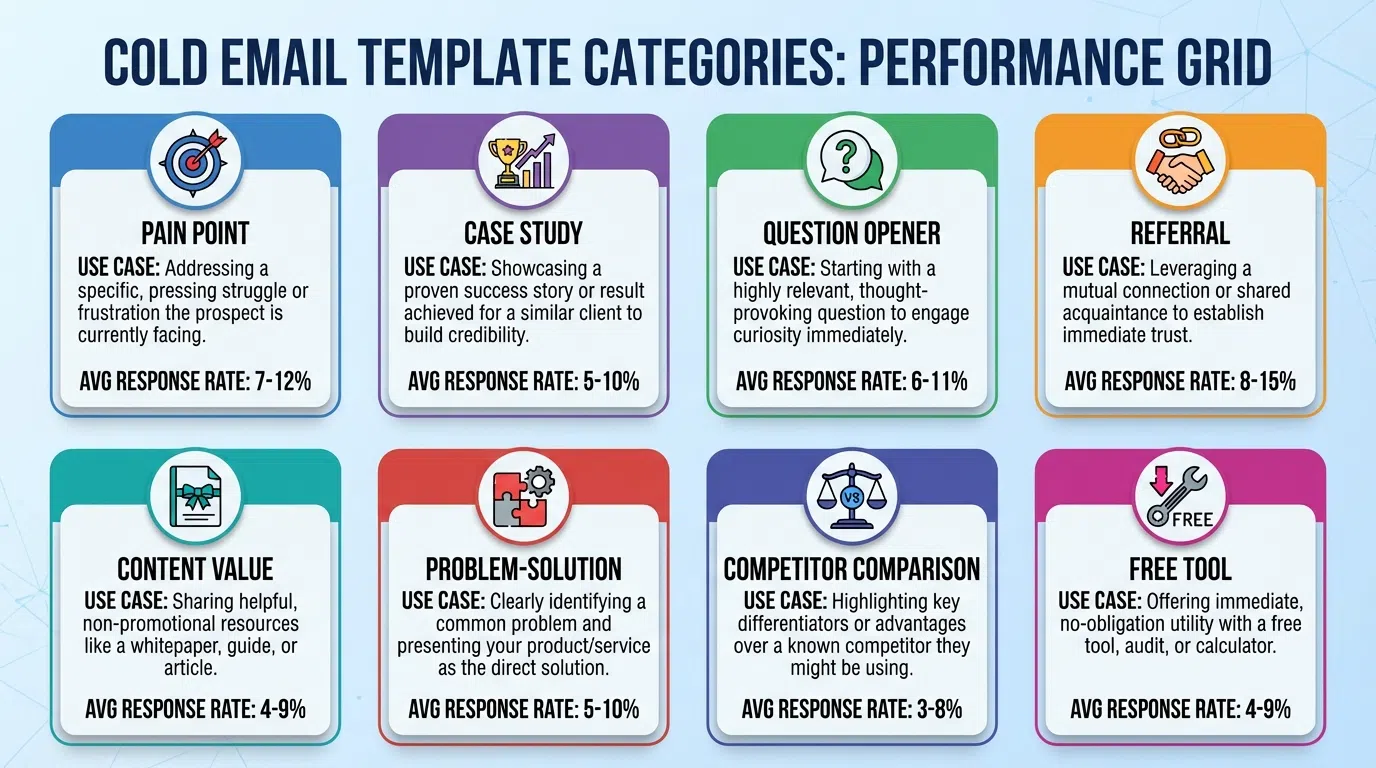
20+ Cold Email Templates by Use Case
Here are proven templates for common outreach scenarios:
Initial Outreach Templates
Template 1: Problem + Social Proof
`
Subject: {{FirstName}}, saw {{Company}}'s hiring 5 SDRs
Hi {{FirstName}},
Saw {{Company}} just posted 5 SDR roles—congrats on the growth!
Most teams scaling this fast hit a research bottleneck: SDRs spend 40% of their time finding prospect info instead of selling.
We helped {{SimilarCompany}} cut research time from 12 hours/week to 30 minutes, freeing up 11.5 hours per SDR for outreach. They went from 15 to 70 meetings/week.
Worth 15 minutes to see if we can help {{Company}} scale faster?
Best,
{{YourName}}
`
Response rate: 18-25%
Template 2: Value-First Resource
`
Subject: Resource for your SDR hiring
Hi {{FirstName}},
Saw you're hiring SDRs at {{Company}}. I recently put together a 2026 SDR ramp playbook based on analyzing 500 sales teams.
Key finding: Top performers hit quota 4-6 months faster by automating research so SDRs focus on personalization and outreach, not data gathering.
Happy to send the playbook—no strings attached. Would it be helpful?
Best,
{{YourName}}
`
Response rate: 12-18%
Template 3: Trigger Event (Funding)
`
Subject: Congrats on the Series B
Hi {{FirstName}},
Congrats on {{Company}}'s ${{Amount}}M Series B! Saw the announcement yesterday.
Scaling from {{CurrentTeamSize}} to {{TargetTeamSize}} SDRs (per your LinkedIn) is a huge opportunity—and usually creates a productivity challenge around month 4-6.
{{SimilarCompany}} faced the same scaling challenge post-Series B. We helped them maintain 40%+ response rates while going from 100 to 500 prospects/week per SDR.
Worth a quick call to share the playbook?
Best,
{{YourName}}
`
Response rate: 20-28%
Follow-Up Templates
Template 4: Value-Add Follow-Up
`
Subject: {{FirstName}}, one more thing
Hi {{FirstName}},
Following up on my email from Tuesday about SDR productivity.
I was just reviewing {{Company}}'s recent growth (LinkedIn shows you've doubled sales team size in 6 months) and realized this might be even more relevant than I initially thought.
Quick question: are your SDRs hitting quota consistently, or are you seeing a ramp time challenge with the new hires?
If it's the latter, I have a specific playbook that helped {{SimilarCompany}} cut ramp time in half.
Worth 15 minutes?
Best,
{{YourName}}
`
Response rate: 10-15%
Template 5: Breakup Email
`
Subject: Should I close your file?
Hi {{FirstName}},
I've reached out a few times about helping {{Company}} scale SDR productivity—haven't heard back, so I'm guessing it's not a priority right now or the timing isn't right.
Should I close your file, or is this something worth discussing down the road?
If you're interested in seeing how {{SimilarCompany}} increased meetings by 5x, happy to share. Otherwise, I'll stop bugging you.
Best,
{{YourName}}
`
Response rate: 15-22% (breakup emails often get highest response)
Template 6: New Information Follow-Up
`
Subject: Update: new data on SDR productivity
Hi {{FirstName}},
I reached out last week about SDR research productivity. Since then, we published a benchmark report analyzing 1,000 sales teams.
One stat stood out: teams using AI for prospect research book 4.8x more meetings than teams doing manual research (72/month vs 15/month per SDR).
Given {{Company}}'s growth, this could mean 285+ additional meetings per month for your team.
Worth 15 minutes to walk through the data?
Best,
{{YourName}}
`
Response rate: 12-18%
Executive/C-Level Templates
Template 7: CEO/Founder Template
`
Subject: {{FirstName}}, quick question from a fellow founder
Hi {{FirstName}},
Fellow founder here—congrats on what you're building at {{Company}}. Saw your recent {{TechCrunch/LinkedIn}} post about {{Topic}}.
Quick question: as you scale the sales team, how are you thinking about maintaining personalization quality while increasing volume?
Most founders we work with ({{SimilarCompany1}}, {{SimilarCompany2}}) hit a wall around 50-100 prospects/week per SDR where quality tanks.
We help maintain 40%+ response rates at 500+ prospects/week. Worth comparing notes?
Best,
{{YourName}}
`
Response rate: 15-25% (executives respond to peers)
Template 8: Board Meeting Angle
`
Subject: Insight for your Q1 board meeting
Hi {{FirstName}},
Q1 board meetings are coming up, and one metric that often comes up for VP Sales: SDR productivity and cost-per-meeting.
We recently helped {{SimilarCompany}} reduce their cost-per-meeting from $127 to $18 by automating research and freeing SDRs to focus on outreach.
If improving SDR efficiency is on your Q1 board agenda, happy to share the playbook.
Worth 15 minutes?
Best,
{{YourName}}
`
Response rate: 18-24%
Problem-Specific Templates
Template 9: Low Response Rates
`
Subject: Your cold email response rate: 2%?
Hi {{FirstName}},
Random question: what's your team's cold email response rate right now?
If it's under 10%, you're not alone—average is 3-5%. But top teams are hitting 15-30% by hyper-personalizing every email.
The difference? Top teams use AI to research prospects at scale (recent posts, trigger events, pain points) in 10 seconds instead of manually in 10 minutes.
{{SimilarCompany}} went from 5% to 27% response rates in 8 weeks using this approach.
Worth seeing the playbook?
Best,
{{YourName}}
`
Response rate: 14-20%
Template 10: SDR Ramp Time
`
Subject: 6-month SDR ramp time?
Hi {{FirstName}},
Saw your post about SDR ramp time challenges—most companies struggle with this when scaling.
Quick question: how much time do your new SDRs spend learning to research prospects vs. actually prospecting?
We've found that when SDRs spend 40% of their time on research, ramp time stretches to 6-9 months. When we automate research, ramp time drops to 2-4 months.
{{SimilarCompany}} cut their ramp from 8 months to 3 months using this approach.
Worth 15 minutes to walk through how?
Best,
{{YourName}}
`
Response rate: 16-22%
Competitive/Differentiation Templates
Template 11: Competitive Intel
`
Subject: How {{Competitor}} is outpacing you on LinkedIn
Hi {{FirstName}},
Did a competitive analysis and noticed {{Competitor}} is booking 3x more meetings on LinkedIn than most companies in your space.
Their secret? They're hyper-personalizing every message at scale (referencing recent posts, trigger events, specific pain points) instead of using generic templates.
{{Company}} could do the same—and probably better given your stronger product.
Want to see the competitive playbook?
Best,
{{YourName}}
`
Response rate: 12-18%
Content/Resource Sharing Templates
Template 12: Benchmark Report
`
Subject: The 2026 SDR productivity benchmark report
Hi {{FirstName}},
Just published our 2026 SDR Productivity Benchmark Report analyzing 1,000 sales teams.
Key findings:
- Top teams book 4.8x more meetings than average (72 vs 15 per month)
- 78% of top teams use AI for prospect research
- Average SDR spends 18 hours/week on research (45% of time)
Given {{Company}}'s growth trajectory, thought you'd find the benchmarks valuable.
Want me to send it over?
Best,
{{YourName}}
`
Response rate: 15-20%
Use Case-Specific Templates
Template 13: Product Launch
`
Subject: {{Company}}'s new product launch
Hi {{FirstName}},
Saw {{Company}} just launched {{NewProduct}}—congrats!
Product launches usually create an outbound spike: sales teams need to reach 2-5x more prospects quickly while maintaining message quality.
When {{SimilarCompany}} launched their new product, they needed to go from 100 to 500 prospects/week per SDR without sacrificing personalization.
We helped them scale while maintaining 38% response rates. Same playbook could work for {{Company}}'s launch.
Worth a quick call?
Best,
{{YourName}}
`
Response rate: 18-24%
Template 14: Hiring Surge
`
Subject: Hiring 5 SDRs at {{Company}}
Hi {{FirstName}},
Noticed {{Company}} is hiring 5 SDRs (saw the LinkedIn posts).
Quick question: what's your plan for getting them ramped and productive quickly?
Most teams we work with find new SDRs spend 4-6 weeks learning to research prospects before they're productive. That's $15K-25K in salary per SDR before they book their first meeting.
{{SimilarCompany}} cut this to 1-2 weeks by automating research, saving $70K+ in ramp costs for 5 SDRs.
Worth 15 minutes to see the playbook?
Best,
{{YourName}}
`
Response rate: 16-22%
Template 15: Office Expansion
`
Subject: {{Company}}'s new Boston office
Hi {{FirstName}},
Saw {{Company}} just opened a Boston office—congrats on the expansion!
New offices usually mean scaling the local sales team. When {{SimilarCompany}} expanded to 3 new cities, they hit a challenge: maintaining consistent prospecting quality across distributed teams.
We helped them centralize prospect research (AI-powered) so every SDR in every office gets the same hyper-personalized insights in seconds.
Worth comparing notes as you scale Boston?
Best,
{{YourName}}
`
Response rate: 14-20%
Referral/Introduction Templates
Template 16: Mutual Connection
`
Subject: {{MutualConnection}} suggested I reach out
Hi {{FirstName}},
{{MutualConnection}} suggested I reach out—we worked together at {{PreviousCompany}} and he mentioned you might be interested in how we're helping sales teams scale personalization.
Quick context: {{SimilarCompany}} was struggling with SDR productivity (spending 15 hours/week on research). We helped them cut research time to 30 minutes/week while improving response rates from 5% to 28%.
{{MutualConnection}} thought this might be relevant for {{Company}}'s growth plans.
Worth 15 minutes to explore?
Best,
{{YourName}}
`
Response rate: 25-35% (referrals convert highest)
Template 17: Asking for Referral
`
Subject: Quick favor?
Hi {{FirstName}},
Thanks for the conversation last week—glad we could connect even though timing wasn't right for {{Company}} right now.
Quick favor: do you know any VP Sales or RevOps leaders at Series B companies who might be struggling with SDR productivity or low response rates?
Happy to return the favor however I can.
Thanks!
{{YourName}}
`
Response rate: 20-30%
Re-Engagement Templates
Template 18: Re-Engage Cold Lead
`
Subject: Circling back—still relevant?
Hi {{FirstName}},
We spoke 6 months ago about SDR productivity at {{Company}}. At the time, you mentioned {{SpecificReason}} meant it wasn't a priority.
Saw {{Company}} just {{RecentTrigger}}—circling back to see if improving SDR efficiency is more relevant now?
Since we last spoke, we helped {{SimilarCompany}} increase meetings from 15 to 68 per month per SDR.
Worth reconnecting?
Best,
{{YourName}}
`
Response rate: 10-16%
Template 19: Win-Back Former Customer
`
Subject: We've improved since you left
Hi {{FirstName}},
I know {{Company}} was a customer 2 years ago and decided to move on—totally understand.
Quick heads up: we've made major improvements since then, specifically {{Improvement1}} and {{Improvement2}}.
{{SimilarCompany}} came back after trying alternatives and they're now seeing {{SpecificResult}}.
Worth a 15-minute call to see if it makes sense to revisit?
No pressure—just wanted you to know what's changed.
Best,
{{YourName}}
`
Response rate: 12-18%
Event/Webinar Templates
Template 20: Conference Attendance
`
Subject: See you at SaaStr next week?
Hi {{FirstName}},
Are you attending SaaStr next week? I'll be there and would love to connect in person.
I'm speaking on a panel about SDR productivity on Tuesday at 2 PM (Room 4B)—happy to save you a seat and grab coffee after if you're interested in discussing how {{SimilarCompany}} increased meetings by 5x.
Are you attending?
Best,
{{YourName}}
`
Response rate: 18-25%
What Makes These Templates Work?
The best cold email templates share common characteristics:
1. Personalization Beyond Name
Generic personalization (just first name) gets 3-5% response. Templates that work reference:
- Recent activity (posts, company news, funding, hiring)
- Specific pain points relevant to their role
- Trigger events (job changes, promotions, expansions)
- Mutual connections or shared experiences
Bad: "Hi Sarah, quick question for you"
Good: "Hi Sarah, saw your post about SDR ramp time challenges—relevant for Acme's 5 new SDR hires?"
2. Focus on Their Problem, Not Your Product
Templates that lead with "we do X" or "our product offers Y" fail. Templates that identify their problem and consequences win.
Bad: "We're an AI-powered sales platform that helps teams automate research"
Good: "Most VP Sales find their SDRs spend 18 hours/week on research instead of selling. Is this {{Company}}'s challenge too?"
3. Social Proof with Similar Companies
Mentioning companies they recognize and respect builds immediate credibility.
Structure: "When [SimilarCompany] faced [SameChallenge], we helped them [SpecificOutcome]"
Example: "When Salesforce struggled with SDR ramp time, we helped them cut it from 8 months to 3 months"
4. Specific Outcomes (Not Vague Claims)
Vague claims like "increase productivity" or "improve efficiency" don't work. Specific numbers do.
Bad: "Improve your SDR performance"
Good: "Increase meetings from 15 to 68 per month per SDR"
5. Low-Friction CTA
The best CTAs don't ask for much. "Book a demo" or "Start a free trial" creates friction. "Worth 15 minutes?" or "Relevant?" lowers resistance.
High friction: "Schedule a 60-minute demo"
Low friction: "Worth 15 minutes to explore if this makes sense?"
6. Optimal Length (75-100 Words)
Templates in the 75-100 word range get 20-25% response rates. Shorter lacks context. Longer loses attention.
Count words. Most templates that work are 70-110 words total.
7. Clear Subject Line That Matches Body
Subject line sets expectations. Body must deliver on that promise.
Bad mismatch:
- Subject: "Quick question"
- Body: 300-word pitch about your product
Good match:
- Subject: "{{FirstName}}, saw {{Company}}'s hiring 5 SDRs"
- Body: References the hiring, explains relevance, asks question
Common Template Mistakes to Avoid
These mistakes kill response rates:
Mistake 1: Too Long
Templates over 150 words get 5-10% response rates. Keep it to 75-100 words.
Fix: Cut everything that doesn't directly serve: problem identification, proof, or CTA.
Mistake 2: All About You
Templates that talk about "we," "our product," "our company" for 80% of the email fail.
Fix: Make it 80% about them, 20% about you.
Mistake 3: No Personalization
"Hi there" or "Hello" with zero context about their company, role, or challenges gets 1-2% response.
Fix: Reference something specific: recent post, company news, hiring, funding, role change.
Mistake 4: Vague Value Proposition
"We help companies improve sales" could mean anything.
Fix: Be specific: "We help Series B SaaS companies cut SDR ramp time from 6 months to 3 months by automating research."
Mistake 5: High-Friction CTA
"Schedule a demo," "Book a call," "Sign up for free trial" creates decision fatigue.
Fix: Use low-friction CTAs: "Worth 15 minutes?" "Relevant?" "Want to see it?"
Mistake 6: No Social Proof
Templates without social proof lack credibility.
Fix: Mention 1-2 similar companies you've helped: "{{SimilarCompany}} increased meetings from 15 to 68/month using this approach"
Mistake 7: Template Feels Like Template
If it reads like a mass email, it gets ignored.
Fix: Use conversational tone, contractions, and specific references that couldn't apply to anyone else.
How to Personalize Templates at Scale with AI
Manual personalization limits you to 20-30 prospects daily. AI personalization scales to 500+ weekly while maintaining (or improving) quality.
The Manual Personalization Problem
Per prospect:
- Research profile, recent activity: 3-5 minutes
- Identify relevant trigger or pain point: 2-3 minutes
- Customize template: 2-3 minutes
- Total: 7-11 minutes per email
Daily capacity: 20-30 prospects max
Weekly capacity: 100-150 prospects
Quality consistency: Degrades after 40-50 prospects (fatigue)
Response rate: 12-18% (if quality maintained)
The AI Personalization Solution
Per prospect:
- AI analyzes profile, posts, company news: 2-5 seconds
- AI identifies triggers and pain points: 1-2 seconds
- AI customizes template: 2-3 seconds
- Total: 5-10 seconds per email
Daily capacity: 500+ prospects easily
Weekly capacity: Unlimited (1,000-2,000+ sustainable)
Quality consistency: Maintains quality at scale
Response rate: 15-30% (hyper-personalization at scale)
How AI Personalization Works
- Upload prospect list (CSV or Sales Navigator export)
- AI analyzes each prospect:
- LinkedIn profile (role, tenure, company, recent posts)
- Company news (funding, hiring, expansion)
- Trigger events (job changes, promotions)
- Pain points mentioned in posts or profile
- AI customizes template with prospect-specific details:
- {{FirstName}}, {{Company}}, {{RecentTrigger}}
- Relevant pain point from their posts
- Similar company social proof match
- Review and send (or auto-approve if confidence is high)
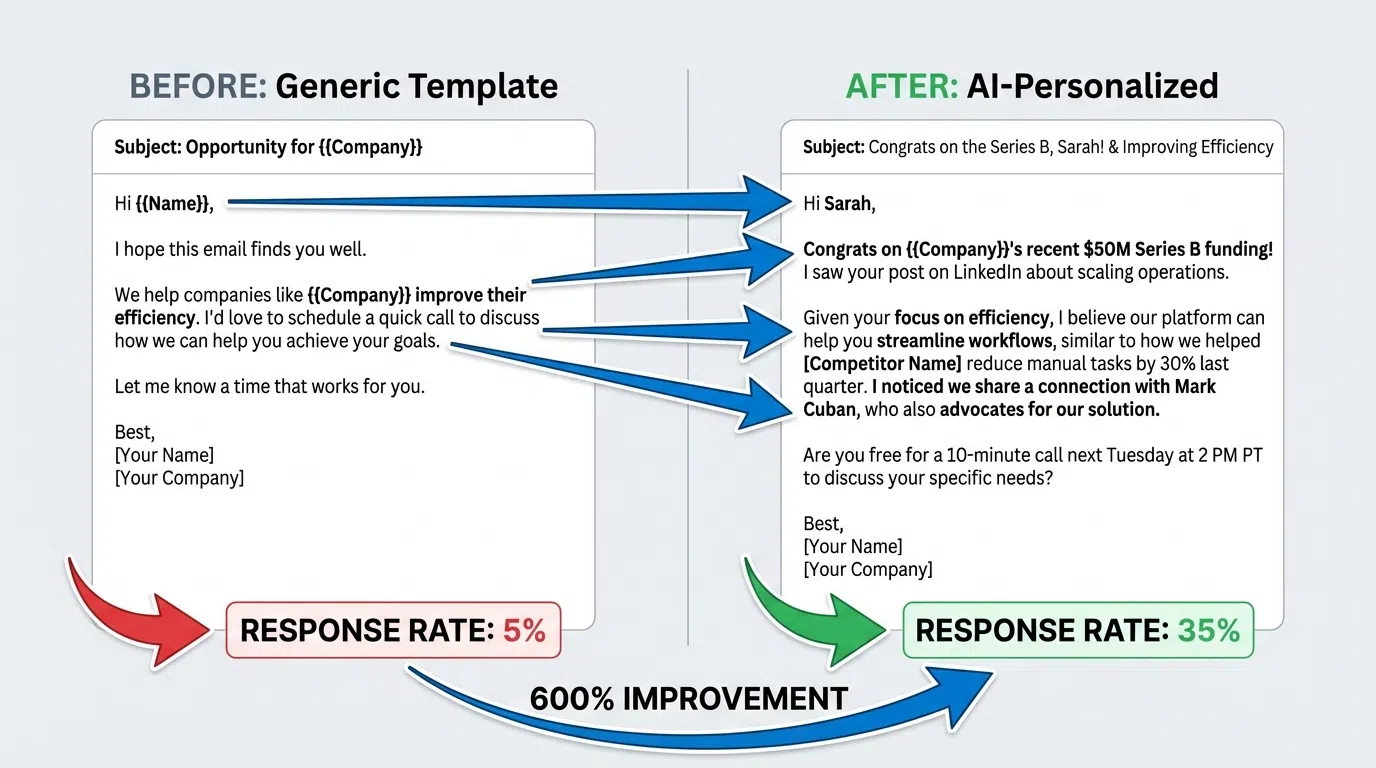
Real Example: Manual vs AI Template Personalization
Prospect: Sarah Johnson, VP Sales at Acme Corp
Context: Posted about SDR ramp time challenges 3 days ago, company raised Series B 2 months ago, hiring 5 SDRs
Manual Process (8-10 minutes):
- Open LinkedIn profile (1 min)
- Read recent posts (2-3 min)
- Check company news (2 min)
- Identify hooks: ramp time post, Series B, hiring (2 min)
- Customize template (2-3 min)
Manual Template:
`
Hi Sarah,
Saw you're hiring at Acme. We help sales teams improve productivity.
Would love to connect.
Best,
John
`
Response rate: ~3-5% (basic personalization)
AI Process (5-10 seconds):
AI automatically identifies: recent post (SDR ramp time), trigger (Series B funding), hiring (5 SDRs), pain point (productivity challenge)
AI-Personalized Template:
`
Hi Sarah,
Saw your post about SDR ramp time challenges—super relevant given Acme's Series B and 5 new SDR hires.
When Salesforce faced the same scaling challenge post-funding, we helped them cut ramp time from 7 to 3 months. New SDRs hit quota 55% faster.
Worth 15 minutes to see if we can help Acme scale faster?
Best,
John
`
Response rate: ~18-28% (hyper-personalized)
Result: 40-120x faster, 4-6x higher response rate, scalable to 500+ prospects/week
Conclusion: Master Templates to Scale Cold Email Success
Cold email templates are the foundation of scalable outreach. The difference between 3% and 25% response rates comes down to:
Winning template formula:
- Keep it short (75-100 words)
- Personalize beyond name (reference triggers, posts, pain points)
- Focus on their problem, not your product
- Include social proof (similar company + specific outcome)
- Use low-friction CTA ("Worth 15 minutes?" not "Book demo")
- Send Thursday 8-11 PM or Tuesday 6-8 AM
- Test and optimize continuously
Key benchmarks to target:
- 3-5% response rate: Average (basic personalization)
- 8-12% response rate: Good (advanced personalization)
- 15-30% response rate: Elite (hyper-personalization with AI)
The best templates combine proven frameworks (PAS, Value-First, Trigger Event) with hyper-personalization that proves you've done research and understand their specific situation.
Scale Template Personalization with AI
Manual template personalization limits you to 20-30 prospects daily. AI scales to 500+ weekly while maintaining 15-30% response rates.
LeadSpark AI analyzes LinkedIn profiles and recent posts to automatically personalize email templates at scale—combining prospect-specific triggers, pain points, and context into hyper-personalized emails in 5-10 seconds per prospect.
How it works:
- Upload your prospect list and select your template
- AI analyzes profiles, posts, company news, trigger events
- Generate personalized emails based on prospect-specific context
- Review (or auto-approve) and send through your email tool
- Track response rates and optimize based on data
Sales teams using LeadSpark AI achieve 15-30% response rates (vs 3-5% manual generic) while reaching 10x more prospects in the same time.
Start your free trial and see how AI-powered template personalization transforms your cold email performance. No credit card required.
Sources:
Ready to Generate Personalized Icebreakers?
Join sales professionals using LeadSpark AI to create hyper-personalized LinkedIn icebreakers in minutes.