Personalization Strategies
Personalization Tokens and Dynamic Content for LinkedIn Outreach
Master LinkedIn personalization tokens and dynamic content for scalable outreach. Learn when to use basic tokens vs AI hyper-personalization.
9 min read
Most SDRs think personalization at scale means using {{FirstName}} and {{Company}} tokens in their LinkedIn templates. They send messages like "Hi {{FirstName}}, I noticed {{Company}} is growing fast..." and wonder why they're getting 8-12% response rates instead of the 30-40% that top performers achieve.
Here's the truth: basic personalization tokens are table stakes in 2026—not differentiation. Prospects instantly recognize token-based templates because they receive dozens of them daily.
Real personalization at scale in 2026 uses dynamic content that adapts to each prospect's specific situation, recent activity, and pain points—going far beyond simple name insertion to create genuinely customized messages that feel hand-written.
This guide breaks down the three levels of LinkedIn personalization—basic tokens, advanced dynamic content, and AI hyper-personalization—showing you exactly when to use each approach and how to implement them for maximum response rates.
Table of Contents
- The 3 Levels of LinkedIn Personalization
- Basic Personalization Tokens
- Advanced Dynamic Content
- AI Hyper-Personalization
- When to Use Each Approach
- Implementation Guide by Tool
- Personalization Performance Benchmarks
- Common Mistakes to Avoid
- Frequently Asked Questions
The 3 Levels of LinkedIn Personalization
LinkedIn personalization exists on a spectrum from simple token insertion to AI-generated custom content. Understanding each level helps you choose the right approach for different prospect tiers.
Level 1: Basic Tokens (5-8% response)
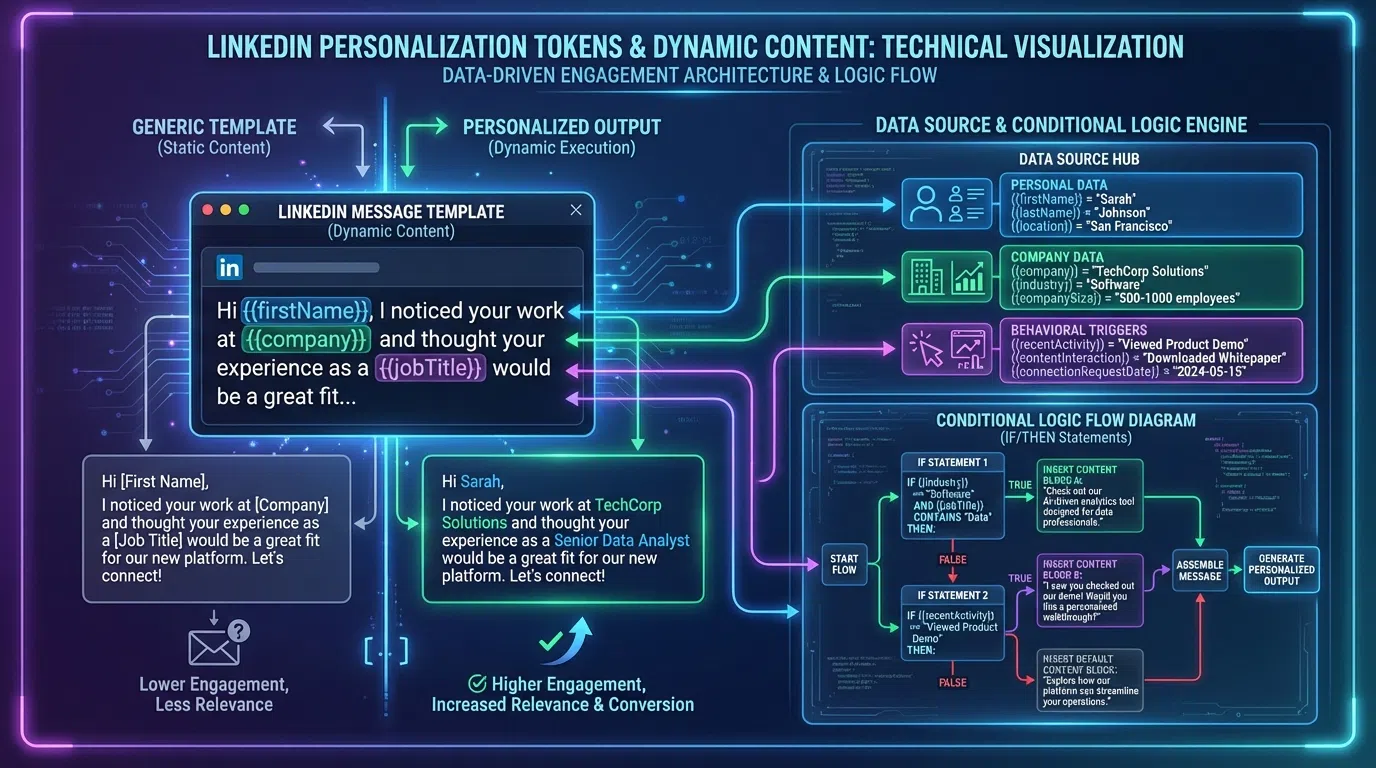
What it is: Simple variable insertion using prospect data like {{FirstName}}, {{Company}}, {{JobTitle}}.
Example:
"Hi {{FirstName}}, I noticed {{Company}} is hiring {{JobTitle}}s—would love to chat about how we help teams like yours scale."
Performance: 5-8% response rate (better than generic 2-5%, but still below average)
Why it underperforms: Prospects instantly recognize template language. According to research on LinkedIn message personalization, 63% of people ignore generic outreach even when it includes their name.
Level 2: Dynamic Content (15-25% response)
What it is: Messages that adapt based on prospect attributes, behaviors, or trigger events using conditional logic and data enrichment.
Example:
"{{IF recent_funding}}Congrats on the Series {{funding_round}}! Scaling from {{old_headcount}} to {{new_headcount}} is where outbound often breaks{{ELSE}}Saw you're hiring {{open_roles_count}} SDRs{{ENDIF}}—exactly when teams need research automation."
Performance: 15-25% response rate (2-3x better than basic tokens)
Why it works: Messages feel contextually relevant because they reference specific, timely situations unique to each prospect.
Level 3: AI Hyper-Personalization (30-40% response)
What it is: AI analyzes LinkedIn profiles and recent posts to generate genuinely unique hooks for each prospect—not template variations.
Example (generated from actual profile + post analysis):
"Your post about cutting SDR ramp from 7mo to 4mo resonated—that playbook shift from 10 to 50 customers is exactly where we help. When Acme faced the same challenge we compressed it to 3mo. Worth comparing notes?"
Performance: 30-40% response rate (4-8x better than basic tokens)
Why it works: Each message references specific, recent activity demonstrating genuine engagement—not obviously automated outreach.
According to Evaboot's 2026 hyper-personalized LinkedIn message research, messages that only use token personalization see 5-8% reply rates, while messages addressing role-specific pain points or interests jump to 15-25%, and AI-generated contextual hooks achieve 30-40%.
Basic Personalization Tokens
Let's start with the foundation: standard personalization tokens that every LinkedIn automation tool supports.
Standard Tokens Available
Profile data tokens:
{{FirstName}}/{{LastName}}- Prospect's name{{Company}}- Current company name{{JobTitle}}- Current role{{Location}}- City, state, country{{Industry}}- Industry vertical{{CurrentPosition}}- Full position description{{Headline}}- LinkedIn headline
Connection data tokens:
{{MutualConnections}}- Number of shared connections{{MutualConnectionNames}}- Names of 1st shared connection{{ConnectionDegree}}- 1st, 2nd, 3rd degree
Company data tokens (if enriched):
{{CompanySize}}- Employee count{{CompanyRevenue}}- Annual revenue{{CompanyFunding}}- Total funding raised{{CompanyGrowth}}- Headcount growth %
Token Best Practices
DO:
- Use tokens naturally in sentences: "Hi Sarah" not "Hi {{FirstName}}"
- Verify token data quality before sending (prevent "Hi {{}}" or wrong names)
- Test with sample data to ensure proper formatting
- Have fallback text for empty tokens:
{{Company | fallback: "your company"}}
DON'T:
- Stack multiple tokens in one sentence: "Hi {{FirstName}} at {{Company}} in {{Industry}}"
- Use tokens that prospect can't verify:
{{CompanyRevenue}}(if not public, feels invasive) - Rely solely on tokens for personalization (it's obvious)
- Use unfamiliar tokens:
{{Custom_Field_3827}}(prospects recognize database fields)
Token-Based Template Example
Connection Request:
"{{FirstName}}, both connected to {{MutualConnectionNames}}—their insights on scaling B2B have been valuable. Given your role leading sales at {{Company}}, thought we should connect."
First Message:
"Hi {{FirstName}}, noticed {{Company}} recently crossed {{CompanySize}} employees—congrats! That's exactly when outbound prospecting tends to break without the right systems. Would love to share what worked for similar {{Industry}} companies."
Performance: These token-based approaches typically achieve 8-12% response rates—better than completely generic, but far below what's possible with dynamic content or AI.
Advanced Dynamic Content
Dynamic content goes beyond simple token insertion to adapt message structure, talking points, and value propositions based on prospect attributes.
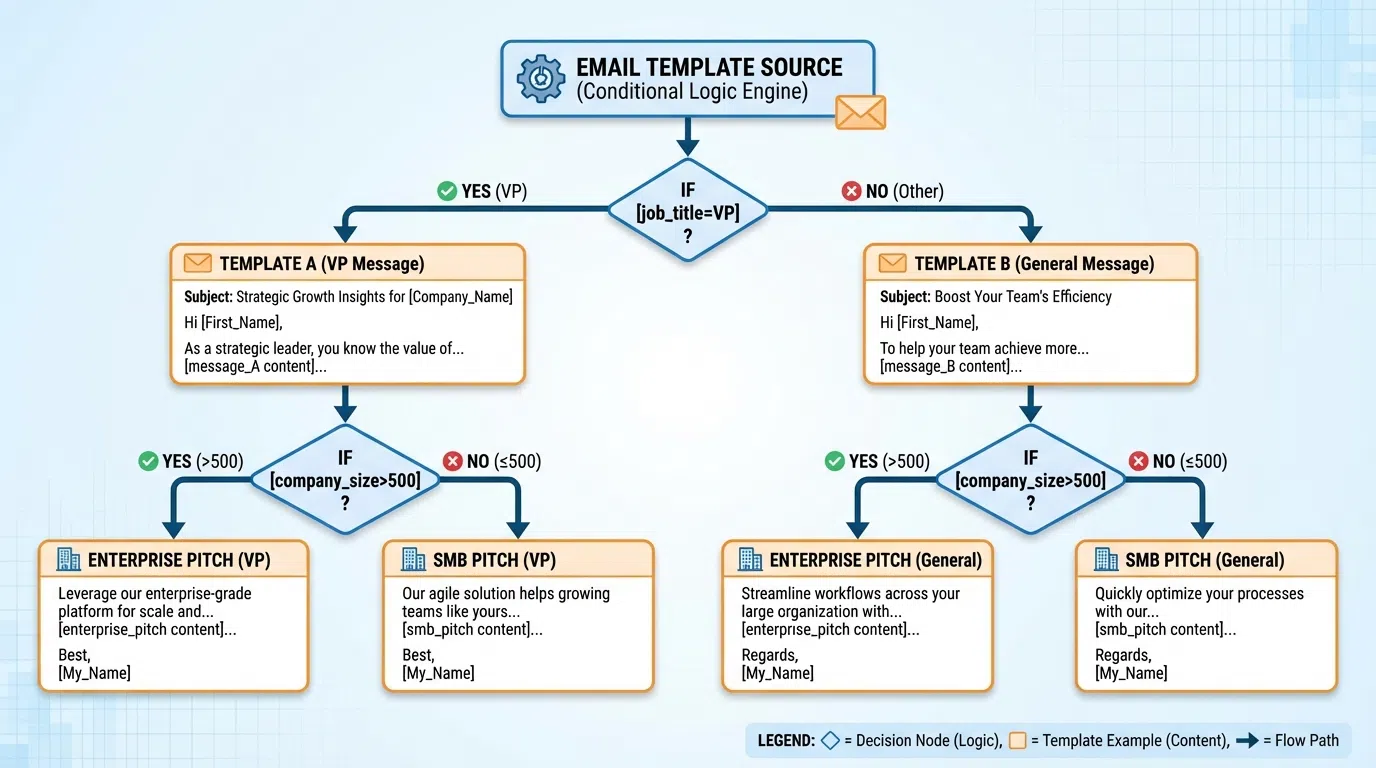
Conditional Logic
Most modern tools (Expandi, Waalaxy, Instantly, Lemlist) support conditional blocks that show different content based on prospect data:
Syntax example:
`
{{IF CompanySize >= 500}}
Enterprise-grade security and compliance are critical at your scale.
{{ELSEIF CompanySize >= 50}}
Balancing speed and quality becomes the challenge as you scale.
{{ELSE}}
Every prospect matters when you're building from the ground up.
{{ENDIF}}
`
Result: Each prospect sees messaging tailored to their company size without creating three separate templates.
Dynamic Value Propositions
Adapt your core value prop based on prospect characteristics:
By role:
`
{{IF JobTitle contains "VP" OR JobTitle contains "Director"}}
Most VPs of Sales struggle with inconsistent SDR performance—your top rep hits 40% of quota while others struggle at 60%.
{{ELSEIF JobTitle contains "Manager"}}
SDR managers often spend 60% of their time coaching research skills instead of booking meetings.
{{ELSE}}
SDRs waste 8-14 minutes researching each prospect manually when they should be in conversations.
{{ENDIF}}
`
By industry:
`
{{IF Industry == "SaaS"}}
SaaS companies at your stage typically see 6-9 month SDR ramp—we compress it to 3-4 months.
{{ELSEIF Industry == "Financial Services"}}
Financial services compliance makes outbound tricky—our approach stays 100% within LinkedIn ToS.
{{ELSEIF Industry == "Healthcare"}}
Healthcare buyers demand deep personalization—our AI analyzes clinical outcomes and certifications automatically.
{{ENDIF}}
`
According to Expandi's guide to advanced LinkedIn dynamic personalization, conditional logic enables marketers to deliver tailored content by segmenting audiences by role, industry, and company size with dynamic messages that adapt based on user data.
Trigger-Based Personalization
Dynamic content works best when triggered by specific events or signals:
Job change trigger:
`
{{IF JobStartDate <= 90_days_ago}}
Congrats on the {{JobTitle}} role at {{Company}}! The first 90 days are critical—happy to share the playbook other new {{IF JobTitle contains "Director"}}directors{{ELSE}}managers{{ENDIF}} used to hit the ground running.
{{ENDIF}}
`
Funding trigger:
`
{{IF FundingDate <= 180_days_ago}}
Saw {{Company}} raised {{FundingRound}} {{FundingAmount}} {{FundingDate | format: "%B %Y"}}—congrats! Scaling from {{PreFundingHeadcount}} to {{CurrentHeadcount}} is exactly when outbound breaks without the right systems.
{{ENDIF}}
`
Hiring trigger:
`
{{IF OpenSDRRoles > 0}}
Noticed you're hiring {{OpenSDRRoles}} {{IF OpenSDRRoles == 1}}SDR{{ELSE}}SDRs{{ENDIF}}—ramping new hires is where teams often struggle. When Acme hired 5 SDRs last quarter, we helped them hit quota 40% faster by automating research.
{{ENDIF}}
`
Visual Personalization
Some tools (Hyperise, Expandi) support visual personalization tokens that customize images:
Image personalization capabilities:
- Add prospect's
{{FirstName}}to image overlays - Insert
{{Company}}logo into graphics - Show
{{ProfileImage}}in custom templates - Include website screenshots of
{{CompanyURL}} - Generate personalized QR codes with
{{LinkedInURL}}
Example:
A case study image that automatically shows the prospect's company logo and name: "How [Company Logo] Reduced SDR Ramp 50%"
According to LinkedIn Helper's guide to hyper-personalized messages with Hyperise, images can be customized with prospects' names, company names, job titles, profile images, business logos, website screenshots, and even augmented reality markers for dynamic GIFs.
AI Hyper-Personalization
The breakthrough in 2026 is AI that goes beyond token insertion to generate genuinely unique content for each prospect based on their actual LinkedIn activity.
How AI Hyper-Personalization Works
Traditional dynamic content (tokens + logic):
- Pull prospect data from database (company, title, size, etc.)
- Insert data into pre-written template slots
- Apply conditional logic to show/hide blocks
- Result: Personalized template variations
AI hyper-personalization:
- AI analyzes prospect's LinkedIn profile comprehensively
- AI reads recent posts and engagement activity
- AI extracts specific hooks (achievements, questions, pain points, topics)
- AI generates completely custom message (not filling template slots)
- Human reviews and approves (5-10 sec)
Key difference: AI creates unique content for each prospect, not template variations filled with different data.
What AI Analyzes
Profile elements:
- Headline (what they want to be known for)
- About section (mission, achievements, challenges)
- Experience (career trajectory, recent changes, relevant companies)
- Featured content (pinned articles, presentations, case studies)
Recent activity (goldmine):
- Last 5-10 posts (topics, tone, data shared, questions asked)
- Comments on others' posts (interests, opinions, engagement patterns)
- Content that got high engagement (50+ likes, 10+ comments = important topics)
Company signals:
- Recent funding announcements
- Hiring surges (3+ new roles posted)
- Product launches or expansions
- Tech stack changes
AI-Generated Hook Examples
Rather than filling template slots, AI generates contextual hooks:
Achievement celebration:
"Your post about hitting 150% of Q4 quota with only 3 SDRs is impressive—most teams struggle to get there with 2x the headcount. Curious how you're planning to maintain that efficiency with the 5 new hires I saw you're onboarding next quarter."
Problem validation:
"Felt your frustration in yesterday's post about SDRs spending 80% of time researching instead of selling. That's exactly the problem we solve—our customers compress 10 min of manual research to 15 sec while maintaining quality. Worth comparing notes?"
Educational engagement:
"Your 3-tier prospecting framework in last week's post was smart—we're seeing very similar results with Tier 2 mid-market outperforming Tier 1 enterprise by 18% response rate when you add AI research. Happy to share the data."
Question answering:
"Saw your question about reducing SDR ramp time from 6mo to 3-4mo. Three things worked for us: waterfall enrichment (90% data coverage), tiered personalization (AI for 80%, manual for 20%), and real-time lead tracking. Would you find a playbook doc helpful?"
According to research on scaling hyper-personalized LinkedIn outreach, AI tools leverage detailed real-time data and user behavior to create highly relevant and timely messages tailored to specific contexts—going far beyond using someone's name or job title.
AI Tools for Hyper-Personalization
LeadSpark AI (Recommended)
- Analyzes LinkedIn profiles + recent posts in 5-10 seconds
- Generates contextual hooks referencing specific content
- Bulk processing: 100-500 prospects simultaneously
- Human review workflow: approve/edit/regenerate
- Performance: 30-40% response rates (customer reported)
- Pricing: $97-297/mo based on volume
Closely
- Multi-channel LinkedIn + email sequences
- AI message generation based on profile data
- Campaign automation with personalization
- Pricing: $79-149/mo
Clay + ChatGPT integration
- Waterfall enrichment + AI prompt engineering
- Custom GPT prompts analyzing enriched data
- Requires technical setup and prompt optimization
- Pricing: $149-800/mo Clay + OpenAI API costs
Lavender
- Email-focused AI personalization (works for LinkedIn too)
- AI scoring and suggestions for improvement
- Chrome extension for real-time coaching
- Pricing: $29-49/mo
The key advantage of AI hyper-personalization is scalability without quality loss. Manual research takes 8-14 min per prospect; AI takes 5-10 seconds while generating equivalently personalized hooks.
When to Use Each Approach
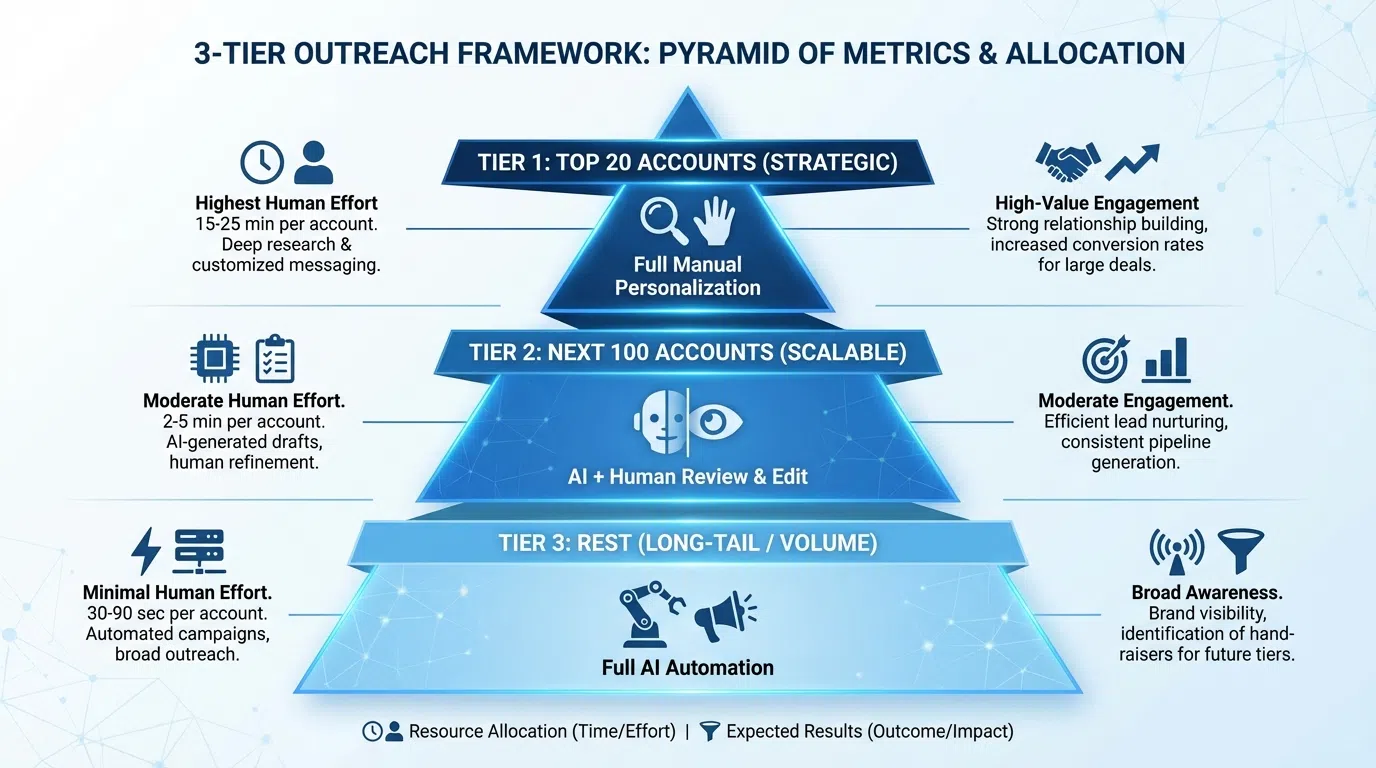
Different prospect tiers require different personalization levels. Here's the framework:
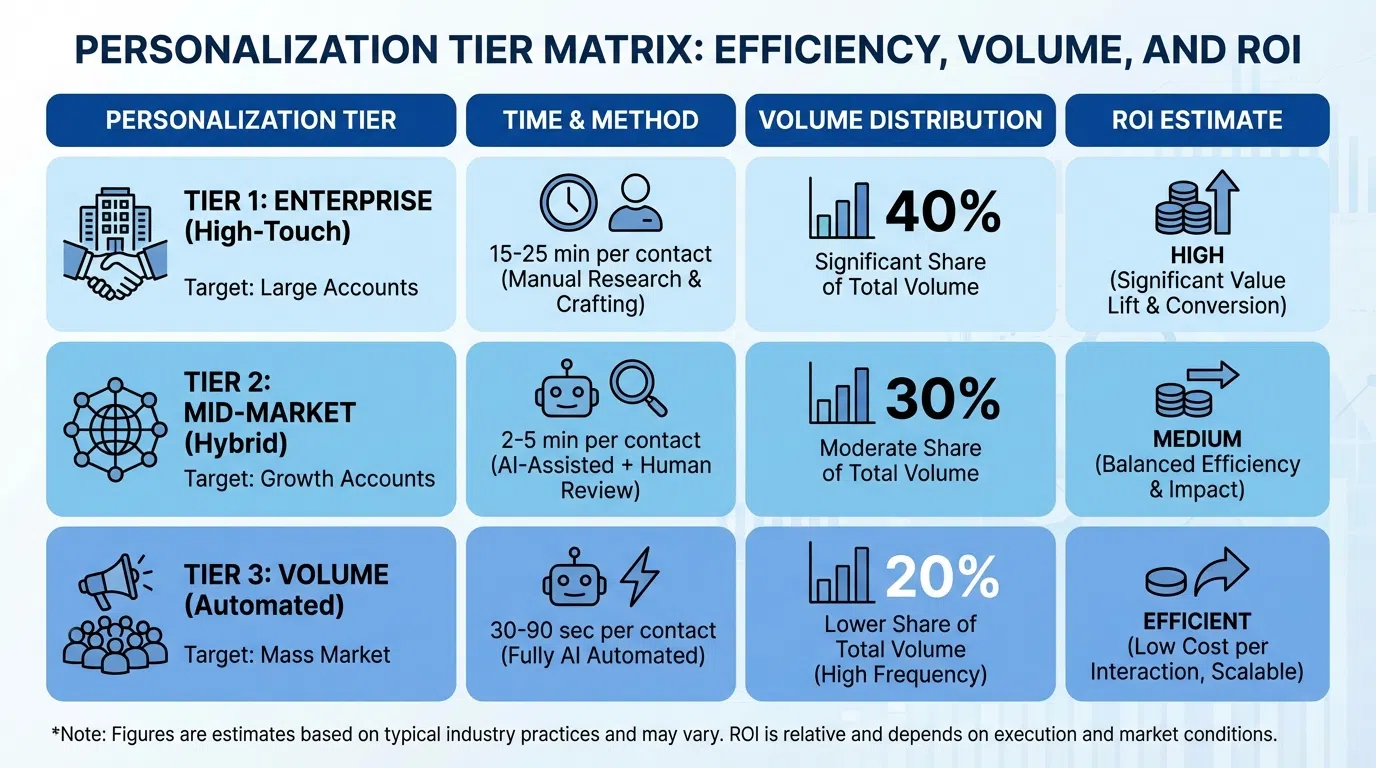
Tier 1: Enterprise Strategic Accounts (Manual + AI Hybrid)
Prospect profile:
- Enterprise deals $50K+ ARR
- C-suite executives, VPs
- Complex multi-stakeholder sales
- 15-20% of volume
Approach:
- Deep manual research: 10-15 min per prospect
- Multi-stakeholder mapping
- Use AI for LinkedIn analysis (saves 5-10 min)
- Fully custom messages (no templates)
Personalization level: Manual + AI hyper-personalization (no tokens needed—every message is unique)
Why: $50K+ deals justify 15 min investment; C-suite expects and deserves white-glove research.
Tier 2: Mid-Market High-Fit (AI + Dynamic Content)
Prospect profile:
- Mid-market deals $10-50K ARR
- Directors, senior managers
- Single decision-maker
- 30-40% of volume
Approach:
- AI hyper-personalization: 30-60 sec per prospect
- LeadSpark AI analyzes profile + posts automatically
- Human reviews AI-generated hooks (edit 10-20%)
- Dynamic content for value prop customization
Personalization level: AI-generated hooks + dynamic content templates
Template example:
`
{{AI_Hook}}
{{IF CompanySize >= 100}}
At your scale, SDR inconsistency becomes the bottleneck—top rep at 140% quota while others struggle at 60%.
{{ELSE}}
With lean teams, every SDR needs to perform like your best rep.
{{ENDIF}}
When {{CompetitorOrSimilarCompany}} faced the same challenge, we helped them {{RelevantMetric}}.
Worth a 15-min comparison?
`
Why: $10-50K deals warrant personalization, but 10-15 min manual research isn't economical at volume; AI + dynamic content delivers quality at scale.
Tier 3: High-Volume Scalable (Dynamic Content + Basic Tokens)
Prospect profile:
- SMB deals $1-10K ARR
- Managers, team leads
- Transactional sales
- 40-50% of volume
Approach:
- AI spot-personalization: 15-30 sec per prospect
- Dynamic content templates with conditional logic
- Basic tokens for names, companies
- Fully automated (spot-check 10% for quality)
Personalization level: Dynamic content templates + basic tokens (AI hooks for 20% highest-potential prospects)
Template example:
`
Hi {{FirstName}},
{{IF OpenSDRRoles > 0}}
Noticed you're hiring {{OpenSDRRoles}} SDRs
{{ELSEIF RecentFunding}}
Congrats on the {{FundingRound}}
{{ELSE}}
Saw {{Company}} is scaling {{Industry}} sales
{{ENDIF}}—exactly when research becomes the bottleneck.
{{IF CompanySize < 50}}
Early-stage teams can't afford 8-14 min manual research per prospect.
{{ELSE}}
At {{CompanySize}} people, inconsistent SDR research quality hurts pipeline.
{{ENDIF}}
Quick question: how are you currently handling prospect personalization at scale?
`
Why: $1-10K deals require efficiency; dynamic templates deliver contextual relevance at low cost; spot-AI for highest-potential prospects adds quality where it matters.
Summary Table
| Tier | Deal Size | Volume % | Personalization Approach | Response Rate | Time/Prospect |
|---|---|---|---|---|---|
| Tier 1 | $50K+ | 15-20% | Manual + AI hyper | 35-50% | 10-15 min |
| Tier 2 | $10-50K | 30-40% | AI hyper + dynamic | 25-35% | 30-60 sec |
| Tier 3 | $1-10K | 40-50% | Dynamic + tokens | 15-25% | 15-30 sec |
Implementation Guide by Tool
Here's how to set up personalization tokens and dynamic content in popular LinkedIn tools:
Waalaxy (Easiest for beginners)
Basic tokens:
- Create campaign → Select template
- Click "Personalize" button
- Choose from dropdown:
{firstName},{company},{jobTitle}, etc. - Tokens auto-populate from LinkedIn profile data
Dynamic content:
Waalaxy uses "Smart Variables" for conditional logic:
- Settings → Custom Variables
- Create condition:
IF company_size > 100 - Define alternate text for true/false
- Insert
{smart_variable_name}in template
AI integration:
Waalaxy doesn't have native AI—integrate with LeadSpark AI:
- Export prospects from Waalaxy as CSV
- Upload to LeadSpark AI for analysis
- Download personalized hooks
- Import back to Waalaxy as custom field
- Use
{custom_hook}token in templates
Expandi (Best for advanced dynamic content)
Basic tokens:
Similar to Waalaxy—use {{FirstName}}, {{Company}}, etc. in message composer
Dynamic content:
Expandi has powerful conditional logic:
`
{{#if CompanySize gte 500}}
Enterprise message variant
{{else if CompanySize gte 50}}
Mid-market message variant
{{else}}
SMB message variant
{{/if}}
`
Visual personalization:
- Campaigns → Images → Upload base image
- Add text layers with tokens:
{{FirstName}},{{Company}} - Expandi auto-generates custom image per prospect
AI integration:
- Export campaign CSV
- Use LeadSpark AI or Clay + ChatGPT
- Re-import with AI-generated content in custom column
- Reference in template:
{{CustomAIHook}}
Instantly.ai / Lemlist (Email-focused, works for LinkedIn)
Basic tokens:
Standard Liquid syntax: {{firstName}}, {{company}}, {{customField1}}
Dynamic content (Liquid templating):
`
{% if company_size >= 100 %}
Enterprise approach
{% elsif company_size >= 50 %}
Mid-market approach
{% else %}
SMB approach
{% endif %}
`
Spintax for variations:
`
{Hi|Hey|Hello} {{firstName}},
{Noticed|Saw|Found} {{company}} {is growing|is scaling|is expanding}...
`
Spintax randomly selects variations to avoid duplicate detection.
AI integration:
Both tools support CSV import with custom columns:
- Enrich list with LeadSpark AI personalization
- Import CSV with
custom_hookcolumn - Reference
{{custom_hook}}in templates
LeadSpark AI (Native AI hyper-personalization)
Workflow:
- Upload prospect CSV (LinkedIn URLs or Sales Navigator export)
- LeadSpark AI automatically:
- Scrapes profiles (headline, about, experience)
- Analyzes last 5-10 posts
- Extracts hooks (achievements, questions, pain points)
- Generates contextual icebreakers
- Review and approve hooks (5-10 sec each)
- Export personalized CSV
- Import to Waalaxy, Expandi, or send manually
No templates needed: Each hook is unique, not template variation
Bulk processing: Analyze 100-500 prospects simultaneously (5-10 sec per prospect)
Performance: Customer-reported 30-40% response rates vs 8-12% with basic tokens
Personalization Performance Benchmarks
Let's compare real-world performance across personalization approaches:
Response Rate Benchmarks (2026 Data)
No personalization (completely generic):
- Response rate: 2-5%
- Use case: Never (don't do this)
Basic tokens only ({{FirstName}}, {{Company}}):
- Response rate: 5-8%
- Use case: Mass outreach where even token effort isn't justified (unlikely)
Basic tokens + dynamic content:
- Response rate: 15-25%
- Use case: Tier 3 high-volume SMB prospects
- Example: Conditional value props based on company size, industry
AI hyper-personalization:
- Response rate: 30-40%
- Use case: Tier 1-2 mid-market and enterprise prospects
- Example: AI-generated hooks referencing specific posts, achievements
According to 2026 LinkedIn outreach benchmarks, connection acceptance of 30% and reply rates of 25-35% are completely achievable when executing consistently with proper personalization.
Time Investment vs Quality
| Approach | Time/Prospect | Response Rate | Prospects/Week | Responses/Week |
|---|---|---|---|---|
| Manual research | 8-14 min | 30-40% | 50-100 | 15-40 |
| AI + review | 30-60 sec | 30-40% | 200-400 | 60-160 |
| Dynamic content | 15-30 sec | 15-25% | 500-800 | 75-200 |
| Basic tokens | 5-10 sec | 5-8% | 1,000+ | 50-80 |
Key insight: AI + review delivers the same quality as manual (30-40% response) while enabling 4-8x volume—best of both worlds.
ROI by Personalization Level
Scenario: 400 prospects per week
Basic tokens only:
- Time: 1 hour (5 sec each × 400)
- Responses: 24-32 (6% response)
- Meetings: 10-13 (40% book)
- Cost: ~$0/prospect (just time)
Dynamic content:
- Time: 2-3 hours (20 sec each × 400)
- Responses: 60-100 (15-25% response)
- Meetings: 24-40 (40% book)
- Cost: ~$0/prospect (template setup time)
AI hyper-personalization:
- Time: 4-5 hours (40 sec review each × 400)
- Responses: 120-160 (30-40% response)
- Meetings: 48-64 (40% book)
- Cost: $97-297/mo (~$0.25-0.75/prospect)
Winner: AI hyper-personalization delivers 4-5x more meetings than basic tokens for marginal additional cost (<$1/prospect).
Common Mistakes to Avoid
1. Over-Tokenizing Messages
Mistake:
"Hi {{FirstName}}, noticed {{Company}} in {{Industry}} with {{CompanySize}} employees is located in {{Location}}..."
Why it fails: Stacking tokens makes it obviously templated—defeating the purpose of personalization.
Fix: Use 2-3 tokens max per message, integrated naturally: "Hi Sarah, noticed Acme is scaling fast" (not "Hi {{FirstName}}, noticed {{Company}} is {{GrowthStage}}")
2. Using Tokens You Can't Verify
Mistake:
"Congrats on {{CompanyRevenue}} in revenue!" (when revenue isn't public)
Why it fails: Prospect knows you pulled database data, not researched them—feels invasive/creepy.
Fix: Only reference publicly visible data (LinkedIn profile info, company size from profile, public funding announcements).
3. Relying Solely on Tokens for Personalization
Mistake: Thinking {{FirstName}} and {{Company}} = "personalized" outreach
Why it fails: According to research, 63% of people ignore generic outreach even when it includes their name. Templates are obvious.
Fix: Combine tokens with dynamic content (conditional logic) or AI hooks (unique content per prospect).
4. Not Testing Token Output
Mistake: Sending messages with broken tokens: "Hi {{}} at {{}}"
Why it fails: Database errors, missing fields, or wrong mapping creates embarrassing sends.
Fix:
- Test every template with 5-10 sample prospects before launch
- Set fallback values:
{{FirstName | fallback: "there"}} - Check for empty fields before sending
5. Using Generic Dynamic Content
Mistake:
`
{{IF Industry == "SaaS"}}
SaaS companies love our solution!
{{ENDIF}}
`
Why it fails: Even if conditional logic works, the content is still generic ("SaaS companies love our solution" = template speak).
Fix: Make dynamic content blocks specific and valuable:
`
{{IF Industry == "SaaS"}}
SaaS companies at your stage typically see 6-9 month SDR ramp time—we compress it to 3-4 months by automating the research bottleneck.
{{ENDIF}}
`
6. Ignoring AI Quality Control
Mistake: Assuming AI output is always perfect and sending without review
Why it fails: AI occasionally generates awkward phrasing, references wrong posts, or misses context
Fix: Always human-review AI output:
- Tier 1: Review 100% (edit 20-30%)
- Tier 2: Review 100% (edit 10-20%)
- Tier 3: Spot-check 10% (full send if quality good)
Frequently Asked Questions
Are personalization tokens against LinkedIn's Terms of Service?
No—personalization tokens are not against ToS. LinkedIn prohibits aggressive automation and bot-like behavior, but using prospect's publicly available data (name, company, title) in personalized outreach is standard practice.
What matters is how you use tokens:
- ❌ Mass generic messages with just
{{FirstName}}= spam - ✅ Thoughtfully personalized messages using tokens naturally = compliant
According to LinkedIn automation safety guidelines, tools that personalize messages, send at natural intervals, and avoid mass generic outreach are safe in 2026.
Can prospects tell when I'm using tokens vs AI?
Basic tokens: Yes, usually. Template patterns are obvious ("Hi {{FirstName}}, I noticed {{Company}} is growing" = instant template recognition).
Dynamic content: Sometimes. Well-crafted conditional content feels more natural, but prospects familiar with automation may recognize patterns.
AI hyper-personalization: Rarely. When AI references specific posts or achievements unique to the prospect, it's nearly indistinguishable from manual research. LeadSpark AI customers report prospects often ask "how did you find this?" not realizing it was AI-assisted.
Key: The more specific and contextual your personalization, the less detectable automation becomes.
Should I use tokens, dynamic content, or AI for connection requests?
Connection requests are premium real estate—optimize carefully:
Bad (basic token):
"Hi {{FirstName}}, would love to connect!"
Better (dynamic content):
"{{FirstName}}, both connected to {{MutualName}}—their insights on scaling B2B have been valuable. Given your role at {{Company}}, thought we should connect."
Best (AI hook + token):
"Sarah, your post about reducing SDR ramp from 7mo to 4mo caught my attention—exactly the challenge we help new sales leaders solve. Worth connecting?"
Recommendation:
- Tier 1: AI-generated unique hooks (no templates)
- Tier 2: Dynamic content + 1-2 tokens
- Tier 3: Dynamic content templates
Connection requests only allow 300 characters (premium) or 200 (free)—make every word count. Personalized requests achieve 45% acceptance vs 15% generic.
How many tokens should I use per message?
Optimal: 2-3 tokens maximum per message, used naturally
Examples:
Good (2 tokens):
"Hi Sarah, noticed Acme is scaling fast—exactly when outbound research becomes the bottleneck."
Acceptable (3 tokens):
"Hi Sarah, saw you're the Director of Sales at Acme—congrats! Scaling {{Industry}} sales at your stage is where research automation helps most."
Bad (5+ tokens):
"Hi {{FirstName}} {{LastName}}, noticed {{Company}} in {{Industry}} with {{CompanySize}} employees in {{Location}} is {{GrowthStage}}..."
More tokens ≠ more personalization. Use sparingly and naturally.
What's the ROI of investing in AI personalization tools?
Cost: $97-297/mo for tools like LeadSpark AI
Return:
- Time savings: 8-14 min manual research → 30-60 sec AI + review = 90-95% time saved
- Volume increase: 50-100 prospects/week manual → 200-400/week with AI = 2-4x volume
- Quality maintained: 30-40% response manual → 30-40% with AI (no quality loss)
- Meeting increase: 15-40 meetings/month manual → 60-160/month with AI = 3-4x meetings
ROI calculation:
- $297/mo investment
- 100 additional meetings per month
- 50% qualified = 50 opps
- 20% close = 10 deals
- $5K average = $50K monthly revenue
- ROI: 168x ($50K / $297)
Even at much lower conversion, AI personalization pays for itself when it enables 2-4x prospect volume without quality loss.
Can I combine dynamic content and AI hyper-personalization?
Absolutely—and you should. The winning formula in 2026:
Template structure with AI hooks:
`
{{AI_Generated_Hook}}
{{IF CompanySize >= 100}}
At your scale, {{Dynamic_Value_Prop_Enterprise}}
{{ELSE}}
With lean teams, {{Dynamic_Value_Prop_SMB}}
{{ENDIF}}
When {{Similar_Company}} faced {{Relevant_Challenge}}, we helped them {{Specific_Result}}.
{{Low_Friction_CTA}}
`
How it works:
- AI generates opening hook (unique per prospect)
- Dynamic content adapts value prop (conditional logic)
- Tokens fill company examples and CTAs
- Result: Scalable yet genuinely personalized
This hybrid approach delivers 30-40% response at Tier 2 volume (200-400 prospects/week).
Ready to Level Up Your LinkedIn Personalization?
Basic tokens like {{FirstName}} and {{Company}} are table stakes—not differentiation. To achieve the 30-40% response rates that top SDRs get in 2026, you need AI hyper-personalization that references prospects' actual LinkedIn activity and generates genuinely unique hooks.
LeadSpark AI analyzes profiles and recent posts in 5-10 seconds per prospect, extracting the personalization hooks that used to take 8-14 minutes of manual research—enabling you to scale from 50 to 500 weekly prospects without sacrificing response quality.
Try it yourself:
- Upload your first 100-prospect CSV
- Let LeadSpark AI analyze profiles + posts automatically
- Review AI-generated personalized hooks
- Export and launch sequences
Related Posts
Ready to Generate Personalized Icebreakers?
Join sales professionals using LeadSpark AI to create hyper-personalized LinkedIn icebreakers in minutes.