Linkedin Prospecting
LinkedIn Profile Research: What to Look For When Prospecting
Complete LinkedIn profile research checklist for SDRs. Learn what to analyze in 2-3 minutes to personalize outreach and boost response rates 30-40%.
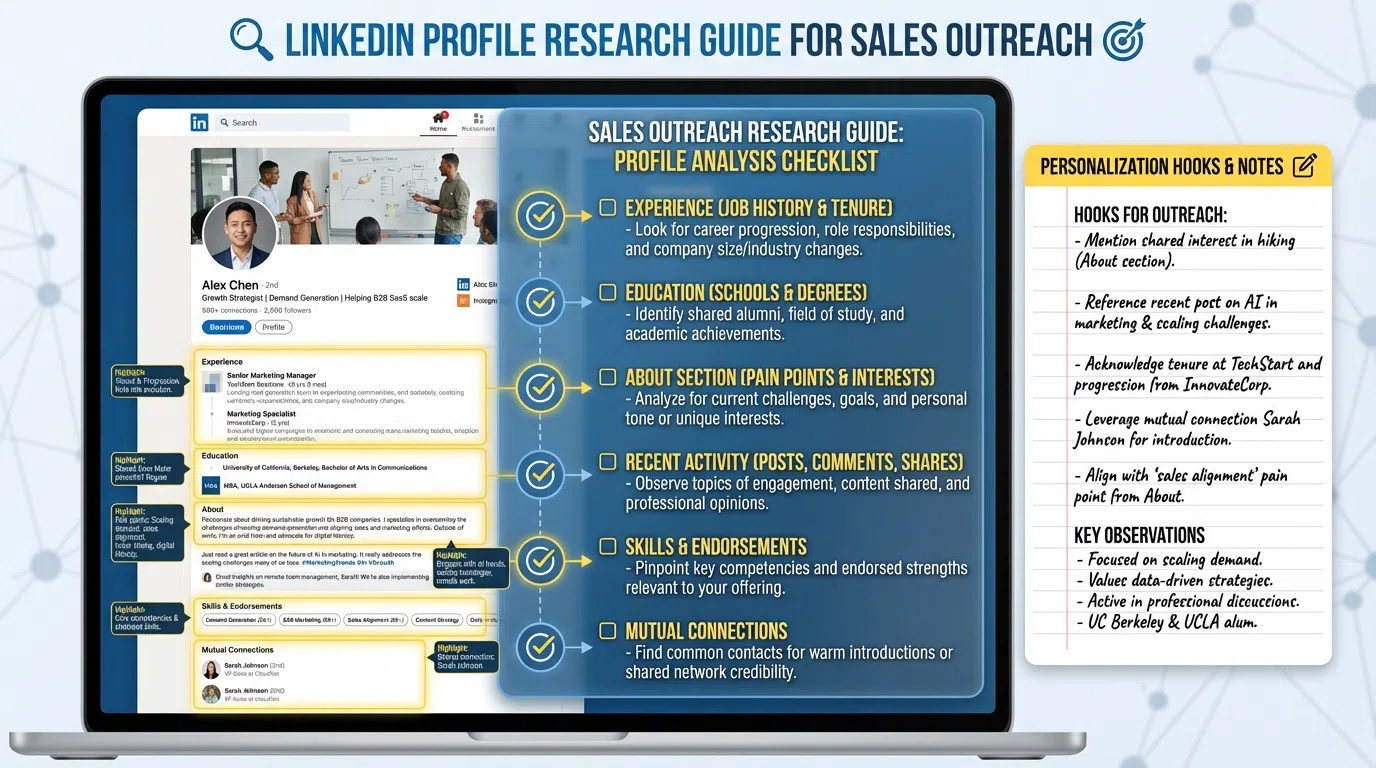
9 min read
The average SDR spends 8-14 minutes researching each LinkedIn prospect, manually reading profiles, scrolling through posts, and trying to identify something—anything—to personalize their outreach.
But here's the problem: most of that time is wasted looking in the wrong places. SDRs skim headlines, glance at job titles, maybe peek at one recent post, then resort to generic "I saw you're growing fast" messages that get ignored.
The top 10% of SDRs know exactly what to look for. They extract the same high-quality personalization insights in just 2-3 minutes by following a systematic checklist that targets the specific profile elements that drive 30-40% response rates.
This guide reveals their exact research framework—what to analyze, what to skip, and how to compress research time while improving message quality.
Table of Contents
- Why Profile Research Matters
- The 2-3 Minute Research Framework
- Essential Profile Elements to Analyze
- What to Skip (Time Wasters)
- Extracting Personalization Hooks
- Manual vs AI Profile Research
- Research Checklist Template
- Frequently Asked Questions
Why Profile Research Matters
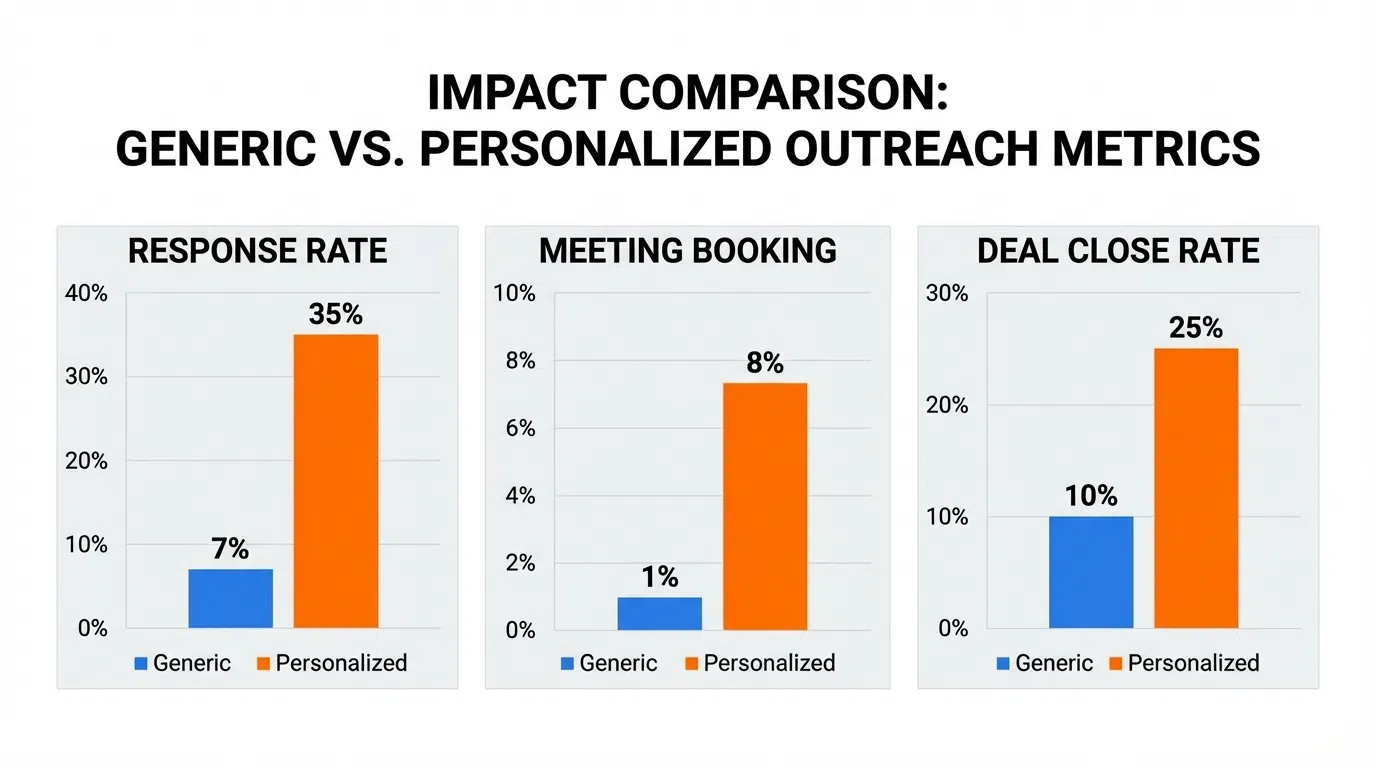
The data is clear: personalization isn't optional anymore—it's the difference between inbox and ignored.
Response rate impact:
- Generic outreach with no personalization: 2-5% response
- Basic personalization (name/company only): 8-12% response
- Genuine personalization (profile-specific insights): 30-40% response
According to SalesBread's 2026 LinkedIn Outreach Stats, personalized connection requests see a 9.36% reply rate compared to just 5.44% for generic ones. Adding a single personalized element increases response rates by 30%.
But personalization needs to be real—not just {{FirstName}} insertion. Prospects instantly recognize template language:
Generic (2-5% response):
"Hi Sarah, I noticed your company is growing fast. Would love to chat about how we help companies like yours scale sales."
Profile-researched (30-40% response):
"Saw your post about cutting SDR ramp from 7mo to 4mo—huge win. When Salesforce faced the same challenge we helped compress it to 3mo. Worth comparing notes?"
The difference? Three minutes of targeted profile research extracting specific, recent activity to reference.
The 2-3 Minute Research Framework
Here's the systematic process top SDRs use to extract high-quality personalization in minimal time:
Phase 1: Qualification Check (30 seconds)
Before investing time in personalization, verify ICP fit:
- Job title: Does it match decision-maker profile? (Director+, Manager for transactional sales)
- Company size: Within your target range? (Check employee count on profile)
- Industry: Vertical you serve well?
- Geography: Territory you cover?
- Activity: Posted or engaged in last 90 days? (Active users respond 27% better)
If 4+ of 5 criteria don't match, skip this prospect—don't waste time personalizing to poor fits. According to LinkedIn prospecting best practices for SDRs, equipping teams with proper ICP filtering provides a competitive edge.
Green light to proceed: ICP fit on 4+ criteria + some recent activity → invest 2-3 minutes in research.
Phase 2: Profile Scan (45-60 seconds)
Quickly scan these profile sections in order:
- Headline (5 sec): What do they want to be known for? Pain points revealed? ("Scaling SaaS from $1M to $10M" signals growth challenges)
- About section (15 sec): Skim first 2-3 sentences for:
- Personal mission or values (helps match tone)
- Specific achievements or metrics (reference points)
- Pain points they mention (problems they care about)
- Current role (10 sec):
- How long in position? (First 90 days = building team, 2+ years = optimizing)
- Key responsibilities listed? (What they're measured on)
- Company description? (Growth stage, size, market)
- Experience (15 sec):
- Recent job changes? (New role in last 6 months = higher intent)
- Career trajectory? (Individual contributor → manager → director shows growth)
- Relevant companies? (Alumni connection, competitors, partners)
- Education & certifications (5 sec):
- Shared alma mater? (Instant connection)
- Recent certifications? (Shows areas of interest/investment)
- Featured section (10 sec):
- What content did they pin? (Reveals priorities)
- Articles, case studies, presentations? (Engagement opportunities)
Output: 3-5 potential personalization angles to explore further
Phase 3: Activity Analysis (60-90 seconds)
This is where the gold is—recent posts and engagement reveal current priorities:
- Recent posts (45-60 sec):
- Visit Activity tab → Posts
- Scan last 5-10 post headlines (look for patterns)
- Read full text of top 2-3 most relevant posts
- Note: topic, tone (celebrating/frustrated/curious), data shared, questions asked
- Engagement patterns (15-30 sec):
- What posts got 50+ likes or 10+ comments? (These topics matter most to them)
- Who do they comment on regularly? (Influences and interests)
- What hashtags do they use? (Communities they follow)
According to research on analyzing LinkedIn posts for personalization, post references show 2-3x better response than profile-only personalization because they demonstrate real-time engagement with the prospect's current priorities.
Output: One specific post, comment, or topic to reference in outreach
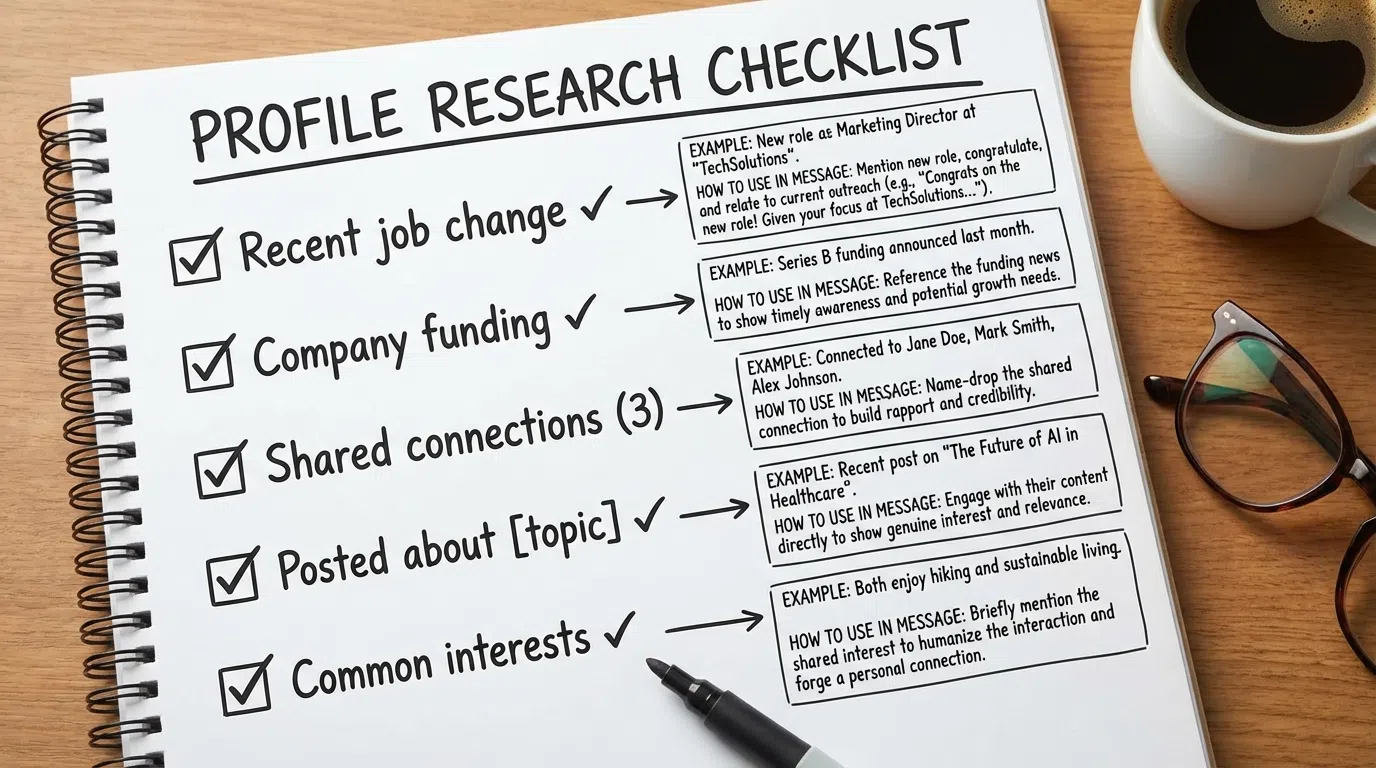
Total Time Investment: 2-3 Minutes
- Qualification check: 30 sec
- Profile scan: 45-60 sec
- Activity analysis: 60-90 sec
- Total: 135-180 seconds (2-3 minutes)
This compressed timeline forces you to focus on high-value elements while skipping time-wasters (reading every job description, analyzing 3-year-old posts, stalking personal photos).
Essential Profile Elements to Analyze
Let's dive deeper into what to look for in each critical profile section:
1. Headline Analysis
The headline reveals how prospects want to be perceived—and often telegraphs pain points.
What to look for:
- Results-focused language: "Scaling SaaS from $5M to $50M ARR" signals growth challenges
- Problem statements: "Making enterprise sales simple" reveals complexity frustration
- Metrics and numbers: "Helped 200+ companies reduce churn 40%" shows data-driven mindset
- Transformation focus: "Turning SDRs into quota-crushing machines" indicates SDR performance priority
How to use it:
Match your message to their stated mission. If headline says "Helping startups scale without breaking," your pitch should focus on sustainable, cost-effective scaling—not enterprise complexity.
Example:
Headline: "Scaling B2B SaaS from $1M to $10M ARR | Investor & Advisor"
Hook: "Your headline about scaling $1M→$10M hit home—that's exactly where we help founders compress SDR ramp from 6mo to 3mo without doubling headcount."
2. About Section Mining
Most SDRs skip the About section—huge mistake. It's where prospects share what they care about most.
What to look for (first 100 words only):
- Personal mission statements: Values and priorities
- Specific achievements: Quantified results to reference ("reduced CAC 60%" = cares about efficiency)
- Challenges overcome: Past pain points likely still relevant
- Helping statements: "I help X achieve Y" shows their value prop (often inverse of their pain)
Red flags to note:
- Overly formal corporate speak (may prefer formal outreach)
- Casual, conversational tone (match their style)
- Lengthy paragraphs (detail-oriented, provide specifics in outreach)
Example:
About: "After struggling to scale outbound at my first startup (6 failed hires, 9-month ramp), I became obsessed with making SDR productivity systematic..."
Hook: "Your story about 9-month SDR ramp at your startup resonated—we solve exactly that problem by compressing research from hours to minutes without sacrificing personalization."
3. Recent Job Changes (High-Intent Signal)
Prospects who started new roles in the last 6 months are 3-5x more likely to respond and buy because they're actively building their team and tech stack.
What to look for:
- Started current role in last 90 days: Highest intent (setting up for success)
- 3-6 months: High intent (building momentum, evaluating tools)
- 6-12 months: Medium intent (optimizing existing processes)
- 12+ months: Lower intent (entrenched in current solutions)
How to reference:
"Congrats on the Director of Sales role at [Company]! First 90 days are critical—happy to share the playbook 3 other new directors used to compress SDR ramp 40% in their first quarter."
New roles = natural trigger event for outreach. They're actively researching solutions, building teams, and haven't committed to vendors yet.
4. Company Signals
The company context shapes messaging and urgency.
What to check:
- Funding status: Recent funding (last 12 months) = budget freed up, hiring mode
- Company size: 11-50 (lean, need efficiency) vs 500+ (need scale)
- Growth trajectory: Check LinkedIn "Insights" for hiring trends (10+ recent hires = scaling pain)
- Hiring signals: If posting SDR/BDR roles, they need outbound support right now
Example:
"Noticed [Company] raised Series B last quarter and is hiring 5 SDRs—exactly when outbound breaks. When Acme hit the same point we helped them ramp new hires 50% faster."
5. LinkedIn Post Analysis (The Gold Mine)
Recent posts are the single highest-value research source because they reveal:
- Current priorities (what they're thinking about right now)
- Communication style (how to match tone)
- Pain points (frustrations they're working through)
- Engagement patterns (what resonates with their network)
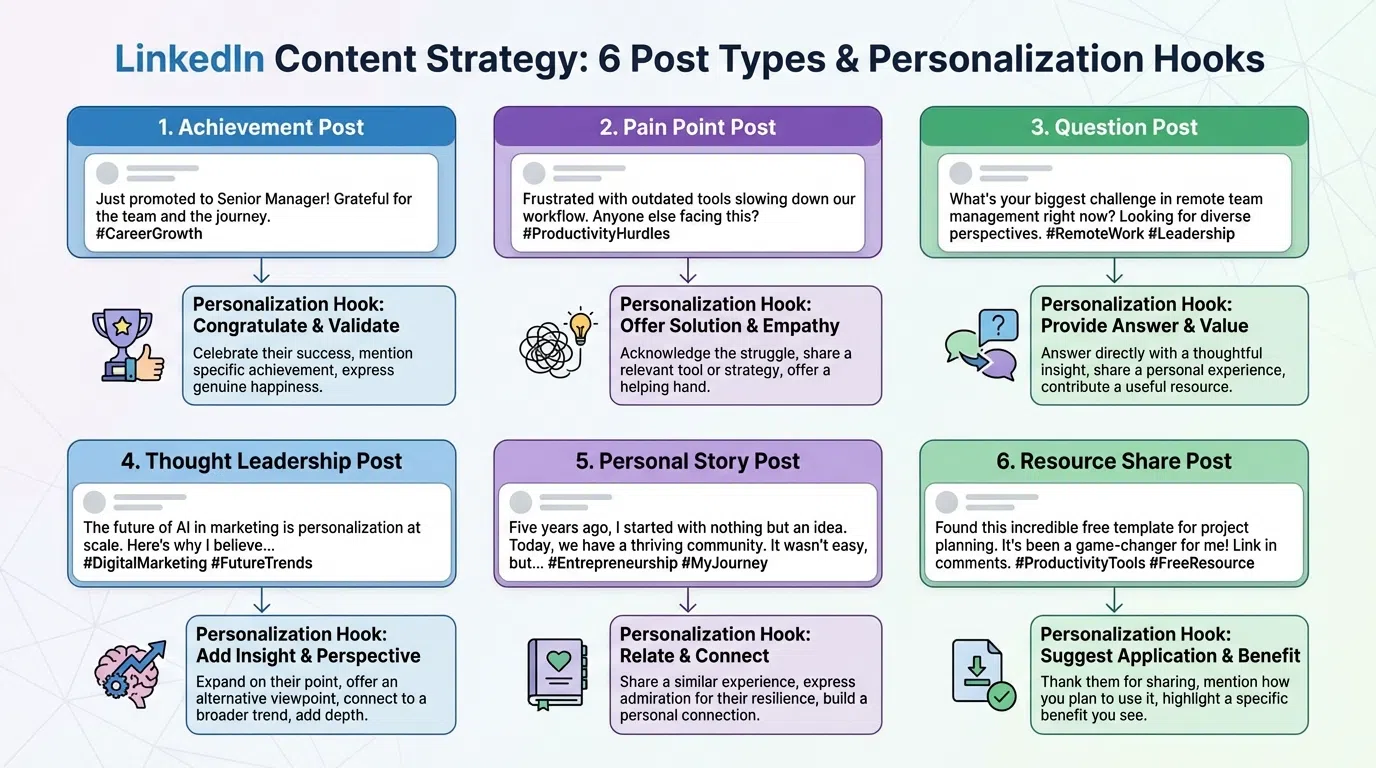
What to analyze:
Achievement posts (celebrating wins):
- Extract the metric or milestone
- Approach: Genuine congrats + connect to related challenge
- Example: "Congrats on 150% of Q4 quota! Curious how you're planning to replicate with 3 new SDR hires—that's where teams often stumble."
Problem/challenge posts (frustrated or seeking advice):
- Identify the specific pain point
- Approach: Validate frustration + offer help
- Example: "Felt your frustration about SDRs spending 80% of time researching—we solve exactly that by compressing 10min to 15sec per prospect."
Educational posts (sharing frameworks or insights):
- Acknowledge their expertise + add complementary data
- Example: "Your 3-tier prospecting framework is smart—we're seeing Tier 2 outperform Tier 1 by 18% when you add AI research. Worth comparing notes?"
Question posts (asking for advice):
- Answer their specific question with actionable help (no pitch)
- Example: "Saw your question on SDR ramp time—3 things compressed it for us: waterfall enrichment, tiered personalization, AI research. Happy to share the playbook."
According to Evaboot's hyper-personalized LinkedIn message research, referencing specific posts achieves 30-40% response rates because it demonstrates genuine engagement rather than automated outreach.
6. Mutual Connections
Shared connections increase acceptance rates by 21% and response by 15-25%.
How to use:
- Check "Mutual connections" count on profile
- If 3+ mutuals, mention in connection request: "Both connected to [Name]—their insight on ABM has been valuable"
- If 10+ mutuals, you likely share communities or past employers (reference shared experience)
- Ask warm connections for intro if high-value target
Example:
"Noticed we're both connected to [Mutual Name]—their take on scaling outbound has been super valuable. Given your role at [Company], thought you might find our approach to SDR productivity interesting."
What to Skip (Time Wasters)
Most SDRs waste time on low-value profile elements that don't improve personalization. Here's what to skip:
Skip: Deep Job Description Reading
Why it's a waste: Job descriptions are corporate boilerplate written by HR, not the prospect. They rarely reveal personal priorities or pain points.
What to do instead: Skim for key responsibilities (30 sec max), focus on headline and About section which prospects write themselves.
Skip: Analyzing Old Posts (12+ Months Ago)
Why it's a waste: Ancient posts don't reflect current priorities. Topics that mattered last year may be solved or irrelevant now.
What to do instead: Only scan last 5-10 posts (90 days max). Recent activity = current priorities.
Skip: Stalking Personal Photos/Interests
Why it's a waste: Comments about hobbies in photos feel creepy and overly familiar for cold outreach. Save for later relationship building.
What to do instead: Keep research professional—focus on work activity, achievements, and challenges.
Skip: Reading Every Recommendation
Why it's a waste: Recommendations are typically old, generic, and don't reveal current state.
What to do instead: Count of recommendations signals credibility (5+ = established) but don't read each one.
Skip: Downloading and Analyzing Their Content
Why it's a waste: Reading full PDFs, watching webinars, or analyzing slide decks takes 15-30 minutes—way too long for initial research.
What to do instead: If they have featured content, skim title and first page for topic. Save deep analysis for after they respond positively.
Extracting Personalization Hooks
After your 2-3 minute research, you should have 3-5 potential personalization angles. Here's how to select the best hook:
Hook Priority Framework
Priority 1: Recent activity (posts/comments from last 30 days)
- Highest relevance because it's top-of-mind
- Shows you're engaged with their current thinking
- Example: "Saw your post yesterday about X..."
Priority 2: Job changes or company milestones (last 90 days)
- Natural trigger events justifying outreach
- High intent—they're building/optimizing right now
- Example: "Congrats on the promotion to Director..."
Priority 3: Specific achievements or metrics they shared
- Demonstrates you read their profile deeply
- Allows you to reference concrete results
- Example: "Reducing churn from 8% to 3% is impressive..."
Priority 4: Shared connections or background
- Establishes commonality and trust
- Easier to get response from warm-ish introduction
- Example: "Both connected to [Name] and also scaled through Series B..."
Priority 5: Industry trends or challenges (generic fallback)
- Least personalized but better than nothing
- Use only if profile lacks better angles
- Example: "SaaS companies at your stage often struggle with..."
Crafting the Hook
Formula: Specific observation + Why it's relevant + Bridge to value
Example:
Observation: "Saw your post about cutting SDR ramp from 7mo to 4mo"
Relevance: "—huge win, especially with 3 new hires starting next month"
Bridge: "When Acme faced the same challenge, we helped them compress it to 3mo. Worth comparing notes?"
The hook should be 1-2 sentences maximum and feel natural, not forced. If you can't write a genuine, specific hook from your research, the prospect probably isn't a good fit—move on.
Manual vs AI Profile Research
The research framework above takes 2-3 minutes manually. In 2026, AI tools can compress this to 10-30 seconds while maintaining quality.
Manual Research (2-3 minutes per prospect)
Process:
- Visit profile (30 sec qualification)
- Read headline, about, experience (60 sec)
- Scan last 5-10 posts, read top 2-3 (90 sec)
- Extract hook and draft message (60 sec)
Pros:
- Deep understanding of nuanced situations
- Can make judgment calls on tone and approach
- Builds intuition about your market
Cons:
- 2-3 min × 100 prospects = 3-5 hours
- Tiring and error-prone at scale
- Quality varies based on energy and focus
Best for: Tier 1 strategic accounts ($50K+ deals), complex enterprise sales, highly customized outreach
AI-Powered Research (15-30 seconds per prospect)
Process:
- Upload CSV of prospects to LeadSpark AI (5 sec)
- AI analyzes profiles + posts automatically (5-10 sec per prospect)
- Review AI-generated hooks (5-10 sec per prospect)
- Approve or customize (5-10 sec per prospect)
Pros:
- 90-95% time savings (2-3 min → 15-30 sec)
- Consistent quality (doesn't get tired)
- Scales to 100-500 prospects easily
- Can process in bulk (analyze 100 simultaneously)
Cons:
- May miss very subtle nuances (review for Tier 1 accounts)
- Requires initial setup and learning
- Monthly cost ($97-297 depending on volume)
Best for: Tier 2-3 mid-market and SMB accounts (80% of most SDRs' outreach), high-volume prospecting, consistent personalization quality across team
According to LinkedIn prospecting strategies for 2026, AI is expected to handle mass personalization, predictive targeting, and content optimization while human reps focus on high-value conversations—making AI + human review the winning combination.
Hybrid Approach (Recommended)
Best practice for most SDRs:
- Tier 1 accounts (20%): Full manual research (2-3 min each)
- Tier 2 accounts (30%): AI research + human review (30 sec each)
- Tier 3 accounts (50%): Fully automated AI (15 sec each, spot-check 10%)
Weekly time investment:
- 40 Tier 1 prospects × 3 min = 2 hours
- 120 Tier 2 prospects × 30 sec = 1 hour
- 200 Tier 3 prospects × 15 sec = 50 minutes
- Total: ~4 hours for 360 prospects vs 10-18 hours fully manual
This hybrid approach maintains quality on high-value accounts while using AI to scale mid-market and SMB outreach efficiently.
Research Checklist Template
Use this checklist for each prospect (print or save to Notion/Evernote):
Qualification (30 sec) - Skip if <4/5
- [ ] Job title matches decision-maker profile
- [ ] Company size within target range
- [ ] Industry vertical we serve well
- [ ] Geography we cover
- [ ] Active on LinkedIn (posted/engaged last 90 days)
Profile Scan (60 sec) - Extract 3-5 angles
- [ ] Headline: Results, metrics, or pain points mentioned?
- [ ] About: Mission, achievements, or challenges (first 100 words)?
- [ ] Current role: How long? Responsibilities? Company stage?
- [ ] Experience: Recent job changes? Career trajectory? Relevant companies?
- [ ] Featured: Pinned content revealing priorities?
Activity Analysis (90 sec) - Find the hook
- [ ] Recent posts: Scan last 5-10, read top 2-3 relevant ones
- [ ] Post topics: What are they discussing? (achievement/problem/education/question)
- [ ] Engagement: What got 50+ likes or 10+ comments?
- [ ] Tone: Celebrating, frustrated, curious, or provocative?
Personalization Hook (30 sec) - Select best angle
- [ ] Recent post/comment (Priority 1)
- [ ] Job change or milestone (Priority 2)
- [ ] Specific achievement or metric (Priority 3)
- [ ] Shared connection or background (Priority 4)
- [ ] Industry trend (Priority 5, fallback)
Draft Message (60 sec)
- [ ] Specific observation (reference hook)
- [ ] Why it's relevant (show you understand context)
- [ ] Bridge to value (how you help)
- [ ] Low-friction CTA (easy next step)
Total research time: 2-3 minutes → Ready to send personalized outreach
Frequently Asked Questions
How many prospects should I research per day?
Manual research: 30-50 prospects per day (2-3 min each = 1.5-2.5 hours) is sustainable without burning out.
AI-assisted: 100-200 prospects per day (15-30 sec each = 30-60 min with review) enables much higher volume while maintaining quality.
Start with 30-50 to perfect your messaging and targeting, then scale to 100-200 with AI tools once you're consistently hitting 25-30% response rates.
What if a prospect has no recent posts or activity?
If there's no activity in 90+ days, they're likely not active on LinkedIn—your response rate will suffer (inactive users respond 27-35% worse than active). Consider these options:
- Skip them if you have enough active prospects
- Research company instead: Check company page for news, funding, hiring
- Use job change or experience: Fall back to career trajectory or recent role change
- Multi-channel: Try email or phone instead of LinkedIn
Don't waste time crafting perfect LinkedIn messages to people who never check LinkedIn.
Should I research every prospect or only high-value ones?
Tier-based approach:
- Tier 1 (Enterprise $50K+ deals): Research every prospect deeply (5-10 min manual)
- Tier 2 (Mid-market $10-50K): AI research + human review (30 sec per prospect)
- Tier 3 (SMB <$10K): Automated AI with spot checks (15 sec, review 10%)
Never send completely un-researched outreach (2-5% response). Even Tier 3 should have AI personalization analyzing profiles and posts—just with minimal human review time.
How do I know if my research is good enough?
Quality indicators:
- You can reference something specific they wrote, said, or achieved (not generic)
- Your hook would feel natural in conversation (not obviously researched/stalkerish)
- You understand their current priority or pain point (not guessing)
- Your message couldn't be sent to 10 other prospects with minor tweaks (truly customized)
Test: If you showed your message to the prospect and asked "how did you find this?", could you explain your research without sounding creepy? If yes, you're good. If no, dial it back.
Can I reuse research for follow-ups?
Absolutely—and you should. After investing 2-3 minutes researching for your initial outreach, extract 3-5 different angles you can use across a multi-touch sequence:
- Touch 1: Reference recent post
- Touch 2: Mention shared connection or background
- Touch 3: Acknowledge specific achievement
- Touch 4: Connect to industry trend they care about
This way, your 2-3 minute investment powers 4-5 touchpoints, all feeling personalized and well-researched.
How often should I re-research the same prospect?
For ongoing sequences:
- Initial research: Before first touch (2-3 min)
- Quick refresh: Before touch 3-4 if it's been 14+ days (30-60 sec to check new posts)
- Full re-research: Only if they've changed jobs or you're reaching out again after 6+ months
Don't re-research before every touch in a 14-21 day sequence—your initial research should power 4-5 touches. Just make sure each touch uses a different angle from your original research.
Ready to 10x Your Profile Research Speed?
Manual profile research works—but it caps you at 30-50 prospects daily and leads to inconsistent quality when you're tired or rushing.
LeadSpark AI analyzes LinkedIn profiles and recent posts in 5-10 seconds per prospect, extracting the same personalization hooks that take 2-3 minutes manually—compressing research time by 90-95% while maintaining 30-40% response rates.
Try it yourself:
- Upload your first 100-prospect CSV
- Let LeadSpark AI analyze profiles + posts automatically
- Review AI-generated personalized hooks
- Launch sequences and watch response rates climb
Related Posts
Ready to Generate Personalized Icebreakers?
Join sales professionals using LeadSpark AI to create hyper-personalized LinkedIn icebreakers in minutes.