Linkedin Prospecting
LinkedIn Sales Navigator vs Regular LinkedIn for Prospecting [2026]
Complete comparison of LinkedIn Sales Navigator vs regular LinkedIn. Features, pricing, ROI analysis, and who should upgrade for B2B sales prospecting.
10 min read
You're doing LinkedIn prospecting with a free account and wondering: is Sales Navigator worth the $99-179/month upgrade?
The short answer: it depends on your sales volume and deal size. Sales Navigator delivers 312% ROI over 3 years and pays for itself in under 6 months—but only if you're closing high-ticket B2B deals and using it properly.
This guide breaks down Sales Navigator vs regular LinkedIn (including Premium) with real pricing, feature comparisons, and honest recommendations for whether the upgrade makes sense for your specific situation.
Table of Contents
- Quick Comparison: Sales Navigator vs LinkedIn
- What is LinkedIn Sales Navigator?
- Regular LinkedIn vs Premium vs Sales Navigator
- Feature-by-Feature Comparison
- Pricing Breakdown 2026
- ROI Analysis: Is Sales Navigator Worth It?
- Who Should Upgrade to Sales Navigator
- How to Maximize Sales Navigator ROI
- Frequently Asked Questions
Quick Comparison: Sales Navigator vs LinkedIn
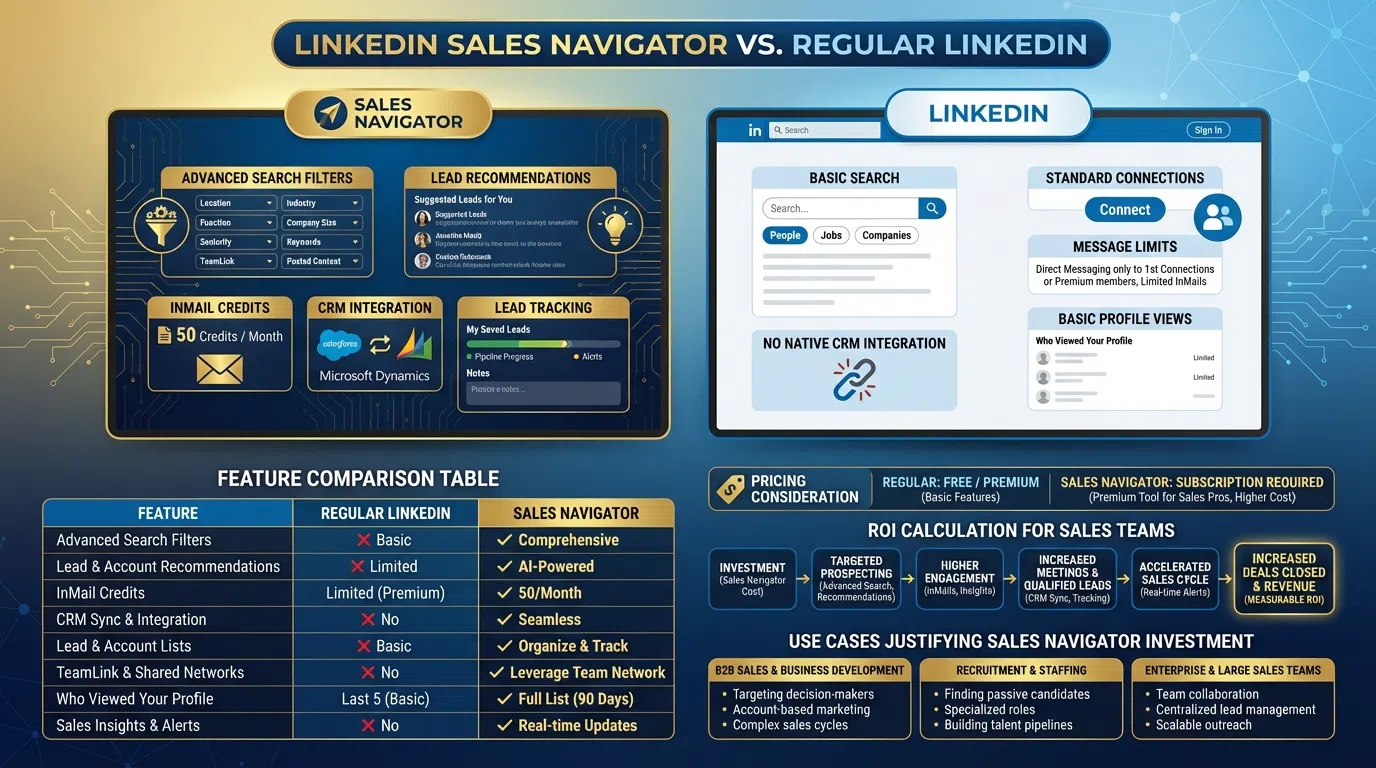
| Feature | Free LinkedIn | LinkedIn Premium | Sales Navigator Core | Sales Navigator Advanced |
|---|---|---|---|---|
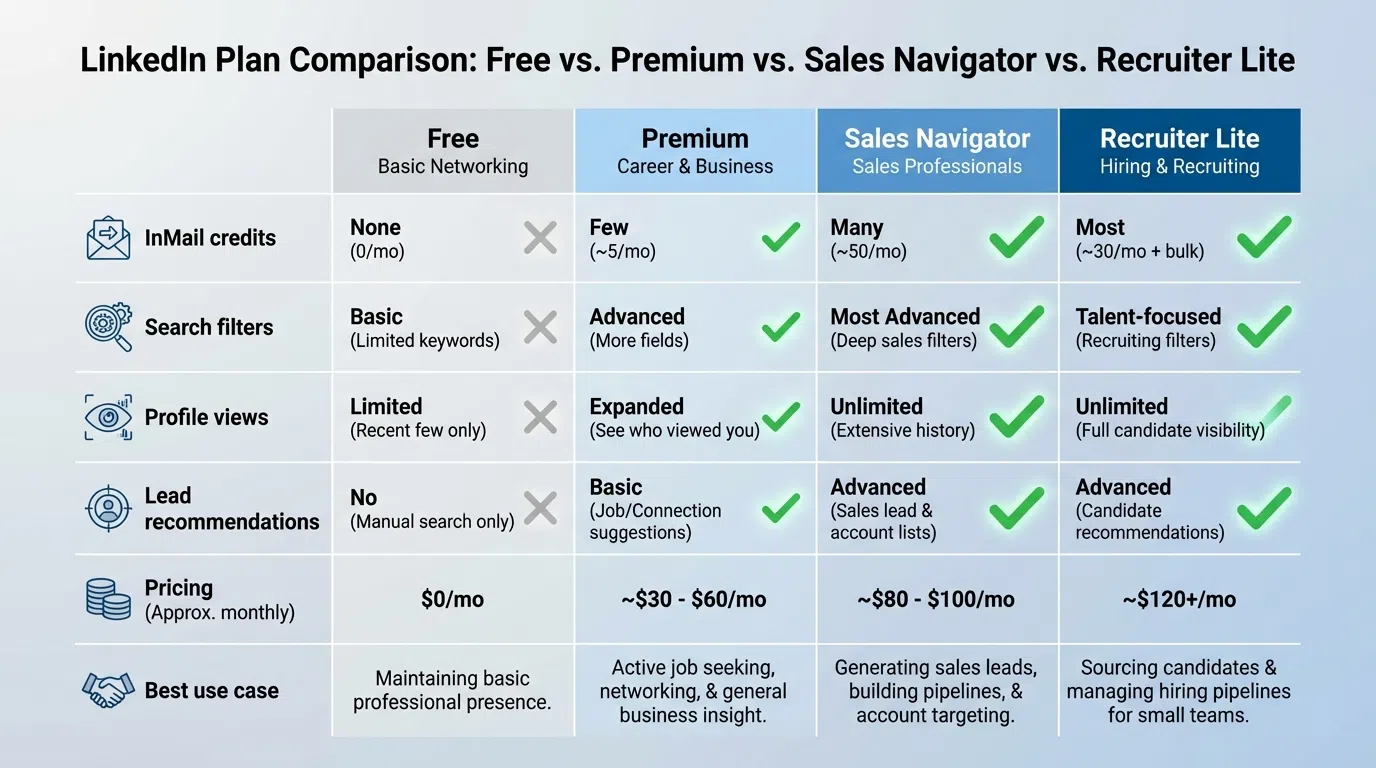
| Monthly Price | $0 | $40-60 | $100 | $180 |
| InMail Credits | 0 | 15/month | 50/month | 50/month |
| Search Filters | 7 basic | 10 | 30+ advanced | 40+ advanced |
| Lead Recommendations | ❌ | Limited | ✅ AI-powered | ✅ AI-powered + intent |
| Account Tracking | ❌ | ❌ | Unlimited | Unlimited + insights |
| CRM Integration | ❌ | ❌ | ✅ Basic | ✅ Advanced |
| TeamLink (see connections) | ❌ | ❌ | ✅ | ✅ |
| Smart Links | ❌ | ❌ | ❌ | ✅ |
| Lead & Account IQ (AI) | ❌ | ❌ | Limited | ✅ Full access |
| Best For | Casual networking | Job seeking | Solo prospectors | Sales teams |
Bottom Line: Free LinkedIn works for casual outreach. Premium helps job seekers. Sales Navigator is built specifically for B2B sales prospecting with 3-5× more targeting power.
What is LinkedIn Sales Navigator?
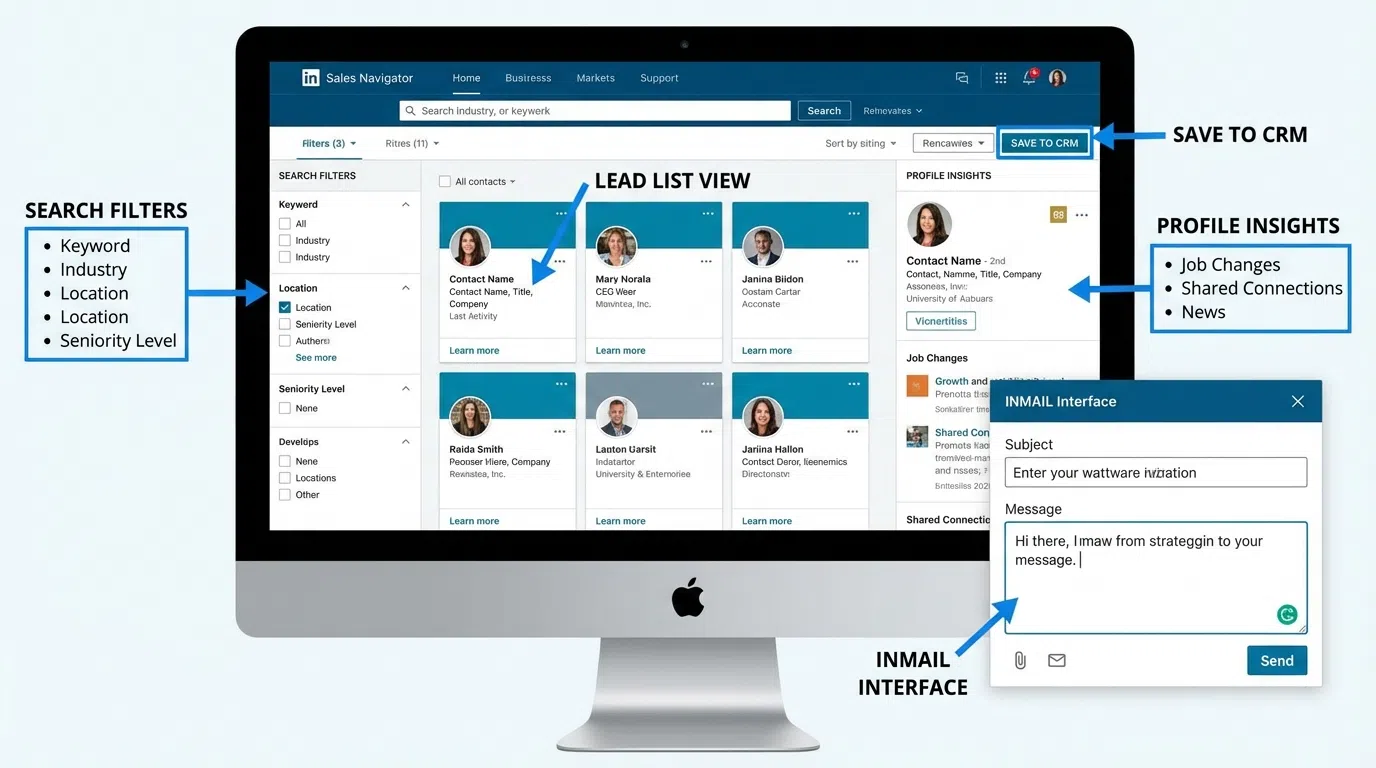
LinkedIn Sales Navigator is LinkedIn's premium B2B sales tool, designed specifically for prospectors, SDRs, and sales teams. Unlike regular LinkedIn (which focuses on networking and job seeking) or LinkedIn Premium (optimized for career development), Sales Navigator provides advanced search, lead tracking, and CRM integration for systematic prospecting.
Core Capabilities:
- Advanced Search: 30-40 filters to find your exact ICP (vs 7 basic filters on free LinkedIn)
- Lead & Account Saving: Track unlimited prospects and companies with automatic updates
- InMail Credits: 50/month for direct messaging (vs 0 on free or 15 on Premium)
- AI-Powered Insights: Account IQ and Lead IQ summarize buyer information using LinkedIn's proprietary data
- CRM Integration: Sync with Salesforce, HubSpot, and other CRMs
- TeamLink: See whose connections can introduce you to prospects
Sales Navigator focuses on personalized outreach at scale—finding the right people, tracking engagement, and coordinating your team's efforts.
Regular LinkedIn vs Premium vs Sales Navigator
Understanding the three tiers helps you choose the right fit.
Free LinkedIn
What You Get:
- Basic profile and connection capabilities
- 7 search filters (location, company, school, etc.)
- Messaging with 1st-degree connections only
- Limited profile views
- Basic company pages
Limitations:
- Can't search by job function, seniority, or company size
- No InMail (can't message people you're not connected to)
- Can't save searches or leads
- Limited visibility into who viewed your profile
Best For: Personal networking, keeping in touch with existing contacts, early-stage LinkedIn presence building.
Prospecting Reality: Extremely limited. You're blind-searching without filters and can't reach prospects unless they accept your connection first.
LinkedIn Premium ($40-60/month)
LinkedIn Premium Business costs $60 USD per month, while Premium Career costs $39.99-$59.99/month.
What You Add:
- 15 InMail credits per month
- See full list of who viewed your profile
- 10 search filters (adds industry, company size)
- Premium badge on profile
- LinkedIn Learning access
Limitations:
- Only 15 InMails per month (insufficient for serious prospecting)
- Limited search filters (still can't filter by job function, seniority, technologies used)
- No CRM integration
- No lead saving or tracking
- No AI insights
Best For: Job seekers, recruiters with light needs, professionals building personal brand.
Prospecting Reality: Better than free but still limited. 15 InMails run out quickly if you're prospecting seriously (20-30 prospects daily).
LinkedIn Sales Navigator ($100-180/month)
Core Plan ($99.99/month):
- 50 InMail credits per month
- 30+ advanced search filters
- Unlimited lead and account saving
- Basic CRM integration
- Lead recommendations
- TeamLink visibility
- Account and Lead IQ (limited)
Advanced Plan ($179.99/month, $140/month annually):
- Everything in Core
- 40+ search filters
- Smart Links (track content engagement)
- Full Account IQ and Lead IQ access
- Advanced CRM sync
- Hiring intent signals
- Buyer intent data
- Enhanced AI features
Best For: B2B sales professionals, SDRs/BDRs, sales teams, anyone doing serious LinkedIn prospecting.
Prospecting Reality: Built for prospecting. The tools align with systematic B2B sales workflows.
Feature-by-Feature Comparison
Search Filters: The Biggest Differentiator
Free LinkedIn (7 filters):
- Keywords, location, current company, past company, school, profile language, connections
LinkedIn Premium (10 filters):
- Adds: Industry, company size, interests
Sales Navigator (30-40 filters):
Adds critical B2B filters:
- Job Function & Seniority: Target VPs of Sales, not just "sales" keyword
- Company Headcount Growth: Find companies hiring (growth signal)
- Technologies Used: Target Salesforce or HubSpot users
- Company Revenue: $10M-$50M range for mid-market focus
- Years at Company: <6 months (new to role, open to solutions)
- Posted on LinkedIn: Last 30 days (active users respond more)
- Geography: Multiple locations, exclude specific areas
Why This Matters:
Without advanced filters, you're searching for "VP Sales" and getting 500,000 irrelevant results. With Sales Navigator, you narrow to "VP Sales at $10-50M SaaS companies using Salesforce in the US, hired in last 6 months, with 50-200 employees" = 2,500 highly-qualified prospects.
That's the difference between spray-and-pray and surgical targeting.
InMail Credits: Quantity and Quality
Free LinkedIn: 0 InMails (can only message connections)
Premium: 15 InMails/month = ~3-4 per week (insufficient for prospecting)
Sales Navigator: 50 InMails/month = 10-12 per week
InMail Response Rates:
- Average InMail response: 18-25%
- Personalized InMail: 25-40%
- Generic InMail: 10-15%
Calculation:
- Premium: 15 InMails × 25% response = ~4 responses/month
- Sales Navigator: 50 InMails × 25% response = ~13 responses/month
Strategic Use:
Don't waste InMails on prospects you can reach via connection requests. Reserve InMails for:
- C-level executives who ignore connection requests
- Prospects who declined your connection
- Time-sensitive outreach requiring immediate delivery
- Open Profile members (InMails to them are free)
For more on maximizing response rates, see LinkedIn InMail vs Connection Request.
Lead and Account Saving
Free/Premium LinkedIn: Can't systematically track prospects
Sales Navigator:
- Save unlimited leads and accounts
- Automatic updates when they change jobs, get promoted, or post content
- Organized lists (by campaign, industry, or custom criteria)
- Notes and tags for context
- Activity tracking (views, posts, job changes)
Why This Matters:
Without lead saving, you're re-searching the same prospects weekly, forgetting who you contacted, and losing track of timing. Sales Navigator turns prospecting from ad-hoc to systematic.
CRM Integration
Free/Premium: No native CRM integration
Sales Navigator:
- Two-way sync with Salesforce, HubSpot, Microsoft Dynamics
- Automatic lead creation in CRM from LinkedIn
- View LinkedIn data in CRM records
- Log LinkedIn activity in CRM automatically
- Assign leads to team members
Why This Matters:
Without CRM integration, LinkedIn prospecting lives in a silo. You can't track ROI, measure pipeline contribution, or coordinate team efforts. Integration makes LinkedIn part of your revenue engine, not a separate side activity.
AI-Powered Features (2026)
Account IQ:
Leverages generative AI to craft account summaries for better research and planning. Instead of manually reading company pages, get instant summaries of recent news, hiring trends, technologies used, and strategic initiatives.
Lead IQ:
Aggregates and summarizes everything you need to know about a buyer using LinkedIn's proprietary data. See job history, interests, content they engage with, and recommended talking points—in seconds, not minutes.
Why This Matters:
Manual research takes 8-14 minutes per prospect. AI summaries compress this to 30-60 seconds while maintaining context quality. For 50 prospects weekly, that's 6-12 hours saved.
Pair this with AI personalization tools like LeadSpark and you're researching + personalizing in under 2 minutes total per prospect.
TeamLink: Leverage Your Network
TeamLink shows you whose connections (across your team/company) can introduce you to prospects.
Example:
Targeting Sarah at Acme Corp? TeamLink shows your colleague Jake is connected to her. Warm intro via Jake gets 3-5× better response than cold outreach.
Free/Premium: Can see mutual connections with individual prospects (manual, one-by-one)
Sales Navigator: Systematically surfaces all warm paths across your entire team's networks for bulk lists.
Pricing Breakdown 2026
Sales Navigator Core
Price: $99.99/month or $959.88/year (20% discount = $80/month)
What's Included:
- 50 InMail credits/month
- 30+ advanced search filters
- Unlimited lead and account saving
- Basic CRM integration (Salesforce, HubSpot)
- Lead recommendations
- TeamLink
- Limited Account/Lead IQ
Best For: Solo SDRs, BDRs, consultants, freelancers, founders doing their own prospecting.
Sales Navigator Advanced
Price: $179.99/month or $1,679.88/year ($139.99/month with 20% discount)
What's Included:
- Everything in Core, plus:
- 40+ search filters (adds buyer intent, hiring signals)
- Smart Links (track content engagement before meetings)
- Full Account IQ and Lead IQ access
- Advanced CRM features
- Enhanced reporting
- Priority customer support
Best For: Sales teams, managers overseeing multiple reps, companies with complex sales processes.
Sales Navigator Advanced Plus
Price: Starts at $1,600 per user per year (custom enterprise pricing)
What's Included:
- Everything in Advanced, plus:
- Larger seat minimums (enterprise teams)
- Advanced admin controls
- Dedicated customer success manager
- Custom integrations
- SLA guarantees
Best For: Enterprise sales organizations (50+ reps), companies requiring dedicated support.
Cost Comparison
| Plan | Monthly | Annual (20% savings) | InMails | Filters | CRM |
|---|---|---|---|---|---|
| Free | $0 | $0 | 0 | 7 | ❌ |
| Premium | $40-60 | $468-708 | 15 | 10 | ❌ |
| Navigator Core | $100 | $960 | 50 | 30+ | ✅ |
| Navigator Advanced | $180 | $1,680 | 50 | 40+ | ✅✅ |
Pro Tip: Annual billing saves 20%. If you're committed, pay yearly and save $240-430/year.
ROI Analysis: Is Sales Navigator Worth It?
The Official ROI Study
A 2023 Forrester Consulting study found Sales Navigator yielded 312% ROI over 3 years with:
- Payback period: <6 months
- Year-over-year revenue increase: 8% average (5% Y1, 8% Y2, 10% Y3)
- Revenue lift attributable to Sales Navigator: 20-30%
Translation: Companies investing in Sales Navigator saw measurable revenue growth tied directly to the platform within 6 months.
Real-World ROI Calculation
Scenario: Mid-Market SDR ($100/month Core plan)
Costs:
- Sales Navigator: $100/month = $1,200/year
- Time investment: 90 min/day using the tool
Benefits:
- Improved targeting: Find 50 qualified prospects/week (vs 20 with free LinkedIn)
- Higher response rates: 25-40% with InMails + personalization (vs 15-20% free)
- Faster research: Advanced filters + AI summaries save 10 hours/week
Pipeline Impact:
- Month 1-3: 50 prospects/week × 30% response × 40% meeting rate = 6 meetings/week
- Month 4-6: 50 prospects/week × 35% response × 50% meeting rate = 9 meetings/week
- Average: ~30 meetings/month
Revenue:
- If closing 10% of meetings with $20K average deal size:
- 30 meetings/month × 10% = 3 deals/month = $60K/month revenue
- Annual: $720K revenue from $1,200 Sales Navigator investment
- ROI: 59,900% (clearly driven by many factors, but Sales Navigator enabling the prospecting workflow)
The Honest Reality:
The ROI only makes sense if you close high-ticket B2B deals (€5k+ average). For low-margin products or SMB deals under $5K, the $1,200-2,160/year cost is hard to justify.
When the Math Works
Sales Navigator pays for itself when:
- Average Deal Size: $5K+
- $100/month = 1 extra deal per year at $5K ACV = Breakeven
- $180/month = 2 extra deals per year at $5K ACV = Breakeven
- Active Daily Usage:
- Using it 60+ minutes daily (serious prospecting)
- 20+ connection requests and 5+ InMails weekly
- Processing 50-100+ prospects weekly
- Complex B2B Sales:
- Multiple decision-makers (account tracking helps)
- Long sales cycles (lead tracking prevents drop-off)
- Team selling (CRM integration coordinates efforts)
When It Doesn't:
- Low-Ticket Products (<$2K):
- Need 50+ deals annually to justify cost
- Volume prospecting works better with cheaper tools
- Light Usage:
- Only prospecting 1-2 hours/week
- Free LinkedIn + persistence works fine
- Simple Sales:
- Single buyer, transactional sales
- Advanced search overkill for simple targeting
For alternative approaches to LinkedIn prospecting, see LinkedIn Lead Generation Strategy.
Who Should Upgrade to Sales Navigator
Definite Yes: Upgrade to Sales Navigator
1. B2B SDRs and BDRs
- Prospecting is your full-time job
- Need to hit 20-30 meetings/month quota
- Selling deals $10K+ average
- Advanced targeting essential for hitting quota
2. Sales Teams (3+ reps)
- CRM integration prevents duplicate outreach
- TeamLink surfaces warm intros across team networks
- Manager visibility into team prospecting activity
- Coordinated account-based selling
3. Enterprise Sales (Large Deals)
- Multi-threading multiple stakeholders per account
- Long sales cycles (6-12+ months) requiring tracking
- High deal values ($50K-$500K+) justify premium tools
- Account-based marketing/sales approach
4. Consultants and Agencies
- Need to quickly identify decision-makers across clients
- Building new networks in unfamiliar industries
- High hourly rates justify time-saving tools
- Client billing covers tool costs
5. Founders Doing First Sales
- Building initial customer base (first 20-50 customers)
- Need precision targeting with limited time
- High-value early deals justify investment
- Learning systematic prospecting
Probably Yes: Consider Sales Navigator
1. Mid-Market AEs
- Selling $5K-$50K deals
- Prospecting 40-60% of your time
- ROI likely positive if closing 10+ deals annually
2. Sales Managers
- Overseeing 3-10 rep team
- Need visibility into team prospecting
- Advanced plan provides reporting and coordination
3. Recruiters (High-Volume)
- Placing $20K+ fees regularly
- Need advanced candidate filtering
- InMails critical for passive candidates
Probably No: Stick with Free/Premium
1. Low-Ticket B2C Sales
- Selling <$2K average deals
- Need hundreds of deals to justify cost
- Better ROI from other channels
2. Casual Networkers
- Not actively prospecting
- Maintaining existing relationships
- Personal brand building focus
3. Early-Stage Bootstrapped Startups
- Cash-constrained (<$10K monthly revenue)
- Founder prospecting <10 hours/week
- Better to invest $100-180 in paid ads or other tools
4. Job Seekers
- LinkedIn Premium ($40-60) better fit
- Don't need advanced B2B search filters
- 15 InMails sufficient for outreach to recruiters
Alternative: Hybrid Approach
Start Free, Upgrade Strategically:
- Months 1-2: Master free LinkedIn prospecting
- Month 3: Add Premium if you need InMails ($40-60 vs $100)
- Month 4-6: Upgrade to Sales Navigator when hitting limits
- Ongoing: Reassess quarterly—cancel if not using daily
Cost-Saving Tip:
Many successful prospectors use Sales Navigator for 2-3 months to build massive lead lists, export contact data, then cancel and prospect via email/phone. Ethical gray area, but cuts costs. See LinkedIn scraping alternatives.
How to Maximize Sales Navigator ROI
1. Master Advanced Search
Don't just use keywords. Layer 5-10 filters to create laser-targeted lists:
Example High-Quality Search:
- Job Title: VP Sales, Director of Sales Development
- Company Headcount: 50-200 employees (mid-market)
- Industry: Computer Software
- Geography: United States
- Company Headcount Growth: 10%+ (hiring = growth)
- Years at Company: 0-2 years (newer to role)
- Seniority: Director, VP
- Posted on LinkedIn: Last 30 days (active users)
Result: 500 highly-qualified prospects vs 50,000 generic "sales" results.
Save this search and check weekly for new matches.
2. Use InMails Strategically
50 InMails sounds like a lot but runs out fast if you're careless.
InMail Priority System:
- Tier 1 (Use InMails): C-level executives who ignore connection requests, prospects who declined connection, time-sensitive opportunities
- Tier 2 (Connection Request First): Mid-level managers, prospects with mutual connections, active LinkedIn users
- Tier 3 (Email/Phone): Anyone whose email you have, prospects with low LinkedIn activity
Pro Tip: InMail response rates are 18-25%. Personalize every single one. Generic InMails waste your 50 monthly credits.
3. Pair with AI Personalization
Sales Navigator finds the right people, but there's no built-in automation—connecting with 30+ prospects daily means burning two hours just typing personalized messages.
The Solution:
Sales Navigator (targeting) + LeadSpark AI (personalization) = complete workflow.
- Sales Navigator: Build list of 100 prospects with advanced filters
- Export to CSV: Download lead list
- LeadSpark AI: Bulk analyze profiles + recent posts, generate personalized icebreakers in minutes (vs hours manually)
- Send: Copy/paste personalized messages or use with automation tools
This combination maintains Sales Navigator's targeting precision while solving the time-intensive personalization problem. 70-90% response rates vs 18-25% generic.
4. Set Up CRM Integration
Day 1: Connect Sales Navigator to your CRM (Salesforce, HubSpot, Pipedrive).
Why:
- Automatic LinkedIn activity logging
- No duplicate outreach across team
- Track LinkedIn-sourced pipeline
- Measure true ROI
Without CRM integration, you're flying blind on which LinkedIn activities drive revenue.
5. Use Lead and Account Tracking
Save every prospect you research. Tag them:
- Campaign name
- Priority tier (A/B/C)
- Status (researching, contacted, replied, meeting booked)
- Custom notes
Set up weekly saved searches for:
- Prospects who changed jobs (re-engagement opportunity)
- Accounts hiring in relevant roles (growth signal)
- Companies announcing funding (buying mode)
This turns Sales Navigator from a search tool into a systematic prospecting database.
6. Leverage TeamLink
Before cold outreach, check TeamLink for warm intro paths.
Process:
- Pull list of 100 target prospects
- Filter by "TeamLink connections" (shows who in your company knows them)
- Prioritize prospects with 2nd-degree connections
- Request warm intros before going cold
Warm intros get 3-5× better response rates than cold outreach.
For comprehensive prospecting strategies, see B2B Prospecting Guide.
Frequently Asked Questions
Is Sales Navigator worth it for solo SDRs?
Yes, if you're prospecting daily and selling deals $5K+. The 312% ROI and <6 month payback period apply to serious prospectors. However, if you're only prospecting 5-10 hours/week or selling low-ticket products (<$2K), stick with free LinkedIn or Premium.
Can I try Sales Navigator before buying?
LinkedIn typically offers a 30-day free trial (sometimes extended to 60-90 days for first-time users). Sign up, test the advanced filters, and cancel before billing if it doesn't add value. Pro tip: Build and export massive lead lists during the trial to maximize value even if you cancel.
What's the difference between Core and Advanced plans?
Core ($100/month) provides 30+ filters, 50 InMails, and basic features sufficient for most solo prospectors. Advanced ($180/month) adds 10 extra filters, Smart Links, full AI access (Account/Lead IQ), and advanced reporting—valuable for teams and managers but overkill for individuals. Start with Core.
Does Sales Navigator include regular LinkedIn Premium?
No, they're separate subscriptions. Sales Navigator includes some Premium features (InMail, profile visibility) but is designed for B2B prospecting, not job seeking or personal branding. Don't pay for both—choose based on your primary use case.
How many InMails do you really need?
Most serious prospectors use 30-40 InMails monthly. Sales Navigator provides 50/month—usually sufficient. If you're burning through all 50, you're likely wasting them on prospects you should reach via connection requests first. Reserve InMails for executives and declined connections.
Can I use Sales Navigator with automation tools?
Technically yes, but risky. LinkedIn's ToS prohibit automation. Tools like Waalaxy or Expandi can integrate with Sales Navigator but risk account restriction if detected. Safer approach: Sales Navigator for search + manual outreach, or Sales Navigator + AI-assisted personalization that doesn't violate ToS.
The Verdict: Should You Upgrade?
Upgrade to Sales Navigator if:
- ✅ You prospect daily (60+ minutes)
- ✅ Selling B2B deals $5K+ average
- ✅ Need precision targeting beyond basic filters
- ✅ Part of a sales team requiring coordination
- ✅ Willing to commit 3-6 months to see ROI
Stick with Free/Premium if:
- ❌ Prospecting <10 hours per week
- ❌ Selling low-ticket products (<$2K)
- ❌ Just networking or job seeking
- ❌ Cash-constrained startup (<$10K MRR)
- ❌ Can't commit to daily usage
The Hybrid Approach:
Start free, upgrade to Premium ($40-60) when you need InMails, then move to Sales Navigator ($100) when you're prospecting full-time. Reassess quarterly—if you're not using it daily, cancel and reinvest those dollars elsewhere.
Sales Navigator is a powerful tool, but it's not magic. Success requires mastering advanced search, personalizing every outreach, and systematically tracking your pipeline. Pair it with AI personalization to save 10-20 hours weekly while maintaining response rate quality.
Ready to see how AI can complement your Sales Navigator workflow? Try LeadSpark AI free and generate 15 personalized icebreakers in minutes.
Related Posts
- LinkedIn Lead Generation: Complete Strategy Guide
- LinkedIn Prospecting Messages: 50+ Templates
- Best AI Sales Tools for SDRs in 2026
- B2B Prospecting Complete Guide
Sources:
- Compare Pricing and Plans | LinkedIn Sales Navigator
- LinkedIn Sales Navigator vs Premium (2026 Comparison)
- Your Guide to LinkedIn Sales Navigator Pricing [2026]
- Is LinkedIn Sales Navigator Worth It? (2026 Review)
- Sales Navigator Review 2026: We Tested Everything
- Forrester Economic Impact ROI Report - LinkedIn Sales Navigator
Ready to Generate Personalized Icebreakers?
Join sales professionals using LeadSpark AI to create hyper-personalized LinkedIn icebreakers in minutes.